Choose a gaming keyboard for long RPG sessions by checking how it fits your desk and chair before paying attention to extra controls. The Health and Safety Executive advises keeping your shoulders relaxed, the keyboard just below elbow height, and the screen and keyboard centred. If that setup works, choose a layout that retains the keys you use: a full-size or compact 96% board can keep a numpad, while TKL or 75% leaves more mouse room; wireless placement also means managing charging.
Who this guide is for
Comfort-first RPG players
If a session lasts for hours, keyboard height and desk position may matter more to you than additional gaming features. The Health and Safety Executive advises a position with relaxed shoulders, a keyboard just below elbow height, and the screen and keyboard centred.
Players with many commands
If you regularly use abilities, menus, chat and media controls, check which keys and remappable controls are directly accessible. The available controls differ by model, even within the same keyboard range.
Players sharing limited desk space
If mouse room matters, a TKL or 75% layout may appeal, provided you can do without a numpad. Bluetooth or 2.4 GHz wireless may also suit a multi-device desk, but connection options vary by model.
What matters when choosing
For a long RPG session, check physical fit first, then decide which keys must remain directly available before choosing a connection type or switch feel.
| Concern |
What to check |
Who this matters to |
| Workstation fit |
Check the keyboard’s front height and angle against your chair and desk. If you want a wrist rest, check its height alongside the board. |
If my shoulders tense or my wrists bend upwards during a long session, I need a board that works with my whole desk setup. Around 36% of consumers put workstation fit first. |
| Command access |
Check for the keys you use in play and whether the exact model has dedicated macro or remappable controls. |
When abilities, menus and chat need frequent inputs, I want those commands within easy reach. For around 29% of consumers, command access is the primary need. |
| Layout and mouse room |
Decide whether you need a numpad; compare full-size or 96% layouts with TKL or 75% before giving it up. |
If my mouse has little room to move, I would consider a narrower keyboard, but not at the expense of keys I rely on. Layout and desk space come first for around 21% of consumers. |
| Connection and switches |
Confirm the offered wired or wireless modes, charging arrangement and fitted switch. For switch changes, check socket compatibility. |
If I move between devices or intend to change compatible switches, those options shape my choice more than desk width does. Around 14% of consumers prioritise connection or switch customisation. |
Buying pitfalls
-
Expecting a wrist rest or slim case to fix an awkward setup
Keyboard height, chair position and screen placement can all affect how you sit during a long session. A thinner board or wrist rest is useful only if it suits that overall position.
Before buying, check whether you can keep relaxed shoulders, place the keyboard just below elbow height and centre it with the screen, as the Health and Safety Executive advises.
-
Choosing the smallest layout without checking the keys
A compact board can free desk space while removing keys you use for bindings, navigation or other tasks. SCAN notes that 60% layouts remove direct access to function, arrow and navigation keys.
List the keys you use. Consider TKL or 75% if you can give up the numpad but want to retain more direct controls; keep a numpad if your bindings depend on it.
-
Assuming a whole keyboard range has the same features
Macro controls, wireless modes and hot-swappable sockets differ between models in the Razer and Corsair ranges, so a family name alone does not identify the controls you will receive.
Check the complete model and layout, its connection methods, switch type and any included accessories before choosing a variant.
-
Overlooking charging and disposal
A wireless keyboard needs charging. When an old keyboard reaches the end of its use, local electrical recycling arrangements may also affect how you dispose of it.
Check the charging arrangement for the model you want, and consult your local authority or retailer about electrical recycling when replacing a keyboard.
Relevant brands to consider
Logitech G
The G915 X LIGHTSPEED is a low-profile wireless option for players considering a thinner keyboard.
- Logitech G lists GL mechanical switches, tri-mode connectivity, KEYCONTROL and LIGHTSYNC RGB for the G915 X LIGHTSPEED.
- A low-profile design does not establish a comfortable fit for every desk and chair; check the exact switch variant and board height against your setup.
Razer
BlackWidow models are worth comparing if accessible controls or switch customisation matter to your RPG setup.
- Razer lists macro controls on the BlackWidow V4 Pro and describes the BlackWidow V4 Tenkeyless HyperSpeed as wireless and hot-swappable.
- These are model-specific features: confirm the controls, connection and switch compatibility of the particular BlackWidow you choose.
Corsair
The K70 CORE models provide a choice between a wired board and a narrower wireless TKL layout.
- Corsair lists MLX Red linear switches for the wired K70 CORE and retained function keys and shortcuts for the K70 CORE TKL Wireless.
- For the wireless model, check charging and connection requirements. Corsair notes that Slipstream v1.5 does not support multipoint.
Joybuy keyboards for these needs
These keyboards offer different ways to balance desk space and direct key access for RPG sessions: the listed 96% boards retain a compact layout, while the 75% boards put more emphasis on a narrower footprint. Check the exact key layout, switch and physical fit before deciding.
 No image available
ASUS ROG Strix Scope II 96 Wireless, White, UK layout
Consider this 96% board if you want a reduced-width layout without moving to a 75% keyboard.
The listed variant is wireless, white and UK layout. Check the fitted switch and whether the board’s height works with your desk and chair.
View on Joybuy
 No image available
AULA F99, Light Blue, US QWERTY
Consider this model if you want a compact keyboard with a choice of wired, Bluetooth and 2.4G connections.
The listed variant has a US QWERTY layout. Check whether its key legends suit your setup, and confirm the fitted switch: the product title and description name different switches.
View on Joybuy
 No image available
AULA F75 PRO 75%, US QWERTY
The 75% layout is worth considering if mouse room matters more to you than a numpad.
The title lists wired, Bluetooth and 2.4G connections, plus hot-swappable switches. Check which keys remain directly accessible, whether the US layout suits you and which switch is fitted.
View on Joybuy
 No image available
AULA S75 Pro 75% with TFT display and knob
Consider this 75% model if you want a narrower board with a display and knob on the keyboard.
The title also lists tri-mode connectivity, hot-swappable switches and side-printed keycaps. Check the precise key layout and fitted switch variant before choosing it.
View on Joybuy
 No image available
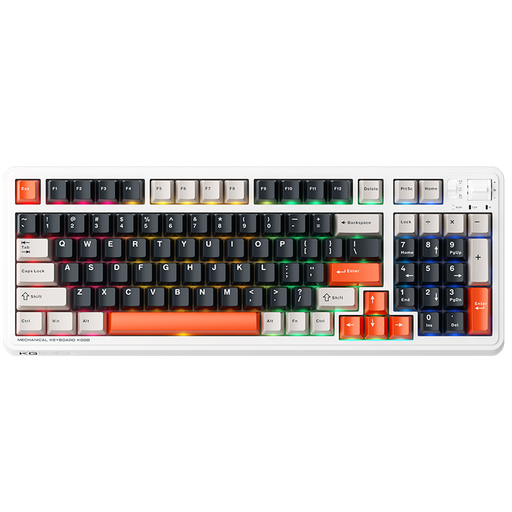
MACHENIKE KG98 96%, Black White Orange, US QWERTY
The 96% layout may suit you if you want a compact board rather than a 75% layout.
The title lists tri-mode connectivity and hot-swappable switches. Check the US key legends against your setup and confirm the fitted switch if its feel is important to you.
View on Joybuy
Common questions
Which keyboard layout makes sense for RPGs?
Choose full-size if you need a numpad and many directly available keys; consider TKL or 75% if mouse room matters more. Before choosing 60%, check whether you can use layers for missing keys: SCAN notes that the layout removes direct access to function, arrow and navigation keys.
Will a wrist rest or low-profile keyboard make long sessions comfortable?
Neither guarantees a comfortable setup. The Health and Safety Executive advises relaxed shoulders, a keyboard just below elbow height, and a centred screen and keyboard; choose a wrist rest or lower-profile board only if it helps you maintain that position at your desk.
What should I check before choosing wireless?
Check the connection modes you need and how you will charge the keyboard. Battery-life claims can depend on settings such as lighting; also check model-specific connection limits if you plan to use multiple devices.
How should I dispose of an old gaming keyboard?
Check your local authority’s electrical recycling service or a retailer take-back option rather than assuming household waste is the right route. Arrangements vary locally; Richmond Council, for example, lists computer keyboards among the electrical items it accepts for recycling.


