
24/7 Customer Support

Free returns

Same-day & Next-day Delivery

Quality Guaranteed

Unlock Your Welcome Offers: FREE Delivery | Up to 80% OFF | Free 30-day JoyPlus trial
Download the APP
Navigating the world of gaming laptops can feel like a minefield of technical jargon and marketing hype. The NVIDIA GeForce RTX 4050 has emerged as a popular choice for those seeking a capable machine that can handle modern games without the premium price tag of high-end models. It represents a sweet spot for 1080p gaming, making it a frequent search for students, young professionals and anyone looking for a versatile and affordable powerhouse.
However, simply looking for the "RTX 4050" label isn't enough. Many buyers fall into common traps, ending up with a laptop that underperforms or fails to meet their expectations. Before you invest, it's crucial to understand the pitfalls that can lead to a disappointing purchase.
To avoid these traps, focus on a few non-negotiable parameters that ensure you get a balanced and capable machine. Here’s what to look for.
A graphics card is only as good as the processor it's paired with. For an RTX 4050, an Intel Core i5 from a recent generation (or an equivalent AMD Ryzen processor) provides an excellent balance. This combination is powerful enough to run demanding processes and feed the GPU with the data it needs, ensuring smooth performance in the best gaming laptop for AAA titles at 1080p. A weaker CPU will struggle to keep up, leading to stuttering and lower frame rates, regardless of how good the GPU is.
For a gaming laptop, the display's refresh rate is just as important as its resolution. A 144Hz gaming laptop display can show up to 144 frames per second, resulting in visibly smoother and more responsive gameplay compared to a standard 60Hz screen. This is especially noticeable in fast-paced action or competitive games. Also, pay attention to colour accuracy, often measured in sRGB coverage. A display with low sRGB coverage will make games look washed out and dull, detracting from the visual experience.
Not all RTX 4050 GPUs are created equal. Manufacturers configure the Total Graphics Power (TGP), which dictates the maximum amount of wattage the card can draw. A higher TGP generally means better performance. A laptop with a 95W TGP will outperform one limited to 65W. This specification is often hidden in the fine print but is directly linked to the effectiveness of the laptop's cooling system. A robust thermal design with multiple heat pipes and fans allows for a higher TGP and sustained performance without throttling.
We've filtered the market based on these critical criteria. Here are a few RTX 4050 gaming laptops that offer a balanced and practical solution for different types of users in the UK.
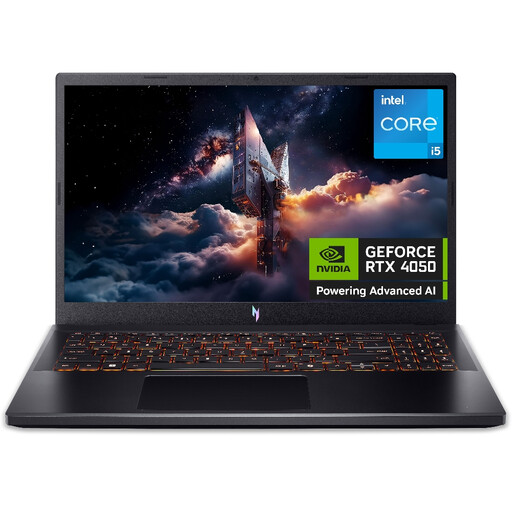
Why This Fits Their Persona: This is an excellent entry point for students or anyone needing a single device for both productivity and serious 1080p gaming. The Acer Nitro V provides a strong feature set for its price, making it a leading affordable gaming laptop without major compromises on gaming essentials.
It pairs the RTX 4050 with a capable Intel Core i5 processor and a 144Hz display, avoiding the common CPU bottleneck and display mismatch traps. Its dual-fan cooling system is designed to manage heat effectively during gaming sessions.
Features the NitroSense utility key for easy monitoring and control of system thermals. It also offers straightforward access for future RAM and SSD upgrades, adding to its long-term value.
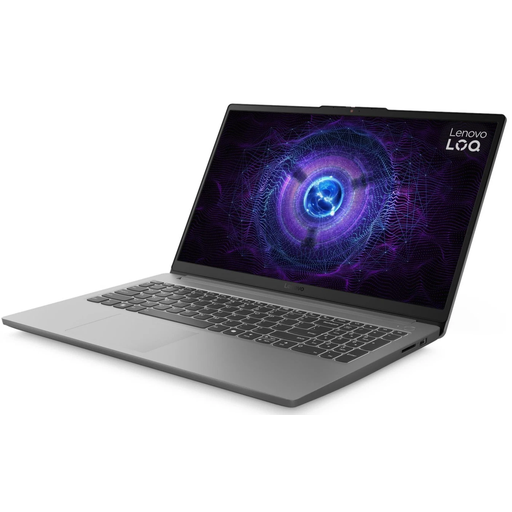
Why This Fits Their Persona: For the user who values reliability and a well-rounded package. The Lenovo LOQ line is often noted in reviews for its solid build and balanced performance, making it a dependable choice for consistent gaming and daily tasks without any glaring weaknesses.
It directly addresses the thermal throttling trap with an advanced dual-fan hyperchamber cooling system. The system is well-balanced with a 144Hz FHD display, 16GB DDR5 RAM and a capable Intel Core i5 processor, ensuring no single component holds back performance.
Features the Lenovo AI Engine+ which helps to automatically optimise system settings for performance. It also comes with a generous 1TB PCIe Gen4 SSD, providing ample fast storage for a large game library.
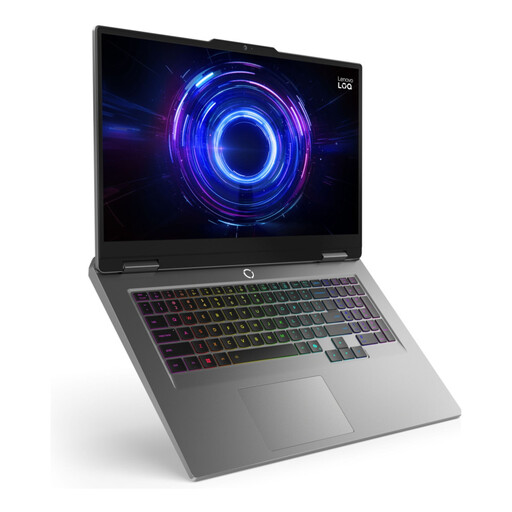
Why This Fits Their Persona: This is for the gamer or creator who prioritises screen size and multitasking power. The larger 17.3-inch display offers a more immersive experience, while the upgraded processor and RAM can handle streaming, video editing and gaming simultaneously.
The larger chassis naturally allows for a more substantial cooling solution, reducing the risk of thermal throttling. It avoids bottlenecks by pairing the RTX 4050 with a powerful Intel Core i7 processor and a massive 24GB of DDR5 RAM.
The main draw is the expansive 17.3-inch display with a 165Hz refresh rate for ultra-smooth visuals. The 24GB of RAM provides exceptional headroom for heavy multitasking and future-proofing.
We have compiled a complete, real-time list of products that fully satisfy these strict selection criteria and UK safety regulations.
Yes, for gaming at 1080p (Full HD) resolution. The RTX 4050 is designed to deliver a solid experience, often exceeding 60 FPS in most modern games at medium-to-high settings. The inclusion of technologies like DLSS (Deep Learning Super Sampling) can further boost frame rates in supported titles, ensuring smooth gameplay for years to come.
For a smooth and future-proof experience, 16GB of DDR5 RAM is the recommended amount. While 8GB might be sufficient for some less demanding or older games, 16GB provides the necessary headroom for modern AAA titles and allows for comfortable multitasking, such as running a game alongside a web browser or voice chat application like Discord without performance degradation.
In terms of physical durability, a well-cared-for laptop can last for many years. From a performance perspective, an RTX 4050-equipped laptop should comfortably handle new games at 1080p for at least the next 3-4 years, although you may need to adjust graphical settings downwards on the newest titles over time. The most critical factor for longevity is the cooling system; a laptop that runs cool will better preserve its internal components over thousands of hours of use.