What matters when choosing a monitor?
For a sales-dashboard desk with limited sockets, decide which need takes priority: freeing the laptop charger’s socket, connecting peripherals without a separate dock, or making dashboard detail easier to view. Then check the selected monitor and laptop together.
| Concern |
What to check |
Who this matters to |
| Free the laptop charger’s socket |
Compare the monitor’s USB-C or Thunderbolt power-delivery limit with your laptop’s charging requirement; confirm video output through the laptop port. |
If I need the laptop and monitor working together but have only one convenient socket, charging from the monitor is my priority. Around 42% of consumers put freeing the laptop charger’s socket first. |
| Connect devices without a powered dock |
Count the USB devices you use and check the exact monitor for suitable downstream ports and RJ45 Ethernet, if needed. |
With a keyboard, mouse and wired network at my desk, I want those connections at the monitor rather than through another powered device. For around 33% of consumers, replacing the separate dock is the primary need. |
| Read dense dashboard content |
Compare screen size and resolution, then check that the model still has the connections your laptop setup requires. |
If charts, tables and small labels compete for screen space, I put display detail ahead of extra dock ports once charging is covered. Dashboard readability comes first for around 25% of consumers. |
Brands with relevant monitor ranges
These examples show features available on specific models, not features shared by every monitor from each brand.
Dell
Dell’s 27-inch UltraSharp and Pro hub models are relevant when QHD workspace and desk connectivity both matter.
- Dell lists 90W power delivery, Thunderbolt 4 and digital daisy-chain capability for the U2724DE; the P2725DE is a QHD USB-C hub model with 90W power delivery and RJ45 Ethernet.
- Check the particular model rather than assuming every Dell display has the same charging rating, Ethernet port or multi-monitor functions.
LG
LG has distinct 27-inch options for a detail-focused display or a more connected business desk.
- LG lists 4K UHD resolution and simultaneous USB-C display, data and 90W charging for the 27U730A-B. Its 27BA850-B lists 90W USB-C charging, Ethernet and built-in conferencing hardware.
- The 27BA850-B is a Full HD model; do not assume it offers the 27U730A-B’s resolution, or that the 27U730A-B has the same business connections.
Lenovo ThinkVision
Selected ThinkVision docking monitors address desks where laptop charging and peripheral connections are central to the setup.
- Lenovo lists QHD resolution, up to 140W USB-C power delivery, four USB-A ports and RJ45 Ethernet for the P27QD-40. The P27h-20 is another QHD USB-C docking model with up to 90W delivery.
- Charging limits and available connections differ by model; confirm the exact model against your laptop and devices.
Joybuy monitors for dashboard desks
These monitors offer different screen formats and USB-C-connected options for a dashboard desk. Check each model’s charging capacity and ports before relying on it to replace a laptop charger or dock.
 No image available
Acer Predator X49X 49-inch curved ultrawide monitor
Consider its 32:9 format if you want a wide workspace for dashboard windows. The title lists a QD-OLED panel, 1800R curve, HDMI, DisplayPort and USB-C; confirm the exact X49X variant and its laptop-charging and hub functions before relying on it as a dock.
View on Joybuy
 No image available
ASUS ProArt PA278CV IPS WQHD monitor
For a dashboard desk where WQHD resolution and USB-C connectivity matter, check whether this model’s charging rating meets your laptop’s requirement. Confirm that its peripheral connections cover the devices you would otherwise attach to a dock.
View on Joybuy
 No image available
MSI MD272UPSW 27-inch 4K UHD smart monitor
Consider this model when dashboard detail is the priority and its USB-C connection suits your laptop. The title specifies 65W USB-C power delivery and Google TV; check whether 65W meets your laptop’s charging needs and whether the available ports cover your peripherals.
View on Joybuy
 No image available
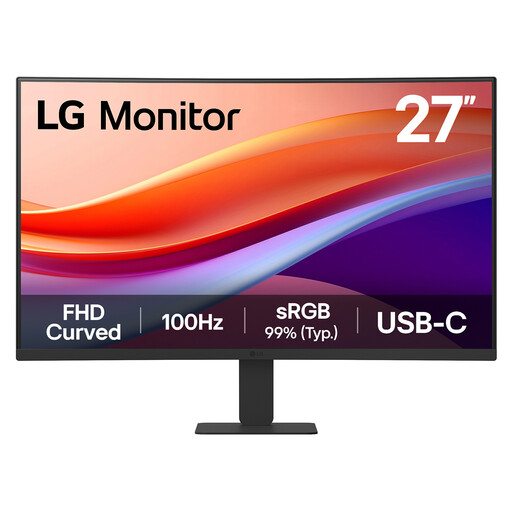
LG 27U421A 27-inch curved Full HD monitor
This Full HD, 100Hz VA model is an option if its display resolution suits your dashboard. It lists USB-C and HDMI, but its description says it has no USB hub; check the USB-C charging rating and plan how you will connect your peripherals.
View on Joybuy
 No image available
ASUS ZenScreen MB249C IPS USB-C monitor
Consider this USB-C model if you need to change how your dashboard display is positioned at the desk. Check its charging capacity against your laptop and confirm which USB hub functions apply to the unit you intend to use.
View on Joybuy
Common questions
Can one USB-C cable replace my laptop charger and monitor cable?
Yes, if the monitor supports display and adequate power delivery through USB-C and your laptop and cable support the required connection. LG lists simultaneous display, data and 90W charging for its 27U730A-B, but check your own laptop’s port and charging requirements before leaving its charger disconnected.
Will a USB-C charging monitor free every socket on my desk?
No, the monitor still needs a mains socket. A compatible setup may free the socket used by the laptop charger, while a monitor with the right hub connections may also remove the need for a separately powered dock.
Can I add a second monitor for a wider sales dashboard?
You can if the selected monitor, computer and connection method support the intended second display. Dell lists digital daisy-chain capability for the U2724DE; BenQ says Mac devices need a Thunderbolt-based connection for daisy chaining with its BL2790QT, so check the requirements of the exact models you plan to connect.
How should I handle limited sockets safely?
Avoid overloading sockets or daisy-chaining extension leads and adaptors. Electrical Safety First warns that these practices can cause overheating and fire; if a plug or socket is hot, damaged, arcing or repeatedly trips protection, stop using it and seek appropriate help.


