Dashboard builders at hot desks
People who move between browser, spreadsheet and CRM windows to create or check charts and tables, sometimes connecting a different laptop at the same desk.


For someone building and inspecting sales dashboards at a desk, a 27-inch QHD monitor offers more pixels for charts, tables and adjacent windows than a 27-inch Full HD display. Choose a USB-C hub model only after checking every laptop that will use the shared desk; Full HD may be sufficient when the dashboard is mainly viewed, while screen position and glare still need attention as part of the workstation setup.
People who move between browser, spreadsheet and CRM windows to create or check charts and tables, sometimes connecting a different laptop at the same desk.
People who mainly keep a sales dashboard in view and want a legible desk display without choosing connections or features they will not use.
Teams choosing monitors alongside screen placement and lighting. The Health and Safety Executive’s guidance makes the wider workstation relevant for qualifying regular display screen equipment users.
Start with the dashboard layout and viewing distance, then check the laptops and desk arrangement that the monitor must accommodate. Dell Technologies, BenQ UK and LG UK list 27-inch examples at both QHD and Full HD resolutions; the right connection and stand features depend on how the desk is used.
| Concern | What to check | Who this matters to |
|---|---|---|
| Dashboard workspace | Compare native resolution and test the actual charts, filters and table text at the intended viewing distance. | When I edit detailed dashboards alongside other windows, I need enough room to see the information I am working on; around 36% of consumers put dashboard workspace first. |
| Shared-laptop connections | Check each laptop’s USB-C video support and charging requirement, plus any Ethernet or additional-display needs. | If different laptops take turns at one desk, I want a connection routine that works for each of them; connectivity is the primary concern for around 29% of consumers. |
| Screen position and glare | Check stand adjustment, planned mounting and reflections under the office’s actual lighting. | At a desk used by several people, I need to position the screen for my work without troublesome reflections; around 21% of consumers prioritise the workstation setup. |
| Simple desk setup | Decide whether the screen is mainly for viewing or detailed editing, then check the inputs and cables required. | If I mostly view a dashboard, I may accept fewer pixels and avoid connections I will not use; a straightforward setup comes first for around 14% of consumers. |
Dell Technologies and BenQ UK specify 2560 × 1440 for the P2725DE and BL2790QT, while LG UK specifies 1920 × 1080 for the 27BA750-B. The diagonal size alone does not establish how much of a dashboard fits on screen.
Compare native resolutions, then test the dashboard’s filters, columns and chart labels at the size people will actually use.
Dell Technologies lists power delivery up to 90W for the P2725DE; BenQ UK and LG UK list up to 65W for their cited models. Those monitor specifications do not establish what a particular laptop can display or how much power it needs.
Check video output, charging, cables and any Ethernet or additional-display requirement for every laptop type that will use the desk.
The Health and Safety Executive says employers must assess workstations for workers who use display screen equipment daily as part of normal work for continuous periods of an hour or more. It also addresses screen and lighting arrangements to avoid glare.
Position the screen for its users and include it in the relevant workstation assessment rather than relying on monitor features alone.
GOV.UK describes waste electrical and electronic equipment rules as intended to reduce electrical equipment going to landfill or incineration.
Before replacing office monitors, agree a reuse, take-back or approved disposal route with the supplier and facilities team.
Dell Technologies lists the P2725DE as a 27-inch QHD USB-C hub monitor with power delivery up to 90W and RJ45 Ethernet.
BenQ UK specifies a 27-inch 2560 × 1440 display, 110 mm height-adjustment range, pivot and USB-C power delivery up to 65W for the BL2790QT.
LG UK lists the 27BA750-B as a 27-inch 1920 × 1080 IPS office monitor with USB-C power delivery up to 65W, RJ45 and an adjustable stand.
These QHD and 4K monitor options relate to building or viewing a dashboard at a shared desk. Compare the screen and connections each desk needs rather than assuming every model offers the same laptop or positioning features.
 Image unavailable
Consider this WQHD display for editing charts and tables at a desk. If laptops will connect through USB-C, confirm the required video and charging functions for each one before buying.
 Image unavailable
Consider this 4K display where detailed dashboard work is the priority. Its Nano Glossy panel makes reflections worth checking in the office; confirm USB-C video and charging compatibility for every laptop that will share the desk, particularly non-Mac models.
 Image unavailable
This QHD model is an option for dashboard editing at a shared desk. Before planning a USB-C laptop setup, confirm the connections and charging capability of the exact variant; if using a monitor arm, check the mount and desk arrangement too.
 Image unavailable
Consider this 4K display for detailed dashboard work where its other features also suit the desk. The product title lists USB-C charging at 65W; check each laptop’s video support and power requirement rather than assuming a one-cable setup will work.
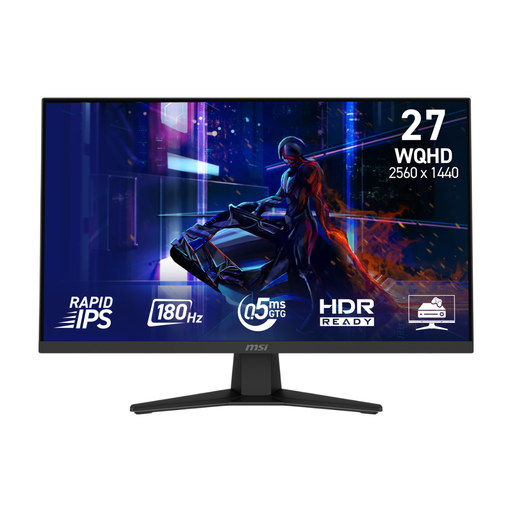 Image unavailable
Its WQHD display makes this model worth considering for dashboard workspace, even if gaming features are not part of the office requirement. Check whether the stand suits different desk users and whether the available connections fit the laptops and network setup.
Choose QHD when the main user edits detailed charts and tables or keeps adjacent windows open; Full HD may be sufficient for simpler viewing if the layout remains legible. Dell Technologies and BenQ UK list cited 27-inch QHD models at 2560 × 1440, while LG UK lists the 27-inch 27BA750-B at 1920 × 1080. Test the actual dashboard at the intended viewing distance.
It can when the monitor, laptop and connection support the functions needed. Dell Technologies lists USB-C DisplayPort Alt Mode, power delivery up to 90W and RJ45 for the P2725DE; LG UK lists USB-C power delivery up to 65W and RJ45 for the 27BA750-B. Check each laptop’s video output, charging demand and office network requirements before standardising the desk.
No. The Health and Safety Executive says employers must assess workstations for workers who use display screen equipment daily as part of normal work for continuous periods of an hour or more. Screen position and lighting are parts of the wider workstation arrangement; an adjustable stand does not replace that assessment.
Arrange a reuse, take-back or approved disposal route before the replacement. GOV.UK describes waste electrical and electronic equipment regulation as intended to reduce electrical equipment sent to landfill or incineration; check the organisation’s process and the supplier’s available arrangements.