
24/7 Customer Support

Free returns

Same-day & Next-day Delivery

Quality Guaranteed

Unlock Your Welcome Offers: FREE Delivery | Up to 80% OFF | Free 30-day JoyPlus trial
Download the APP
Choosing a new tablet can feel like navigating a minefield of technical jargon and exaggerated marketing claims. For many UK families and students, the goal is simple: find a reliable device for entertainment, study and everyday browsing without overspending. The Samsung Galaxy Tab A11+ is often a contender in this space, but it's crucial to understand what you're buying and how to avoid common pitfalls that lead to buyer's remorse.
As a Joybuy Product Recommendation Officer, my role is to help you see past the hype. Before you decide, let's look at a few frequent traps shoppers fall into:
To make an informed choice, focus on the specifications that genuinely impact your daily use. Here are the non-negotiables to analyse.
When you see a Samsung tablet 128GB model, that 128GB refers to the internal storage. This is where your operating system, apps and their data live. It's designed for fast access. Many tablets also offer a tablet with expandable storage via a microSD card slot. This is excellent for storing large files like films, photos and documents, but it's significantly slower than internal storage. For smooth app performance, a healthy amount of internal storage (64GB at a minimum, 128GB is a comfortable sweet spot) is more important than a massive expansion capability alone.
Most modern tablets use an "octa-core" processor. This simply means the chip has eight processing units to handle tasks. For a tablet for students or family use, this is more than enough for smooth video streaming, web browsing and running educational apps. The processor in the Galaxy Tab A11+ is built to handle these everyday tasks without lag, ensuring a responsive experience when you're switching between a video lecture and your notes.
The operating system is the tablet's brain. An Android 16 tablet like the Galaxy Tab A11+ provides access to the latest features, security enhancements and a vast library of apps on the Google Play Store. More importantly, Samsung provides a clear security update promise for this model until late 2032. This commitment is a crucial factor for a long battery life tablet, as it ensures the device remains safe and functional for many years, protecting your investment.
Instead of a single recommendation, let's match some options to different user needs.
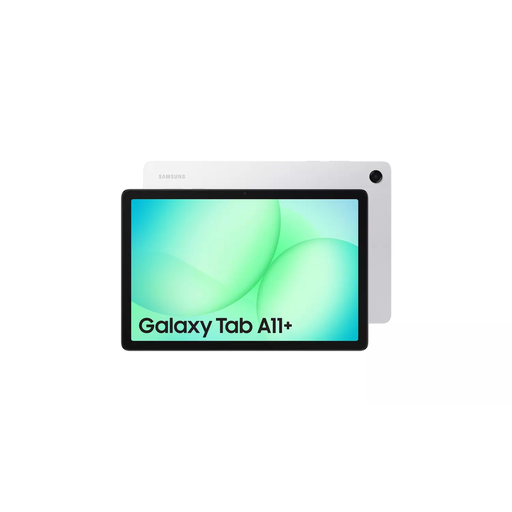
Why This Fits Their Persona: This is the quintessential all-rounder. It's a reliable WiFi tablet perfect for online learning, streaming films on its bright 11-inch screen, and casual browsing. The balance of performance, display quality and brand trust makes it a safe and practical choice for most UK households.
It sidesteps the software lifespan trap with a clear security update policy until 2032. Its RAM and storage specifications are stated clearly without relying on virtual memory gimmicks.
Exceptional software longevity and a smooth 90Hz WUXGA display that offers great clarity. Also features a 3.5mm headphone jack, a rarity on modern tablets.
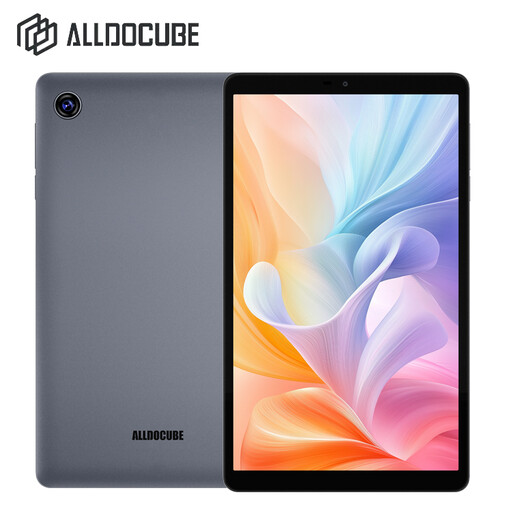
Why This Fits Their Persona: For those needing a simple, portable device for reading e-books on the train, checking emails or light video watching. Its compact size and lower price point make it an accessible entry into the tablet market without a large financial commitment.
This tablet is transparent about its specifications. With 4GB RAM and 64GB storage, it sets realistic expectations for performance, avoiding the trap of over-promising with inflated virtual RAM figures.
Its primary advantage is its portability. The 8.68-inch screen makes it easy to handle with one hand and it runs a modern version of Android, ensuring good app compatibility.
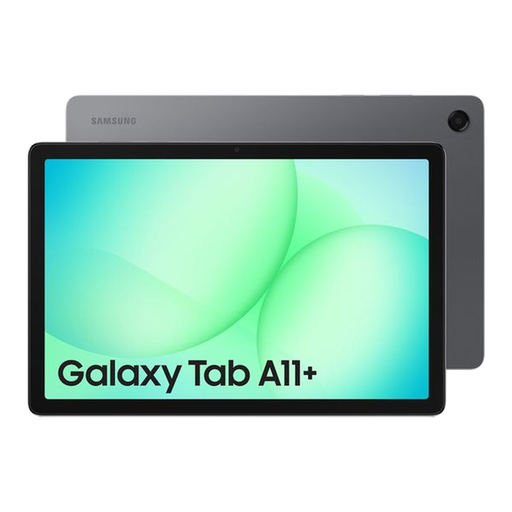
Why This Fits Their Persona: For users who download large apps, games and lots of offline media, this version of the Tab A11+ is a strong contender. The combination of 8GB of physical RAM and a huge 256GB of internal storage provides ample power and space for more demanding use cases.
This model offers a substantial 8GB of true, physical RAM and 256GB of fast internal storage, delivering genuine performance without misleading virtual memory claims. It also benefits from the same long-term software support.
Massive internal storage for apps and media, plus 8GB RAM for smoother multitasking. It also includes a **tablet with facial recognition** for convenient and secure unlocking.
We have compiled a complete, real-time list of products that fully satisfy these strict selection criteria and UK safety regulations.
Physically, the tablet is well-built for everyday use. From a software perspective, its value is significantly enhanced by Samsung's commitment to provide security updates until 30 November 2032. This means the device will remain secure and usable for far longer than many competitors in its price range.
Yes, it is a capable tablet for students. The large, clear 11-inch screen is great for reading academic papers, watching lectures and participating in video calls. Its octa-core processor can comfortably handle research with multiple browser tabs open and light productivity apps for note-taking and writing essays.
The Samsung Galaxy Tab A11+ (models SM-X230 and others) includes a USB-C cable in the box for charging and data transfer. However, the 25W fast-charging power adapter is typically sold separately. You will need to use a compatible USB-C power adapter to charge the device.