
24/7 Customer Support

Free returns

Same-day & Next-day Delivery

Quality Guaranteed

Unlock Your Welcome Offers: FREE Delivery | Up to 80% OFF | Free 30-day JoyPlus trial
Download the APP
As a creative professional, photographer or videographer in the UK, your workflow is your livelihood. Every minute spent waiting for files to transfer is a minute you are not creating. A high-performance portable drive is no longer a luxury; it is an essential tool. However, the market is flooded with options, and it is easy to fall into common purchasing traps that leave you with a device that underperforms or fails when you need it most.
This guide cuts through the marketing clutter. We will explore the critical pitfalls to avoid when buying a high-speed portable SSD and break down the specifications that truly matter. Our goal is to help you understand if a drive like the SanDisk Extreme 1TB portable SSD is the right fit for your demanding workflow.
Before investing, be aware of these frequent issues that can lead to buyer's remorse:
To make an informed decision, focus on these three non-negotiable parameters.
The speed of your drive is dictated by its internal technology and its connection interface. Look for a USB-C SSD, but pay close attention to the specific standard:
To achieve these speeds, your computer's port must match the drive's specification. Plugging a 20Gbps drive into a 10Gbps port will limit its performance.
For any portable SSD for photographers or field professionals, durability is paramount. Look for two key indicators:
If you handle sensitive client files or personal data, security is essential. An encrypted portable drive with 256-bit AES hardware encryption provides a robust layer of protection. This encrypts your data at the hardware level, making it virtually impossible to access without your password, even if the drive is removed from its casing.
We have selected a few options from our catalogue that align with different user needs, helping you avoid the common pitfalls.
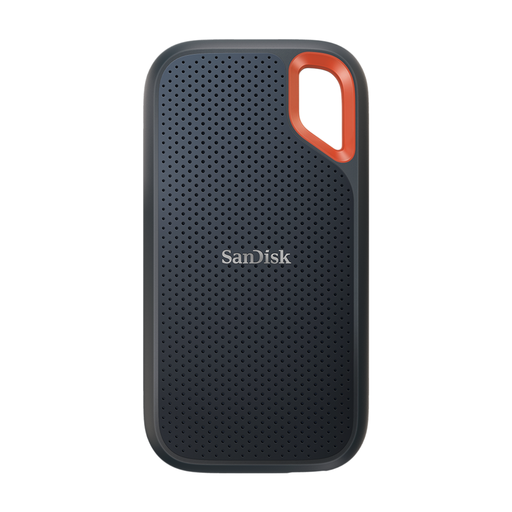
Why This Fits Their Persona: This drive offers a superb balance of high-speed performance (up to 2000MB/s), a generous 1TB capacity and exceptional durability. It is compact enough for any camera bag, making it ideal for photographers and videographers working on location across the UK.
It sidesteps the durability pitfall with certified IP65 water and dust resistance and 3-metre drop protection, ensuring your data is safe in challenging environments.
Its combination of a fast USB 3.2 Gen 2x2 interface and robust physical protection makes it a reliable workhorse for demanding creative projects.
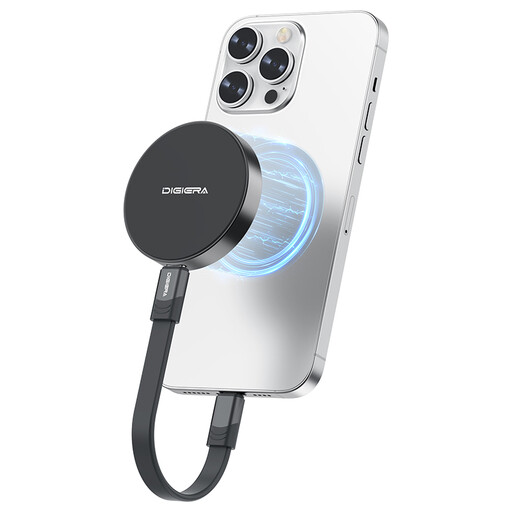
Why This Fits Their Persona: This drive is tailored for content creators using an iPhone 15 Pro or newer. Its magnetic design allows it to attach directly to the phone, enabling seamless recording of 4K ProRes video straight to the SSD, which is a game-changer for mobile workflows.
It counters the "speed illusion" by using a top-tier USB 3.2 Gen 2x2 interface, delivering genuine 2000MB/s read speeds for incredibly fast offloads when connected to a compatible computer.
The unique magnetic attachment for direct iPhone recording is its standout feature, solving a major pain point for mobile videographers by freeing up internal phone storage.
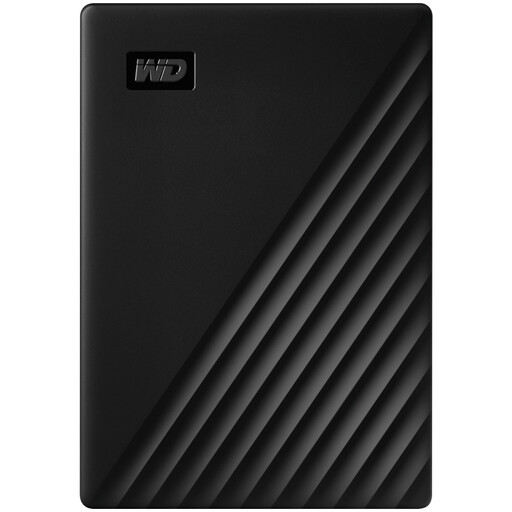
Why This Fits Their Persona: For users who need to back up vast amounts of data—such as entire system backups or years of photo archives—this HDD offers an enormous 4TB of space at an excellent value. It is a reliable choice for long-term storage rather than high-performance editing.
This drive correctly navigates the capacity vs. speed trade-off. It is positioned as a high-capacity backup solution, preventing the mistake of buying it for speed-intensive tasks where an SSD would be required.
Its primary benefits are the massive 4TB capacity and built-in 256-bit AES hardware encryption, providing secure, large-scale storage for archiving sensitive files.
We have compiled a complete, real-time list of products that fully satisfy these strict selection criteria and UK safety regulations.
For everyday tasks like backing up documents or photos, a high-performance drive like the SanDisk Extreme might be more than you need. Its value truly shines in professional workflows where time is money—transferring large video files, editing high-resolution photos directly from the drive or working in rugged outdoor conditions. If your needs are less demanding, a standard SSD or a high-capacity HDD could be a more cost-effective choice.
To achieve the advertised transfer speeds, three components must align. First, the SSD itself must support a high-speed standard like USB 3.2 Gen 2x2. Second, your computer must have a corresponding port (e.g., a Thunderbolt 4 or USB 3.2 Gen 2x2 port). Finally, you must use a high-quality cable rated for that speed. Using an older port or a lower-spec cable will create a bottleneck and reduce your transfer rates.
Yes, you can. Most external SSDs can be used interchangeably between macOS and Windows. To ensure seamless read-and-write compatibility without reformatting, the drive should be formatted with the exFAT file system. Some drives come pre-formatted this way. If a drive is formatted as NTFS (for Windows) or APFS (for Mac), you can easily reformat it using the Disk Utility on a Mac or Disk Management on a Windows PC, but be aware that this process will erase all data on the drive. This makes a 1TB external SSD for Mac and PC a very flexible tool.