Teams with a large video library
If clips, exports and project versions will mainly be archived beside one computer, start by measuring the library and allowing room for it to grow.


Choose a portable hard drive for a large video library that travels occasionally, a desktop hard drive for an archive kept beside a workstation, or a portable SSD when carrying and repeatedly copying footage are priorities. Check that the chosen capacity leaves room for new clips and exports; whichever drive you use, keep a separate backup copy and follow the school’s security requirements for identifiable footage.
If clips, exports and project versions will mainly be archived beside one computer, start by measuring the library and allowing room for it to grow.
If the drive will travel between home, school and filming locations, consider how often files need copying and whether the drive’s connector works with each computer.
If videos contain identifiable pupils or interviewees, check the school’s rules for carrying, storing and encrypting the files before putting them on removable storage.
Match the drive’s location and carrying needs to the project before settling on a capacity. A drive intended for frequent transfers presents a different choice from one that will stay beside a workstation.
Choose it when: a sizeable archive needs to travel occasionally without becoming a fixed desktop setup.
Trade-off: check the exact drive’s capacity and connection rather than assuming every portable HDD suits frequent file transfers.
Choose it when: footage moves regularly between locations and the selected capacity covers the whole backup.
Trade-off: even a model with stated resistance to dust, water or drops still needs careful handling and a separate backup copy.
Choose it when: the archive will stay beside a home or school workstation.
Trade-off: a fixed-location drive is less convenient for carrying raw footage between locations.
| Concern | What to check | Who this matters to |
|---|---|---|
| Library capacity | Measure existing clips and allow room for planned footage, exports and versions. Check the individual drive’s capacity, bearing in mind that available space can appear lower than the labelled figure. | If the project is building an archive, I need to retain original clips as well as later exports without immediately running out of room. Around 40% of consumers put library capacity first. |
| Carrying and copying footage | Check the drive and computer connections, the cable needed and the selected model’s stated limits for drops, dust or water. | When footage moves between school, home and filming locations, I want a drive that fits that routine without treating a resistance rating as a guarantee. For around 30% of consumers, carrying and copying footage is the primary concern. |
| Recovery and access | Plan a separate copy that can be disconnected, check that files open from it, and confirm the school’s approved protection for personal information. | If the computer or a connected drive fails, I need another usable copy; identifiable footage also needs controlled access. Keeping files recoverable and protected comes first for around 30% of consumers. |
New footage, exports and project versions can take the library beyond its initial size. Seagate UK also notes that a computer may report less available capacity than the decimal figure on a drive’s label.
Measure the files you already have, allow for planned work and check the capacity of the exact drive variant.
A permanently connected drive can be affected by an incident involving the computer. The National Cyber Security Centre advises keeping an offline backup disconnected when it is not needed.
After copying files, open a sample of clips and project files from the backup, then disconnect and store one copy securely.
Samsung says the T7 Shield’s resistance claims come from controlled tests, real-world resistance can vary, and liquid or dust damage is not covered under its warranty.
Handle a carried drive carefully, keep it dry and retain another copy of the footage.
A lost removable drive can expose personal information. The Information Commissioner’s Office and the National Cyber Security Centre discuss encryption as a protection for data on removable media.
Before moving footage containing identifiable people, confirm the school’s data-handling rules and use its approved protection method.
Samsung’s UK T7 Shield range is a portable SSD option to consider when a video drive will be carried and used for repeated copying.
Seagate positions its Expansion Portable range as straightforward portable backup storage for a library that needs to travel occasionally.
The LaCie d2 Professional 8 TB, as listed by Apple UK, is a desktop-drive reference for an archive kept at a workstation.
These drives cover portable SSD, desktop HDD and portable HDD options for the school video library. Compare their stated capacities with the size of your files, then check the connections and backup routine your project requires.
 No image available
Consider this portable SSD when the library needs to move between locations and 4 TB leaves enough room for the planned footage.
The product name specifies USB Type-C and USB 3.2 Gen 2. Check the computers and cables you will use; do not confuse this T7 with the separately described T7 Shield.
 No image available
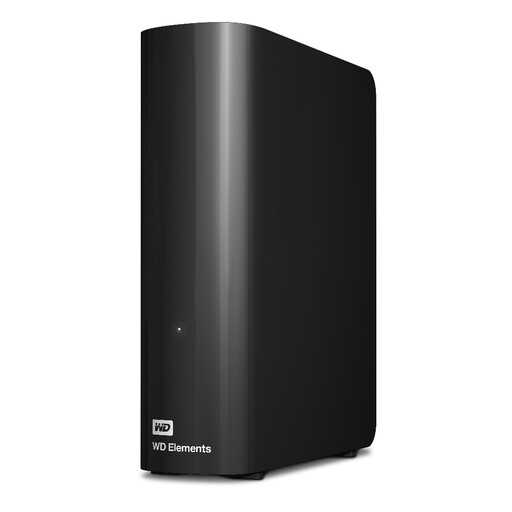
Consider this desktop hard drive for a large video archive that will stay beside a workstation rather than travel with the project.
The product name specifies an 18 TB capacity and USB 3.0. Check the workstation connection and power setup before choosing a desktop drive.
 No image available
Consider this portable drive for footage carried between locations if 1 TB accommodates the library and future project files.
The product name specifies USB Type-C and USB 3.2 Gen 2. Check connection compatibility and the school’s approved method for protecting identifiable footage.
 No image available
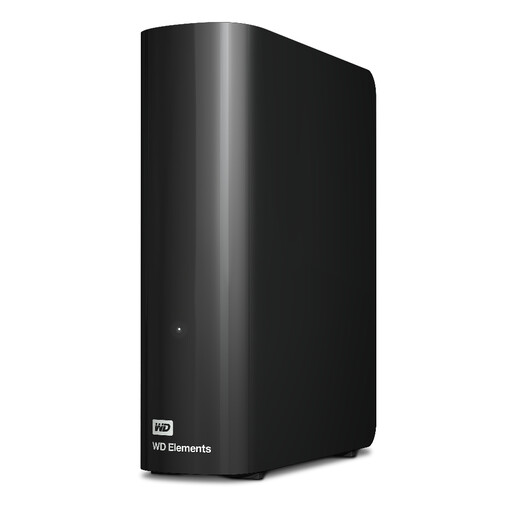
Consider this desktop hard drive when the video archive will remain at one workstation and 12 TB suits its expected size.
The product name specifies USB 3.2 Gen 1. Check the intended computer’s connection and file-system requirements before setting up the backup.
 No image available
Consider this portable hard drive for a video archive that needs occasional transport, provided 4 TB leaves space for later clips and exports.
The product name specifies USB 3.0. Check that its connection works with the computers used for the project.
No: treat the external drive as one copy, not the entire backup plan. The National Cyber Security Centre advises keeping at least one backup offline when it is not needed, so an incident affecting the computer cannot reach every connected copy.
The available capacity shown by a computer can be lower than the number on the drive’s label. Seagate UK explains that operating systems may use a different measurement convention, while formatting also uses some space; leave headroom for the project rather than sizing the drive to the exact current folder.
Check the school’s approved encryption and data-handling method before putting identifiable footage on a removable drive. The Information Commissioner’s Office discusses encryption for protecting stored personal information, but a drive’s password feature alone does not establish that it meets a particular school’s requirements.
Open representative clips and project files from the backup, then disconnect and store the copy securely when it is not being updated. The National Cyber Security Centre advises keeping an offline backup digitally disconnected to reduce the chance of one incident affecting all copies.
No: a recovery service does not ensure that every lost, deleted or damaged project file can be restored. Keep another independent copy, and check the terms of any service offered with the exact drive you choose.