Choose a controller for the console or computer running your RPG, not for the size of its screen. An Xbox Wireless Controller suits an Xbox or compatible Windows setup; DualSense is the native PS5 route, while PC-focused and wired alternatives depend more closely on the host and connection you use. Check the game’s controller support and the distance to your seat before deciding which features matter.
Who is choosing?
Cross-platform sofa players
If your RPG runs on Xbox or Windows PC, start with host compatibility, then find a wireless connection that works from your seat. Microsoft Xbox and 8BitDo specify different wireless modes for their controllers, so the exact model matters.
PS5 and PC feedback fans
If you play on PS5, or want DualSense features in a PC game, check that the particular RPG supports them. PlayStation says PC haptic feedback requires USB as well as game support.
Players who map extra controls
If you often use abilities, maps or inventory commands, extra inputs may be worth considering. The 8BitDo Ultimate 2C has remappable bumpers for its stated Windows use; the GameSir G7 SE offers back buttons but requires a wired connection.
What should you check?
Identify the game-running device and the RPG’s controller support first. Then choose a connection that reaches your seat and decide whether game-dependent feedback or extra controls would change how you play.
| Concern |
What to check |
Who this matters to |
| Host and game compatibility |
Match the exact Xbox, PS5, PC or other host to the controller’s stated compatibility; check the RPG’s gamepad support. |
If I alternate between a console and a computer, I need to know which device can use the controller before considering its extras. Around 31% of consumers put compatibility first. |
| Sofa connection |
Check which host supports the controller’s Bluetooth, Xbox Wireless, 2.4 GHz receiver or wired mode, and whether a cable can reach safely. |
Playing away from the game-running device makes a workable cable-free connection my main concern. Wireless sofa play comes first for around 31% of consumers. |
| Supported feedback |
Check the individual game’s DualSense features; PlayStation says PC haptic feedback requires USB. |
I want to feel the feedback features my RPG actually supports, rather than choose a controller for effects I might not get. That is the primary concern for around 23% of consumers. |
| Extra controls |
Check the exact model’s remappable inputs and whether its connection and control settings suit your host. |
When I use maps and abilities frequently, I would rather arrange commands around my own controls. Around 15% of consumers put that flexibility first. |
Mistakes to avoid
-
Choosing for the TV instead of the device running the game
A large display does not make a controller compatible with the console or computer connected to it. For example, 8BitDo states Windows and Android connection modes for the Ultimate 2C, while GameSir specifies wired Xbox and Windows use for the G7 SE.
Note your exact game-running device, then check the controller’s stated compatibility and connection mode for that device.
-
Assuming controller configuration adds native gamepad support
Steam Support says gamepad-only input styles work only with games that support gamepads. Configuring a controller is not the same as the RPG providing native controller input.
Check the particular RPG’s store information, support pages or in-game input settings before choosing a controller.
-
Expecting every DualSense feature over Bluetooth on PC
PlayStation says PC haptic feedback requires USB, and feedback features depend on support in the individual game.
If those features drive your choice, confirm the RPG’s support and plan for a USB connection when PC haptics matter to you.
Brands to consider for this setup
Xbox
Microsoft Xbox offers first-party controllers for Xbox consoles and supported Windows PCs.
- Microsoft specifies Xbox Wireless and Bluetooth for the standard Xbox Wireless Controller; its Elite Wireless Controller Series 2 Core adds adjustable-tension sticks and trigger locks.
- Choose the exact model and connection for your host rather than assuming every Xbox controller has the same controls or power arrangement.
PlayStation
DualSense is PlayStation’s native PS5 controller route and can connect to supported PCs and other devices.
- PlayStation lists Bluetooth and USB connections on supported devices, with haptic feedback and adaptive triggers in select PC games.
- PlayStation says PC haptic feedback needs USB; feature availability also depends on the game.
8BitDo
Its Ultimate controller range includes models with different host and connection options.
- 8BitDo specifies 2.4 GHz or wired Windows use and Android Bluetooth use for the Ultimate 2C Wireless Controller.
- Check the complete Ultimate model name: compatibility stated for one variant should not be assumed for another.
GameSir
The G7 SE is an alternative for players seeking a wired Xbox or Windows controller.
- GameSir specifies USB-C wired use for Xbox Series X|S, Xbox One and Windows 10/11, with two lockable back buttons.
- A wired-only controller needs a cable route that reaches your seat without creating a trip hazard.
Joybuy controller choices
These choices cover Xbox and Windows controllers with different control and connection priorities, plus a DualSense option for PS5 or supported PC play. Match each one to the device running your RPG; the screen alone does not determine the fit.
 No image available
Microsoft Xbox Elite Wireless Controller Series 2
Consider this Xbox and PC variant if configuring controls matters to you during long RPG sessions. Confirm its connection requirements for your exact host and check that the game supports controller input.
View on Joybuy
 No image available
Xbox Wireless Controller – Robot White
This is a route to consider when your RPG runs on Xbox or a compatible Windows PC and you want a wireless setup. Microsoft specifies Xbox Wireless and Bluetooth for the standard controller; check which connection your host uses and whether its power arrangement suits you.
View on Joybuy
 No image available
Turtle Beach PDP Victrix Pro BFG for Xbox and Windows – Black
Consider this Xbox and Windows variant if you want to arrange frequently used RPG commands around your controls. Check the connection mode available on your particular host before planning a sofa setup.
View on Joybuy
 No image available
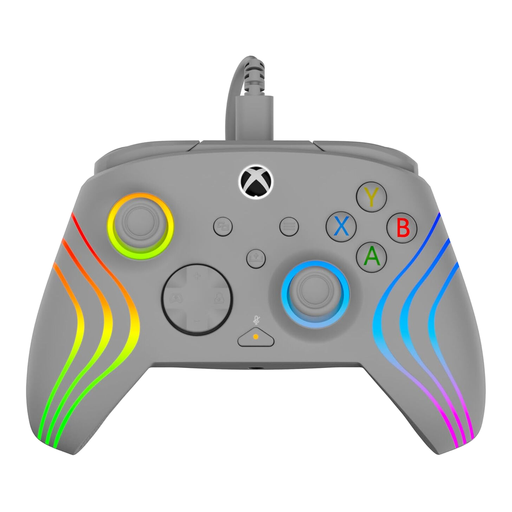
Turtle Beach Afterglow Wave Wired Controller for Xbox – Grey
A wired controller is worth considering if the game-running device is close enough to your seat. Check host compatibility and plan a safe cable route before choosing this variant for a large-screen setup.
View on Joybuy
 No image available
Sony DualSense Wireless Controller – HYPERPOP Techno Red
Choose a DualSense route for PS5, or consider it for a supported PC RPG if its specific controller features matter to you. PlayStation says PC haptic feedback requires USB and game support; adaptive triggers also depend on the game.
View on Joybuy
Common questions
Will every science-fiction RPG work with a controller?
No. Check the individual game’s input support: Steam Support says gamepad-only input styles work only with games that support gamepads. Controller configuration does not by itself provide native gamepad controls.
Does a bigger TV or monitor call for a different controller?
Not by itself. The controller needs to work with the device running the RPG, while its connection needs to reach your seat. Microsoft specifies Xbox Wireless and Bluetooth for the Xbox Wireless Controller; 8BitDo specifies different Windows and Android modes for the Ultimate 2C.
Will DualSense feedback work wirelessly on PC?
Do not count on wireless PC haptics: PlayStation says haptic feedback on PC requires USB and support from the game. Check the specific RPG for adaptive-trigger support too.
What matters when using a wired controller from the sofa?
Confirm host compatibility, a suitable connection and a cable route that reaches your seat safely. GameSir specifies USB-C wired use for the G7 SE on Xbox Series X|S, Xbox One and Windows 10/11; other wired models need their own compatibility check.


