Choose a controller that works with your gaming platform and the specific RPG before weighing lighting or extra controls. For a dark room, favour a layout you can use by touch and a power arrangement that fits your setup; lighting effects do not establish that button labels are illuminated. The right controller family depends on whether you play on PS5, Xbox, PC or another supported device.
Who these choices suit
PS5 RPG players interested in game-supported feedback
If you mainly play on PS5, Sony’s DualSense offers haptic feedback and adaptive triggers when a game supports them. DualSense Edge is a separate option if you expect to use its remapping and rear controls.
Xbox or Windows players who switch devices
If you play across Xbox, Windows PC or supported mobile devices, Microsoft lists Xbox Wireless and Bluetooth connectivity for its standard controller, along with a 3.5 mm headset jack. Check the connection method for each device you intend to use.
PC players who want a charging dock
If your PC or mobile setup is on 8BitDo’s published compatibility list, the Ultimate 2 Wireless offers a dock and selectable light effects. Those effects may help you spot the controller in a dark room, but do not establish that its button labels are lit.
What to check before buying
Start with your platform and the RPG’s controller support. Once those fit, decide whether quicker access to actions, low-light orientation or simpler power management matters most to you.
| Concern |
What to check |
Who this matters to |
| Platform and game compatibility |
Confirm the exact console or operating system, connection method and RPG controller support. Check game support separately for features such as adaptive triggers. |
If I move between devices, I need to know the controller will connect to the one I am using and that the RPG accepts controller input. Around 36% of consumers put compatibility first. |
| Access to RPG actions |
Check which buttons can be remapped and whether saved profiles would suit the game’s controls. |
When I use the same menus or abilities repeatedly, I may want those actions within easier reach, but only if I will set up the controls. Around 29% of consumers make customisation their primary concern. |
| Low-light orientation |
Check whether you can identify the layout by touch and adjust or turn off any lighting; do not assume lighting illuminates button labels. |
In a dark room, I want to find and orient the controller without lighting that distracts me from the screen. For around 21% of consumers, that is the main priority. |
| Power and cables |
Check the battery or charging arrangement, what accessories are included and where a wired cable would run. |
During a long session, I would rather have a charging routine I can keep up or a cable that stays clear of walkways. Power and cable planning comes first for around 14% of consumers. |
Mistakes to avoid
-
Choosing lighting before checking compatibility
Controller families differ in their supported platforms, and a game may not use every feature its controller offers.
Confirm your console or operating system, connection preference and exact RPG against the manufacturer’s information for the precise model.
-
Assuming RGB makes every button readable
Lighting zones and selectable effects do not establish that face-button labels are illuminated. Bright effects may also be distracting in a dark room.
Choose a layout you can recognise by touch, and check whether the lighting settings suit the room.
-
Overlooking batteries, charging or cable routing
The standard Xbox Wireless Controller can use AA batteries or a compatible rechargeable pack; Microsoft says rechargeable AA cells do not charge inside it. A dock needs a place to sit, while a wired controller needs a clear cable route.
Check what power accessories are included and decide where charging equipment or a cable will go before buying.
-
Choosing extra controls you will not configure
Rear buttons, trigger settings and profiles are useful only if they suit the RPG’s control scheme and you intend to set them up.
Identify the actions you would remap before choosing a more configurable controller.
Relevant brands to consider
Xbox
Microsoft’s controller range is relevant to Xbox players and to supported Windows and mobile setups.
- Microsoft lists Xbox Wireless, Bluetooth, device switching and a 3.5 mm headset jack for the standard Xbox Wireless Controller.
- The standard controller uses AA batteries or a compatible rechargeable pack; rechargeable AA cells must be charged outside the controller.
PlayStation
Sony’s DualSense range suits PS5 players choosing between standard controls and additional physical customisation.
- DualSense Edge adds mappable back buttons, trigger-length adjustment and control profiles.
- Sony says haptic feedback and adaptive-trigger features depend on game support; the Edge controls also require setup to be useful.
8BitDo
The Ultimate 2 Wireless is an option for players whose PC or mobile setup matches its published platform requirements.
- 8BitDo lists an integrated charging dock, configurable controls and selectable light effects for this model.
- Check the exact device, operating-system version and connection mode; its PC and mobile compatibility list does not establish Xbox- or PS5-console support.
PowerA
PowerA’s Advantage Wired Controller with Lumectra is a wired Xbox-oriented option for players interested in configurable lighting.
- PowerA lists RGB lighting zones, two mappable buttons, trigger locks and a 3.5 mm headset jack for this model.
- Its stated 10 ft USB-C cable makes seating distance and a clear cable route part of the decision.
Joybuy controller choices
These controllers cover wired Xbox-oriented play and a wireless modular PlayStation-oriented option. Choose among them only after checking your device, RPG and preferred connection.
 No image available
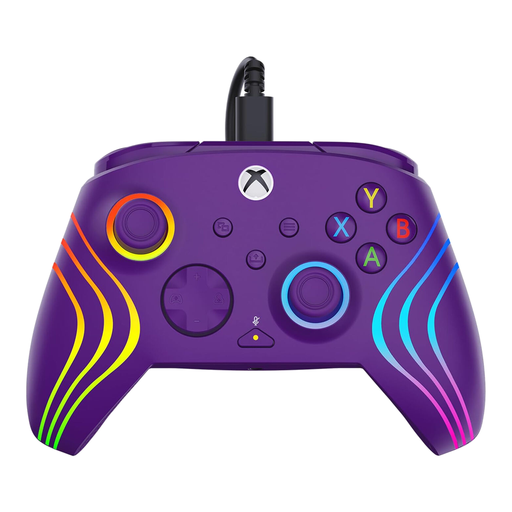
Turtle Beach Afterglow Wave Wired Controller for Xbox – Purple
Consider this wired option if you play on a compatible Xbox setup and can keep the cable clear in a dark room. Check your exact device and RPG before buying; controller lighting should not be taken as proof of illuminated button labels.
View on Joybuy
 No image available
Turtle Beach Afterglow Ignite Time Wired RGB Controller for Xbox and PC – Time Machine
If you want an RGB controller for Xbox or PC play and are comfortable with a wired setup, check this Time Machine variant against your device and RPG. Plan a safe cable route, and check its lighting settings if a subdued room matters to you.
View on Joybuy
 No image available
Turtle Beach Victrix Pro BFG Reloaded Wireless Modular PlayStation Controller – White
This wireless modular option is worth considering for a compatible PlayStation setup if you expect to configure its controls for repeated RPG actions. Confirm support for your device and game, and check its charging arrangement before choosing it for long sessions.
View on Joybuy
Common questions
Do I need RGB lighting to play an RPG in a dark room?
No. Lighting may help you locate a controller, but it does not establish that button labels are illuminated. A layout you can recognise by touch is more useful if you do not want to look away from the screen.
Will DualSense adaptive triggers work in every science-fiction RPG?
No. Sony states that adaptive-trigger and haptic-feedback features depend on game support. Check the specific RPG before making those features a reason to choose a DualSense controller.
Can I use rechargeable AA batteries in an Xbox Wireless Controller?
Yes, but they will not charge inside the standard Xbox Wireless Controller. Microsoft lists AA batteries and a compatible rechargeable battery pack as power options; charge rechargeable AA cells using the battery manufacturer’s recommended method.
How should I dispose of an old controller or spent batteries?
Keep unwanted electrical products and spent batteries out of household rubbish. GOV.UK Office for Product Safety and Standards advises using an appropriate recycling point; check your local collection instructions for the controller and any removable batteries.


