What matters when choosing
Start with the device you use for RPGs and the power source available beside it. Then decide whether game-specific controls or an immediate battery backup matters more to you.
| Concern |
What to check |
Who this matters to |
| Charging without another wall adaptor |
Check for a free USB port and whether it supplies power when the console or PC is in the state you expect to use for charging. |
If my sockets are already occupied, I need a charging routine that uses my console or PC without disrupting the rest of the setup. Around 40% of consumers would make that their primary concern. |
| Platform compatibility |
Match the exact controller model and connection mode to your main console, computer or phone. |
When I move between devices, I cannot assume that a Bluetooth label means the controller will work with the one I play on most. Compatibility would come first for around 30% of consumers. |
| Supported RPG controls |
Check the game’s feature support and any USB requirement for haptics, adaptive triggers or remapping. |
If tactile effects or adjustable controls shape how I play, I want to know that my chosen RPG and connection can use them. Around 20% of consumers would prioritise those controls. |
| Power during a long session |
Decide whether you need spare compatible cells, access to USB charging or a powered dock. |
If the controller runs low mid-session, I would rather have a ready power option than pause to arrange charging. An immediate backup would be the main concern for around 10% of consumers. |
Controllers to consider on Joybuy
These controllers cover two different ways to play without planning around a separate wireless-controller wall charger: a PS5 or Windows PC controller with a listed wired mode, and a Type-C mobile controller for compatible phones. Check the power arrangement and your RPG’s controller support before choosing either.
 No image available
Turtle Beach Victrix Pro BFG Reloaded PlayStation Controller, White
For PS5 or Windows PC RPG play, its listed wired USB-C mode is worth considering if you can spare a host USB port. Confirm whether that mode charges the controller or only supports play before relying on it as your power routine.
View on Joybuy
 No image available
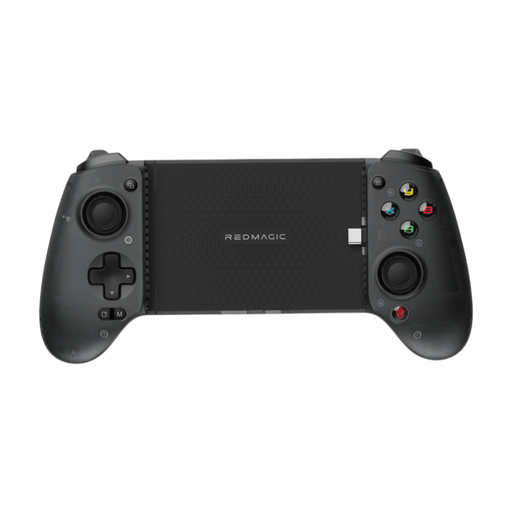
REDMAGIC Shadow Blade Gamepad 2.0, Type-C
For RPG play on a compatible Type-C iPhone or Android phone, its direct connection avoids planning a separate wireless-controller charging routine during play. Confirm that your particular game accepts a controller and whether the phone can charge while the controller occupies its port.
View on Joybuy
Frequently asked questions
Can I charge a controller without using another wall socket?
Yes, if your chosen controller has a suitable USB charging route and your console or PC can supply power to it. Sony documents PS5 USB charging for a compatible controller while the console is on or in rest mode with the relevant setting enabled; Microsoft offers a separate rechargeable Xbox pack that can charge while playing or when the Xbox is in standby.
Does a charging dock always save a plug socket?
No: it depends on how the dock is powered. The 8BitDo Ultimate 2 dock can connect to a Windows PC by USB, while Sony’s DualSense Charging Station package includes an AC adaptor and power cord. Check the dock’s power input as well as the USB ports you can spare.
Will DualSense haptics work in every sci-fi RPG on PC?
No. Sony says DualSense haptic feedback and adaptive triggers depend on game support and may require USB. Check the specific RPG’s feature information and connection requirements if those effects are a reason for choosing the controller.
Do rechargeable AA batteries charge inside an Xbox Wireless Controller?
No. Microsoft says rechargeable AA cells need a separate charging method. Its rechargeable battery pack is a different, optional accessory, so decide which power arrangement you want before choosing batteries or charging equipment.
What should I do with old controller batteries in the UK?
Use an appropriate battery recycling collection point rather than putting them in household rubbish. UK government guidance also says electrical products marked with the crossed-out wheelie-bin symbol should be recycled; check an electrical-waste collection route for an old controller.


