Choose a laptop that runs your screenplay software, then check how it will fit a standing-desk workstation. For prolonged laptop use, the Health and Safety Executive advises raising the screen and using a separate keyboard and mouse. A larger built-in screen gives you more room for a script, while a smaller laptop takes up less desk space; either way, check the exact ports and software requirements before buying.
Who is this for?
Writers at a standing desk
If you draft for long periods while standing, plan for a raised laptop screen and separate input devices. That lets you position the screen without lifting the keyboard with it, as advised by the Health and Safety Executive.
Writers using Final Draft 13
Your operating system and, on Windows, processor choice matter. Final Draft lists macOS 12 or later, or Windows 10 or later with an Intel or AMD processor; it says the application is not supported on Chromebooks or Linux computers.
Writers who move between workspaces
If you carry your laptop between a standing desk and other locations, weigh built-in screen size against the space the computer takes up when carried or placed on a desk. Apple, Lenovo and ASUS list different screen sizes and configurations, so compare the particular model you intend to buy.
What matters when choosing?
For consumers choosing a screenplay-writing laptop for a standing desk, start with the workstation and your writing software. Then decide how much built-in screen space you want when you work away from that desk.
| Concern |
What to check |
Who this matters to |
| Standing-desk setup |
Allow room for a raised laptop screen and separate keyboard and mouse. Check the connections needed for your input devices and any monitor. |
If I write while standing for long sessions, I need the screen and my hands positioned independently rather than relying on the laptop keyboard. Around 50% of consumers put workstation fit first. |
| Software compatibility |
Check your screenplay application and version against the exact operating system and processor. Final Draft 13 specifies macOS 12 or later, or Windows 10 or later with Intel or AMD. |
When my scripts depend on a particular application, being able to run that application comes before choosing a screen size. Roughly 30% of consumers make software compatibility their primary concern. |
| Screen and portability |
Compare the exact display size with the space you have for carrying and positioning the laptop; confirm the ports needed at your desk. |
If I move between workspaces, I want enough room to read a script without carrying a larger machine than I need. About 20% of consumers prioritise that balance of screen space, portability and connectivity. |
Mistakes to avoid
-
Relying on the laptop alone for a standing workstation
A faster laptop does not separate its screen from its built-in keyboard. For prolonged use, the Health and Safety Executive advises a separate keyboard and mouse so you can elevate the laptop screen.
Plan where the riser and input devices will sit, and check the laptop connections required by your desk arrangement.
A riser, keyboard and mouse take additional desk space; your chosen layout may also call for a monitor or dock.
-
Assuming every laptop runs Final Draft 13
Final Draft specifies Windows 10 or later with an Intel or AMD processor, or macOS 12 or later. It says Chromebooks and Linux computers are not supported.
Match the exact laptop operating system and processor to the requirements for the application version you intend to use.
-
Treating a product family as one fixed configuration
Lenovo ThinkPad and ASUS Zenbook configurations vary in display, memory, processor and connections. A feature listed for one configuration need not apply to another.
Check the selected product page for its screen, memory, ports, keyboard, power adaptor and warranty.
Brands to consider for this setup
These product lines illustrate different screen-size and operating-system choices; their specifications depend on the selected configuration.
Apple
MacBook Air is a macOS option for writers considering a 13-inch or 15-inch laptop and connections for a separate display.
- Apple lists a 15.3-inch MacBook Air display option, two Thunderbolt 4/USB-C ports and external-display support.
- If your workflow requires Windows-only software, check that it will work with your chosen macOS setup rather than assuming the platforms are interchangeable.
Lenovo
ThinkPad X1 Carbon Gen 13 Aura Edition is a 14-inch Windows option for writers considering a smaller built-in screen.
- A Lenovo UK configuration lists Windows 11, 16GB memory and a 14-inch 1920 × 1200 anti-glare display.
- Check the screen, processor, memory, keyboard and adaptor on the particular configuration you select.
ASUS
Zenbook models give writers another 14-inch Windows route, with display and wired-connection options that differ by model.
- ASUS lists Zenbook configurations with 16:10 displays and, on selected models, Thunderbolt 4 USB-C connections.
- Processor, display panel, memory and ports vary; check the exact model against your screenplay software and desk equipment.
Joybuy laptop choices
These laptops offer different built-in screen sizes for writing at and away from a standing desk. Choose one only after checking your screenplay software and planning the separate keyboard, mouse and screen position your workstation needs.
 No image available
Lenovo LOQ Essential 15ARP11, Ryzen 7 170, 16GB, 1TB SSD
Consider this model if you want a 15.6-inch built-in screen for writing. Its title lists a 144Hz Full HD display and GeForce RTX 5050; check the operating system and processor requirements of your screenplay software before choosing it.
Plan a riser and separate keyboard and mouse for prolonged use with the screen raised.
Joybuy
 No image available
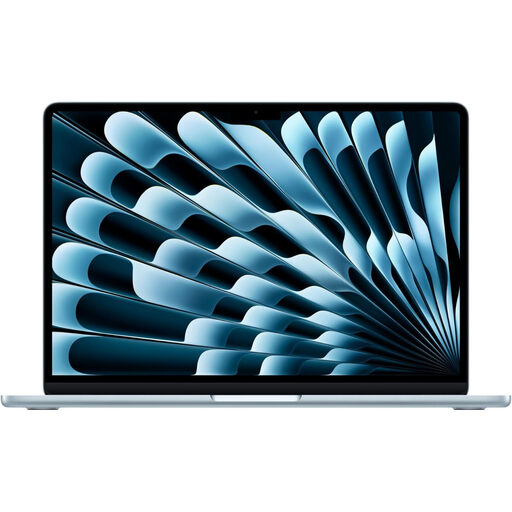
Apple 15-inch MacBook Air M5, 16GB, 1TB SSD, Sky Blue
The 15-inch format suits writers who prefer more built-in screen space when working away from their desk. If you use Final Draft 13, confirm that the installed macOS version meets its macOS 12-or-later requirement.
For prolonged standing-desk sessions, arrange a way to raise the screen and use a separate keyboard and mouse.
Joybuy
 No image available
Apple MacBook Pro 14.2-inch M5 Pro, 24GB, 2TB, Silver
This 14.2-inch model is an option if you want a smaller built-in display than the 15-inch laptops shown here. For Final Draft 13, check the installed macOS version against its macOS 12-or-later requirement.
Check the charging arrangement: this configuration calls for a compatible USB-C power adaptor or USB-PD charger rated at 70W or above. A raised-screen workstation also needs separate input devices.
Joybuy
 No image available
MSI Modern C2RMG-282UK, 15-inch FHD, 16GB, 512GB SSD
The 15-inch screen is worth considering if you want a larger built-in view of your script. The product title identifies an Intel Core 5 processor; confirm the exact operating system and processor configuration against your screenplay software before buying.
Allow space for a riser if you will use the laptop with its screen raised for prolonged sessions.
Joybuy
 No image available
Apple 13-inch MacBook Air M5, 24GB, 1TB SSD, Midnight
Choose the 13-inch format if a smaller laptop footprint matters more to you than the built-in screen space of the larger models shown here. If Final Draft 13 is your writing application, confirm the installed macOS version meets its macOS 12-or-later requirement.
At the standing desk, plan how you will elevate the screen while using a separate keyboard and mouse.
Joybuy
Frequently asked questions
Can I write a screenplay using only a laptop at a standing desk?
For prolonged laptop use, plan on more than the laptop alone. The Health and Safety Executive advises a separate keyboard and mouse so you can raise the screen on a riser or similar support.
Does a larger laptop screen remove the need to raise it?
No. A larger built-in screen gives you more display space, but the screen and keyboard are still attached. For prolonged standing-desk use, raising the laptop screen and using separate input devices remains the relevant setup advice from the Health and Safety Executive.
Can Final Draft 13 run on a Chromebook?
No. Final Draft says Final Draft 13 is not supported on Chromebooks or computers running Linux. It lists macOS 12 or later, or Windows 10 or later with an Intel or AMD processor, as its platform requirements.
Does an employer need to assess a standing-desk laptop workstation?
In the UK, the Health and Safety Executive says employers must carry out a workstation assessment for workers who use display screen equipment daily as part of their normal work and continuously for an hour or more. Whether that condition applies depends on the work arrangement, not on which laptop model you choose.


