Buying priorities
Start with the laptop’s confirmed video-output port, then decide whether charging, extra desk ports and stand adjustment are needed for your setup.
| Priority |
What to check |
Your needs |
| Working space |
Choose screen size and resolution for the desk distance and available space. Check whether the stand can position the display appropriately for regular use. |
I want active work on one screen while documents, calls, research or spreadsheets remain visible on the other. |
| Connection compatibility |
Match the laptop’s confirmed HDMI, DisplayPort, Thunderbolt or USB-C video output to a monitor input. Check the selected input and use a correctly matched cable. |
I need to know whether a direct cable will work or whether a physical connector mismatch calls for an adapter. |
| One-cable charging |
Compare the monitor’s USB-C power-delivery wattage with the laptop’s normal charging requirement. Confirm any cable requirement and whether the laptop supports video over that USB-C port. |
I want fewer cables at a fixed desk, but I do not want to assume that every USB-C monitor can replace my laptop charger. |
| Screen positioning |
Measure desk width and depth. Look for height adjustment or suitable VESA mounting, plus tilt, swivel or pivot where those movements matter. |
For longer sessions, I want the second screen positioned without constant neck twisting or an unsuitable viewing height. |
Joybuy product options
Joybuy monitor options for a laptop-based home office or study desk using one external display.
 No image available
MSI MD272UPSW 27-inch 4K UHD Smart Monitor
For a fixed desk where a compatible laptop is connected regularly and screen position matters.
27-inch 3840 × 2160 IPS display; USB-C with up to 65W power delivery; height, tilt, swivel and pivot adjustment.
Compare 65W with the laptop’s normal charger rating, and confirm USB-C video output support on the laptop and cable.
Joybuy
 No image available
Dell P2425H 24-inch Full HD Monitor
A compact option for document, browser and call multitasking on a smaller home desk.
24-inch 1920 × 1080 IPS display, 100Hz refresh rate, HDMI, DisplayPort, VGA and USB-C; height, tilt and swivel adjustment.
Confirm the exact monitor variant’s USB-C video and charging functions if one-cable use is important. Full HD provides less desktop area than QHD or 4K options.
Joybuy
 No image available
Dahua 32-inch 4K Curved OLED Gaming Monitor
For a permanent laptop desk that needs a large separate workspace and several connection options.
31.5-inch 3840 × 2160 display, Type-C with 65W, HDMI, DisplayPort, USB hub, VESA mounting, and height, tilt and swivel adjustment.
Check desk width and depth for the curved format. Verify laptop USB-C video output and whether 65W meets its charging requirement.
Joybuy
 No image available
Samsung Odyssey G6 S27DG612 27-inch QHD OLED Monitor
For a laptop desk with a confirmed HDMI or DisplayPort route and a need for an adjustable 27-inch second screen.
27-inch QHD OLED display with HDMI 2.1 and DisplayPort 1.4 inputs; height, tilt, swivel and pivot adjustment.
USB-C display input and laptop charging are not confirmed here, so verify the laptop port and required cable before purchase.
Joybuy
 No image available
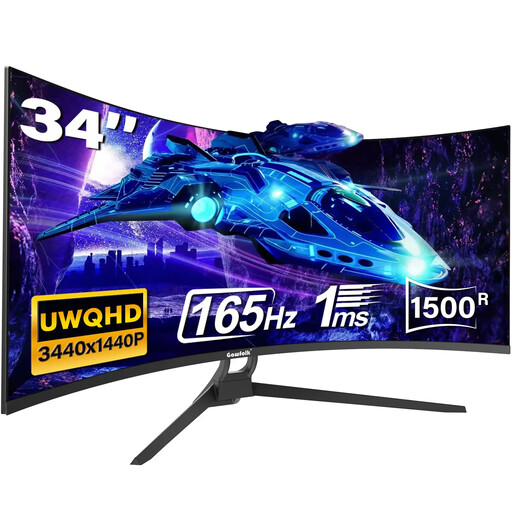
Gawfolk 34-inch UWQHD Curved Gaming Monitor
For wide spreadsheet, document and reference workflows where the desk has room for an ultrawide screen.
34-inch 3440 × 1440 21:9 curved display, HDMI and DisplayPort inputs, and VESA mounting compatibility.
Check desk width and depth first. The included stand adjustment and USB-C display capability need confirmation for this variant.
Joybuy
Frequently asked questions
Will any USB-C port on my laptop work with a USB-C monitor?
No. USB-C is a connector type, not a guarantee of video output or sufficient charging. Check the laptop model’s technical specifications for external-display support on that port, then confirm the monitor’s USB-C video input and stated power-delivery rating. The Video Electronics Standards Association explains that DisplayPort over USB-C uses Alternate Mode.
Can a USB-C monitor replace my laptop charger?
Only when the monitor’s stated power delivery suits the laptop and the connection supports charging. Do not assume this from the presence of USB-C: LG lists up to 15W on the 27U631A-B, Dell lists up to 90W on the P2425HE, and Lenovo states that the T27QD-40 reaches up to 100W only with compatible Lenovo VDM products.
Do I need an adapter if my laptop has HDMI?
Usually not when the monitor also has HDMI; use an appropriate direct HDMI cable. An adapter is for a physical port mismatch, such as a laptop with USB-C video output and a monitor with HDMI or DisplayPort. Identify the available laptop ports before choosing a cable or adapter.
How should I position a second screen for long home-working sessions?
HSE guidance says to keep the top of the screen level with your eyes and place it about an arm’s length away. Keep the screen directly in front of you where possible and avoid twisting your back; measure desk depth and consider a height-adjustable stand or suitable mounting if needed.


