What to consider when buying
Check your laptop’s video output first, then match the screen and connection to your available workspace. Which? covers monitor size and home-office use; Dell explains USB-C video support, while the Health and Safety Executive (HSE) advises considering the workstation as a whole.
| Concern |
What to check when buying |
Who this matters to |
| Usable screen space |
Compare screen dimensions, resolution and available desk width; diagonal size alone does not tell you how much room the setup will take. |
I want documents and applications visible together, but need the screen to fit my desk; around 26% of consumers put usable work area first. |
| Compatible connection |
Check the exact laptop’s video output, monitor input and any required cable or adapter. Confirm USB-C video and charging support separately. |
I want to avoid buying a screen or cable that will not connect as needed; around 26% of consumers put connection compatibility first. |
| Space to store the screen |
Measure the work surface and storage space, then check the screen’s stand, power arrangement and required video cable. |
I need to reclaim a shared or compact surface after work; around 21% of consumers put clearing the workspace first. |
| Screen positioning |
Check the stand’s adjustments and, if you need a mount, the exact monitor’s mounting pattern and your surface. |
I want the screen positioned to suit my regular workstation; around 16% of consumers put screen positioning first. |
| Complete setup requirements |
List the cables, adapters, charging arrangement and positioning accessories required for your chosen setup before comparing total costs. |
I want to avoid buying accessories I do not need or overlooking something essential; around 11% of consumers put the complete setup first. |
Joybuy monitor choices for laptop setups
These Joybuy choices cover fixed and portable external monitors for adding a screen to a laptop setup. Check each model’s stated connections against your laptop and workspace before choosing.
 No image available
BenQ MA270UP 27-inch 4K UHD USB-C Mac monitor
A fixed-screen option for a regular workstation; the product title identifies it as a Mac monitor, so check your laptop’s compatibility before relying on USB-C.
27-inch; 4K UHD; IPS; glossy; USB-C; height-adjustable stand.
Joybuy
 No image available
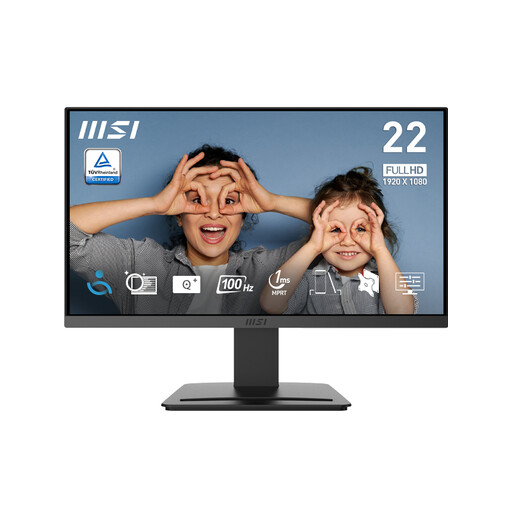
MSI PRO MP223 E2 21.45-inch Full HD office monitor
A compact fixed-screen option; check the monitor’s inputs against your laptop’s supported video output.
21.45-inch; 1920 × 1080; 100Hz; tilt-adjustable; HDMI 1.4b and DisplayPort 1.2a.
Joybuy
 No image available
ASUS ProArt PA278CV IPS WQHD monitor
A fixed-screen option for a regular workstation; check the exact monitor inputs against your laptop’s video output.
IPS; WQHD.
Joybuy
 No image available
Lenovo L32p-30 31.5-inch 4K UHD monitor
A large fixed-screen option for a dedicated desk; confirm your laptop supports the required USB-C video and power functions before relying on that connection.
31.5-inch; 4K UHD; IPS; USB-C.
Joybuy
 No image available
ASUS ZenScreen MB166CR FHD portable monitor
A portable second-screen option for a shared table or a workspace where the display needs to be put away. Check the laptop’s USB-C video support; the product information specifies no HDMI input.
FHD.
Joybuy
Frequently asked questions
Does any USB-C port let my laptop send video to a monitor?
No. Check the exact laptop specifications for a supported USB-C video mode, such as DisplayPort Alt Mode, or a suitable Thunderbolt connection. Dell explains that a USB-C port supporting only data or charging will not provide video through the USB-C monitor connection it describes; check the monitor and cable too.
How should I arrange a monitor for laptop work?
Plan the display alongside the rest of the workstation rather than assuming a monitor alone completes the setup. HSE guidance suggests using a separate keyboard and mouse so a laptop screen can be raised, or using a separate display.
Do UK home workers have to buy an external monitor?
HSE guidance does not establish a blanket requirement to buy one. It says display-screen-equipment regulations do not apply to workers who use display screen equipment only occasionally or for short periods; where the regulations do apply, HSE says an individual workstation assessment should be carried out.
What if an online monitor purchase is unsuitable or faulty?
For applicable UK distance purchases, GOV.UK says a customer generally has 14 days after receiving the item to tell the seller they want to cancel, followed by another 14 days to return it; exceptions and conditions apply. Faulty or misdescribed goods have separate statutory remedies, so check the terms that apply to your purchase.
What energy information should I look for on a monitor listing?
GOV.UK includes electronic displays among products covered by energy-information rules and says products in scope must show an energy label at the point of sale, including online. Check whether the specific display falls within the applicable requirements.


