Households reusing a screen
If you have a spare TV or monitor, a separate player may let you use broadcaster catch-up and subscription apps without replacing the display. Check its input and sound arrangement before choosing a player.


If you already have a working screen with a suitable connection, adding a streaming player avoids buying another display; if the room needs a permanent screen too, consider a smart TV. Check the exact model against the UK services and accessibility features you use, along with the room’s connection, sound and Wi-Fi arrangements. BBC iPlayer, live viewing and subscription accounts also have rules that a second device does not change.
If you have a spare TV or monitor, a separate player may let you use broadcaster catch-up and subscription apps without replacing the display. Check its input and sound arrangement before choosing a player.
A smart TV may suit a bedroom, kitchen, study or guest room that needs its own display. Built-in apps still need checking against the exact TV model and the UK services you watch.
Subtitles, audio description and manageable controls can determine whether a setup is usable. Check the required feature in each app, not just on the device’s feature list.
Start with whether the room needs a display or only a way to stream to one. Then check the services and viewing features that matter to your household.
Choose it when: A working TV or monitor has a suitable input and you want to keep using it.
Allow for: A separate device and a check of the screen’s sound and picture capabilities.
Choose it when: The room needs a permanent display as well as streaming apps.
Allow for: App and feature support that varies by TV platform and model generation, as ITV’s ITVX device guidance illustrates.
| Concern | What to check | Who this matters to |
|---|---|---|
| Apps and viewing features | Check the exact model against each required UK service. If you watch live or regional programmes, check those features separately; ITV says ITVX support varies by device. | If I mainly want broadcaster catch-up in the other room, I need my chosen device to run the services and features I actually use. Around 31% of consumers put that compatibility first. |
| Screen and connection | Check the screen’s available input, sound arrangement and the room’s Wi-Fi. Match any 4K or HDR expectations to the display and content, not just the player. | When I already have a usable screen, I would rather connect a player than replace the whole display. Roughly 31% of consumers make screen reuse and connection their main concern. |
| Accessibility and controls | Check the needed subtitle or audio-description feature in the specific app, and assess whether the remote is manageable. Channel 4 lists audio description on selected platforms, including Roku and tvOS. | If someone in my household relies on audio description or easier navigation, an app icon alone does not tell me whether they can use the service. About 23% of consumers prioritise accessibility and control. |
| Household viewing rules | Check TV Licence coverage for BBC iPlayer or live viewing, and check each subscription’s household and simultaneous-stream terms. | I need the second screen to work alongside viewing elsewhere in the household without assuming another device adds another permitted stream. Around 15% of consumers put viewing rules and account use first. |
ITV distinguishes ITVX support by platform and model, and says some live events or regional content are unavailable on particular devices.
Check the official UK service guidance for the exact TV or player, including live and regional viewing if you need them.
A 4K player cannot make an HD display show a 4K picture; the display and content must support the format too.
Check the existing screen’s input, resolution and HDR capability before using picture-format specifications to choose a player.
Channel 4 lists audio description on selected platforms, so being able to open its app does not establish that a viewer’s required feature is available.
Check the feature on the intended service, platform and programme before settling on a setup.
TV Licensing’s requirements for BBC iPlayer and live viewing still apply, while Netflix sets household and simultaneous-stream conditions through its account terms and plan.
Check licence coverage and the current terms of each service for the way your household intends to watch.
These brands illustrate different device routes; service support still depends on the particular model and app.
A separate streaming-player route for an existing TV. ITV lists Amazon Fire among its ITVX platforms.
A separate player for adding a streaming interface to an existing screen. ITV lists Roku for ITVX.
Apple TV is a separate HDMI streaming-box route. ITV lists Apple TV with tvOS 18 or later for ITVX.
A smart-TV route for a room that needs a display with built-in apps.
These choices cover separate streaming sticks for an existing screen and smart TVs for rooms that also need a display. Match the screen size, connections and exact app support to your room before choosing.
 No image available
Consider this stick if you want to add streaming to an existing screen. It is a 4K model; check that your display has the required connection and supports any picture format you expect to use.
Channel 4 lists Roku as a platform for audio description, but check the feature on the intended app, device and programme.
 No image available
Consider this smart TV if the second room needs its own display and you have space for a 65-inch screen. Its listed features include 4K HDR and Google TV.
Check the required UK broadcaster apps and accessibility features for the exact model, along with its dimensions and placement needs.
 No image available
Consider this smart TV when the room needs a display and a 43-inch screen fits the intended position. Its listed features include 4K HDR and Google TV.
Check exact-model UK app and accessibility support, as well as the space and installation requirements.
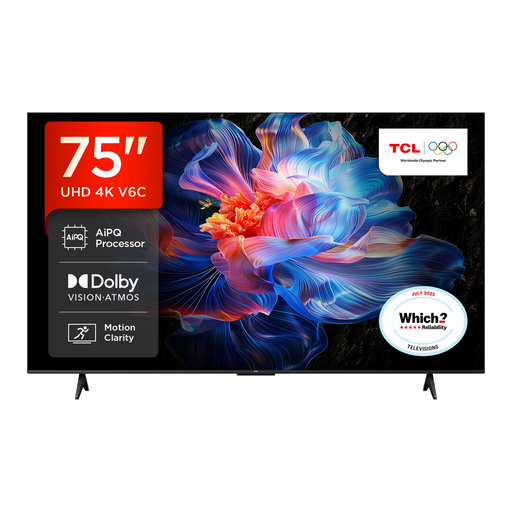 No image available
Consider this smart TV if the additional room needs its own display and can accommodate a 75-inch screen. Its listed features include 4K HDR and Google TV.
Confirm the screen’s dimensions and installation requirements, then check the exact model against your UK apps and accessibility needs.
 No image available
Consider this separate player if you want to keep an existing second-room screen. It is identified as a 4K streaming stick; confirm its connection requirements against your display.
Check the exact device and apps for the broadcaster services and accessibility features your household needs.
Adding a screen does not by itself determine the licence requirement; what you watch matters. TV Licensing says you must be covered by a TV Licence to watch or download BBC iPlayer or watch live TV on any service. It says a licence is not needed solely for on-demand programmes on services other than BBC iPlayer if you do not watch live TV.
No: check the exact device against ITV’s supported-platform and model guidance. A listed platform does not necessarily mean every generation or live and regional feature works on it.
No. The display and content must also support the picture format. Apple, for example, says Apple TV 4K requires a compatible 4K and HDR TV for 4K and HDR streaming.
Choose by the service and platform combination that provides the feature you need, then check the intended programmes. Channel 4 currently lists audio description on its website, mobile apps, Roku and tvOS; app access on another device does not establish audio-description support.
A screen at the main place where you watch Netflix can form part of a Netflix Household. Netflix says sharing outside that household is not permitted, and the number of simultaneous streams depends on the membership plan; check both conditions for your intended use.