Frequent document switcher
If you regularly compare documents or spreadsheets while keeping messages or a call visible, consider whether a second screen can stay on your work surface.


If you regularly need documents, spreadsheets or messages visible together and have room to position a screen, a fixed monitor is a practical option; if you need to move or clear your workspace, consider a portable display instead. Check your laptop’s video outputs, display limits and desk layout before buying. In Great Britain, the Health and Safety Executive (HSE) says an applicable DSE assessment—not a general rule that everyone needs two screens—determines whether equipment is needed, and workers cannot be charged for DSE equipment identified by that assessment.
If you regularly compare documents or spreadsheets while keeping messages or a call visible, consider whether a second screen can stay on your work surface.
If you use a laptop for long sessions but need to clear or share your desk, compare a portable display with raising the laptop screen and using separate input devices.
If you want another display but are unsure which video output your laptop supports, check whether the proposed monitor or dock can extend the display you need.
Decide whether the display will stay on your desk or need to move, then check your laptop’s video output and the space available for the complete setup. If an applicable workstation assessment identifies an equipment need, discuss provision with your employer before buying.
| Concern | What to check when buying | Who this matters to |
|---|---|---|
| Keeping work visible across applications | List the documents and communications you need to see together; check the usable display area against your desk. | If I need to compare files while keeping messages or a call in view, I want an arrangement that suits that workflow. Around 33% of consumers put keeping work visible across applications first. |
| Positioning the screen for prolonged work | Check the stand’s adjustments and whether a compatible mount fits the screen and desk. | When I work at a screen for long stretches, I need to position the display and input devices as part of a workable setup. Around 25% of consumers prioritise positioning for prolonged work. |
| Making the display work with the laptop | Check the exact laptop’s video-capable ports and display limit, plus the monitor input and any adapter or dock requirements. | If I am adding a screen to my laptop, I need confidence that its connections support the setup I want. About 25% of consumers put laptop compatibility first. |
| Keeping or clearing a limited workspace | Measure the usable desk area and compare the full fixed-screen setup with a display that can be moved or put away. | When my desk has to be shared or cleared, I need an arrangement I can move or put away. Around 17% of consumers prioritise a workspace they can clear. |
A USB-C connector’s shape does not confirm that it can send video. Dell specifies that the P2425H’s USB-C downstream port is for data, while portable-display connections depend on the host and monitor specifications.
Match the exact laptop output to the monitor input, and check video and power-delivery functions separately.
Depending on the laptop and monitor, you may need a compatible cable, adapter or dock.
Mounting patterns and supported weights vary between arms. The specifications for one model do not establish what another arm can hold.
Check the screen’s mounting pattern and weight against the specific arm, then confirm that the desk accepts its attachment.
If the screen or desk is incompatible, a different mounting solution may be needed.
An applicable DSE assessment considers the job, equipment, furniture and working conditions together; it may identify an action other than adding a screen.
Review screen placement, laptop input devices and the assessment findings before deciding what equipment to obtain.
Dell’s P2425H and P2425E illustrate how connectivity can differ between fixed monitors.
The ThinkVision M14 is a portable second-screen option for a compatible notebook.
The GW2490E is a fixed-screen example with dimensions and a mounting pattern to check against a desk or arm.
Ergotron’s LX arm is an example of a separate support for repositioning a compatible display or freeing desk space beneath its base.
These Joybuy options include portable displays for a movable laptop setup and fixed monitors for a desk-based workspace.
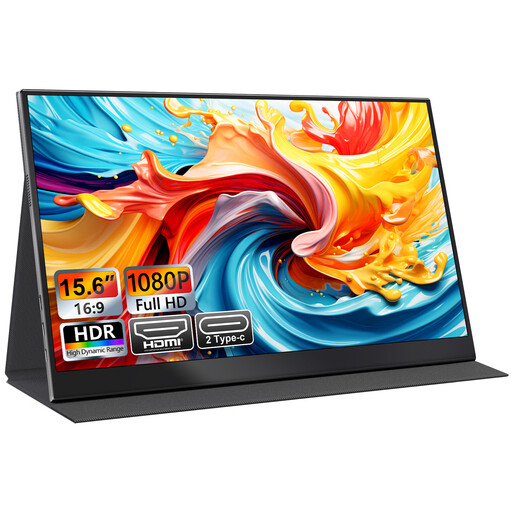 No image available
A portable second screen for a laptop-based workspace that needs to be moved or cleared.
15.6-inch FHD 1080P IPS; USB-C and HDMI; smart-cover stand; VESA mountable.
Check your laptop’s video output and the required connection before buying.
 No image available
A portable display option if you need a second screen that can move with a laptop setup.
The described USB-C video connection uses DisplayPort Alternate Mode, so the host must support it.
 No image available
A fixed-screen option for a desk-based workflow that benefits from a dedicated display.
The product name identifies an IPS WQHD monitor. Check its connections and the space needed for the complete setup.
 No image available
A fixed monitor option for a desk-based workflow involving documents and spreadsheets.
24-inch FHD display.
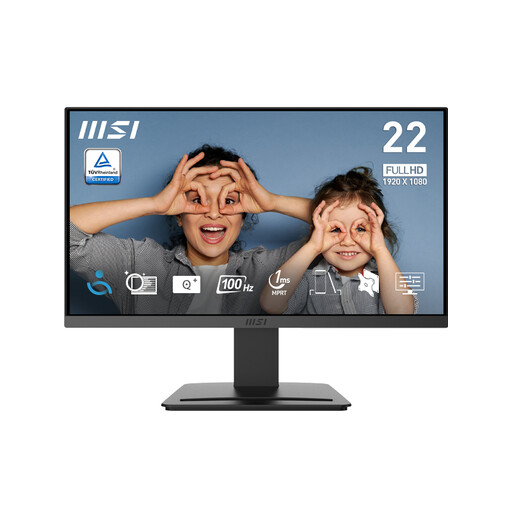 No image available
A fixed-screen option for office tasks where a dedicated desk display suits the available workspace.
21.45-inch Full HD display; 1920 × 1080 resolution; 100 Hz; HDMI 1.4b and DisplayPort 1.2a; tilt-adjustable stand.
The supplied stand does not offer height adjustment.
No; the HSE does not prescribe a second monitor for every home worker. In Great Britain, where the relevant DSE rules apply, the assessment considers the home workstation and identifies whether action is needed. The HSE says a worker cannot be charged for DSE equipment that the assessment indicates is needed. Northern Ireland has separate guidance from the Health and Safety Executive for Northern Ireland.
Treat the laptop, extra display and input devices as one workstation arrangement. HSE positioning guidance advises placing the top of the screen around eye level and about an arm’s length away; for prolonged laptop use, it advises separate keyboard and mouse input so the screen can be raised. Include the complete setup in an applicable workstation assessment.
No. Check whether the exact laptop port supports the video output the monitor needs, and whether the laptop supports the number of displays you intend to use. ASUS distinguishes USB-C DisplayPort Alt Mode from USB video that uses DisplayLink; Apple’s display guidance also sets model-specific limits. A dock does not necessarily increase a laptop’s supported display maximum.
For applicable DSE equipment needs in Great Britain, the HSE says workers cannot be charged for equipment the assessment indicates is needed. Acas advises discussing who will pay other home-working equipment costs with employees and their representatives; that does not make every preferred monitor purchase an assessment-required item.
No. HSE guidance says employers should plan breaks or changes of activity for applicable DSE work and provide an eyesight test when a DSE user requests one. A monitor purchase is not a substitute for those steps.