What to check before buying
For a hybrid-work setup using an existing laptop, decide whether your priority is desk space, compatible display output, easier reconnection, portability or keeping the setup simple.
| Concern |
What to check when buying |
Who this matters to |
| Workspace for documents |
Compare screen size and resolution, then check stand adjustment and whether the layout suits your desk. Dell UK lists the P2425HE as a 23.8-inch Full HD model with an adjustable stand. |
If I work at one desk and want documents and applications to have separate space, I would prioritise the usable display area. Consumers whose main concern is workspace account for about 26%. |
| Laptop and display compatibility |
Check the exact laptop model, video-capable port, operating system, maximum display count and the resolution and refresh rate supported together. A USB-C connector alone does not confirm video support. |
If I need more than one independent screen, I would check the laptop’s limits before choosing an adapter. Consumers who put compatibility and display support first account for about 26%. |
| Reconnection and charging |
Confirm which ports carry video, whether power is delivered or passed through, and whether it meets your laptop’s requirements. Dell UK specifies up to 90 W for the P2425HE; Anker UK specifies up to 85 W for the A8383 after its stated 15 W operating allowance. |
If I move between work locations and want to reconnect my screen and peripherals with fewer separate connections, I would check both video output and laptop charging. Consumers prioritising reconnection account for about 21%. |
| A screen that travels |
Check the actual display size, stand or support arrangement, connection method and any software requirements for your operating system. ASUS UK lists a 15.6-inch Full HD display for the MB16ACV. |
If I need to pack the screen away or take it with my laptop, I would prioritise portability over a permanently installed display. Consumers whose primary concern is a screen they can move account for about 16%. |
| Keeping the setup simple |
Inventory your existing screen, cables and charger before choosing accessories. Check what is included and compare the complete connection setup, not just the device. |
If I already have equipment that may work, I would avoid buying connections or charging accessories I do not need. Consumers focused on reusing equipment and limiting setup needs account for about 11%. |
Joybuy product choices
These Joybuy choices cover fixed and portable external displays, plus a dock for laptop display and peripheral connections.
 No image available
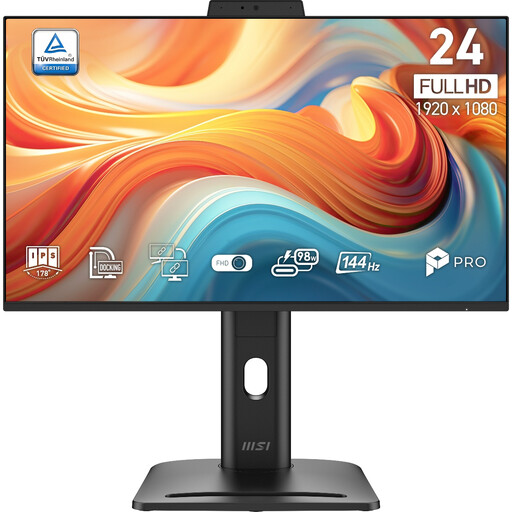
PRO MP245PDG E14 24-inch FHD 144Hz Adaptive-Sync Monitor - Black
A fixed-desk option if you want additional screen space and adjustable positioning.
23.8-inch Full HD IPS display; 1920 × 1080 resolution; 144 Hz; height, swivel and pivot adjustments; HDMI, DisplayPort and VGA inputs.
Joybuy
 No image available
ASUS ZenScreen MB166CR FHD
A portable-screen option if you need a second display that can travel with your laptop.
15.6-inch Full HD IPS display; 780 g; USB-C with DisplayPort Alternate Mode. HDMI is not supported.
Joybuy
 No image available
ASUS ProArt PA24ACRV IPS QHD
A fixed-screen option if you want a QHD display and USB-C video and power connections.
24-inch QHD IPS display; USB-C Power Delivery up to 96 W; height, swivel, tilt and pivot adjustments; HDMI and DisplayPort inputs. USB-C video requires a laptop with DisplayPort Alt Mode.
Joybuy
 No image available
ASUS ZenScreen MB249C IPS USB-C
A movable larger-screen option if you need to reposition a display between workspaces.
23.8-inch Full HD IPS display; USB-C Power Delivery up to 60 W; HDMI input; listed at 2.8 kg. USB-C video requires a device with DP Alt Mode. Listed positioning options include a kickstand, carrying handle, C-clamp arm and partition hook kit.
Joybuy
 No image available
Targus USB-C Universal Dual HDMI 4K Docking Station with 100W Power Delivery Pass-Thru
A dock option if your laptop setup needs HDMI display outputs as well as peripheral connections.
Dual HDMI 2.0 outputs; USB-A, Ethernet and card-reader connections; up to 100 W Power Delivery pass-through. The host connection requires USB-C Alt Mode, and the listed power setup requires an external 100 W or higher adapter.
Joybuy
Frequently asked questions
Why do both screens show the same thing instead of giving me more workspace?
An ordinary display splitter duplicates a signal rather than creating independent desktops, according to Microsoft Support. In Windows, you can select Extend using Windows key + P, but that setting cannot give a splitter capabilities it does not have.
Will a dock automatically let my MacBook use more external displays?
No; Apple Support says the maximum depends on the MacBook Air model and the displays’ resolution and refresh rate, and a supported hub does not increase that limit. Check your exact laptop model before buying a dock.
What should I check before choosing a DisplayLink-based dock for a work Mac?
DisplayLink Manager needs to be installed and granted the required macOS permissions, including Screen Recording, according to DisplayLink Support. If your laptop is managed, check that your organisation permits the software and permissions before choosing this connection route.
Does a pass-through charging hub include everything needed to charge my laptop?
Not necessarily. Anker UK says the A8383 does not include a wall charger and reserves 15 W from its stated maximum 100 W input for hub operation. Check your charger, cable and laptop’s power requirement as part of the complete setup.
What if an online purchase is incompatible and I want to return it?
For the ordinary distance-sale case covered by GOV.UK, tell the seller within 14 days of receiving the item that you want to cancel, then return it within the following 14 days. Check the applicable terms and exceptions; cancellation is distinct from a claim about faulty goods.
Should electrical-product requirements be treated identically in Great Britain and Northern Ireland?
Do not assume that Great Britain guidance alone settles the requirements for Northern Ireland. The Office for Product Safety and Standards’ Great Britain guidance points readers to separate Northern Ireland guidance, so check the rules applicable to the destination and the supplied product.


