
24/7 Customer Support

Free returns

Same-day & Next-day Delivery

Quality Guaranteed

Unlock Your Welcome Offers: FREE Delivery | Up to 80% OFF | Free 30-day JoyPlus trial
Download the APP
A camera can appear affordable until you discover that it needs a paid subscription, struggles with your Wi-Fi, misses movement outside its fixed viewing angle or is unsuitable for the location you planned. Comparing security cameras by resolution alone can therefore lead to an expensive mismatch.
Whether you need an indoor security camera for a nursery, an outdoor security camera for a driveway or an inspection camera for an engine or pipe, focus on how the product works in your actual space. The following guide explains the specifications that matter and highlights suitable options for different users.
A 2K or 4K label describes image detail, but it does not guarantee that a camera will cover the whole room or garden. A fixed camera may leave blind spots, particularly near doorways or along the sides of a property. A PTZ camera (pan, tilt and zoom) can move across a wider area, while a 360° surveillance camera may provide broader room coverage from one mounting point.
Also check whether movement tracking follows people continuously or simply detects motion and sends an alert. These functions are not interchangeable.
Some Wi-Fi CCTV cameras encourage cloud recording, which may involve an ongoing fee after a trial period. A camera with local storage can save recordings to a microSD or TF card, but check the maximum supported capacity and whether the card is included.
For example, the eufy C220 supports a microSD card up to 128GB, while the ZOSI C518 supports a card up to 256GB, although the card is not included. Continuous recording can fill storage quickly, so event recording, overwrite settings and notification controls are also worth checking.
An outdoor security camera still needs careful installation. Look for an IP rating, protect power connections from rain and follow the supplied mounting instructions. IP65 indicates protection against dust and water jets, but it does not mean the camera or adaptor should be immersed or left exposed to every weather condition.
For rented homes, drilling can also be a problem. A window-mounted design or removable adhesive fixing may be more practical than a permanent bracket.
Resolution is useful when viewing faces, packages or vehicle details, but lens position and lighting affect the result. Check:
For an indoor camera used as a baby monitor camera or pet camera, a stable live view and clear two-way audio may matter more than the highest resolution.
Human detection can help separate people from general movement, reducing unnecessary notifications caused by curtains or pets. Some models also identify animals or vehicles. Motion tracking and auto-panning can keep a moving subject in view, but a moving lens may not record every angle simultaneously.
Look for adjustable detection zones, activity schedules and privacy masking. A privacy mode that physically turns the lens away can be preferable in bedrooms or shared areas. If recording people beyond your private domestic use, consider UK data protection and privacy requirements, including guidance from the Information Commissioner’s Office.
Most home security cameras use mains power, so check cable length, socket position and whether installation requires drilling. Dual-band Wi-Fi may help compatible devices connect through less congested 5GHz networks, while 2.4GHz generally offers longer range through walls. Neither option removes the need for a dependable router signal.
For specialist work, a borescope camera is different from a Wi-Fi CCTV camera. It normally has a built-in screen and battery, records to a TF card and does not rely on home internet access. Probe diameter, articulation range, cable length and minimum access-hole size are the specifications to prioritise.
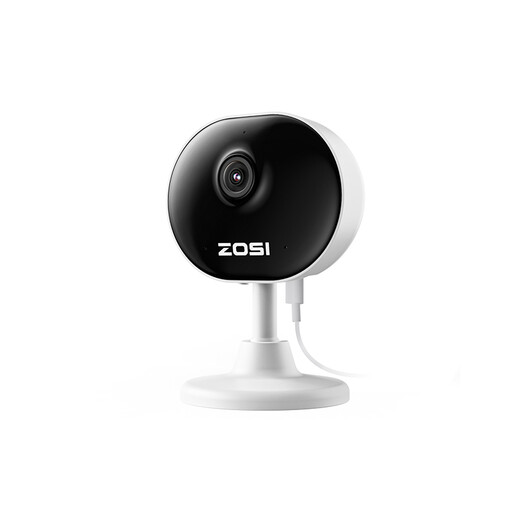
Why This Fits Their Persona: A compact option for renters, students, small offices or anyone starting with indoor monitoring without installing a larger system.
The specification lists 1080p video, 33ft night vision, motion and human detection and 24/7 recording with mains power. It also supports app viewing and two-way audio.
85g mini design; magnetic base or 3M tape mounting; adjustable viewing angle and mobile access.
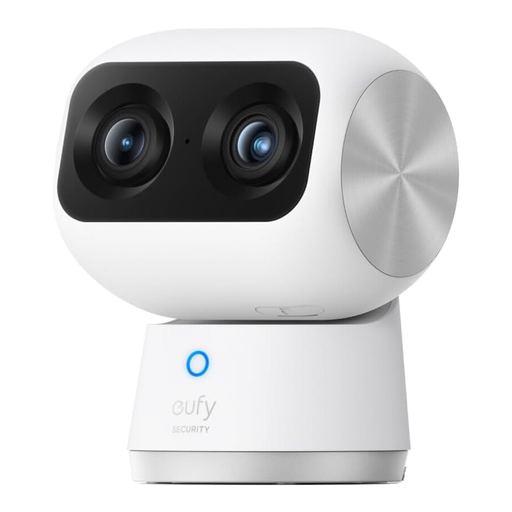
Why This Fits Their Persona: Suited to households wanting detailed indoor footage for family rooms, pets or baby monitoring, with zoom and broad pan-and-tilt movement.
Its listed dual-camera system combines a 4K wide-angle lens with a 2K telephoto lens, rather than relying only on digital enlargement. It also specifies 355° pan and tilt, human and pet AI and tracking.
Up to 8× hybrid zoom; infrared night vision listed to 40 feet; dual-band Wi-Fi 6 connectivity.
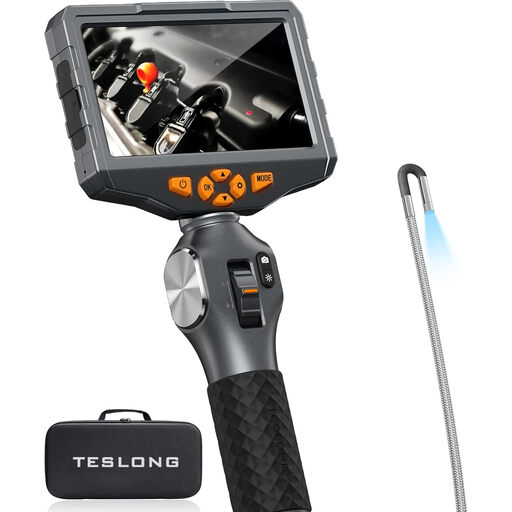
Why This Fits Their Persona: A practical choice for mechanics, engineers, DIY users and maintenance teams inspecting engines, pipes, dashboards or other confined spaces.
It is a standalone inspection system, so it does not depend on Wi-Fi or a cloud plan. The 3.9mm probe requires an access hole of at least 4.5mm and articulates through 210°.
5-inch IPS display; 1920×1080 photo and video specification; 3,000mAh battery and included 32GB TF card.
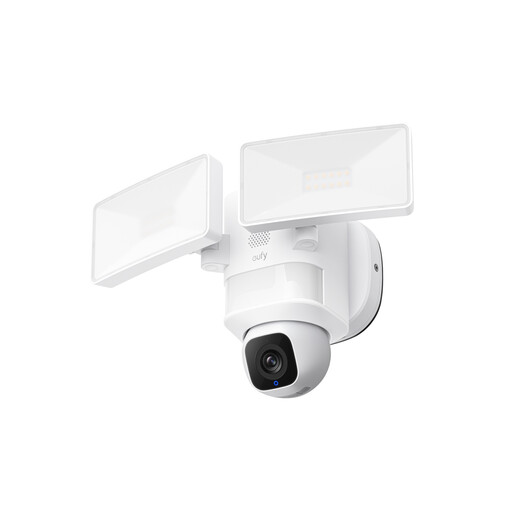
Why This Fits Their Persona: Designed for homeowners monitoring driveways, entrances, gardens or other outdoor areas where lighting and wide coverage are important.
The product specification identifies IP65 weather resistance, hardwired power for 24/7 recording, 2K video and AI detection with auto-tracking. Power connections still need weather-protected installation.
2,000-lumen motion-activated floodlights; 360° coverage; full-colour visibility in low light.
We have compiled a complete, real-time list of products that fully satisfy these strict selection criteria and UK safety regulations.
Most mains-powered indoor cameras use relatively little electricity, but continuous recording, floodlights and pan-and-tilt movement can increase consumption. Battery models avoid permanent cabling but require charging, and an outdoor floodlight camera may use more power when its light activates frequently.
Lifespan depends on heat, moisture, installation quality, power stability and software support. Indoor models should be kept away from damp areas, while outdoor cameras need suitable weather protection. Cleaning lenses, updating firmware and avoiding damaged cables can help maintain reliable operation.
No. A borescope or automotive inspection camera is designed to view confined spaces through a narrow probe. It usually has a built-in display and local recording, whereas a home security camera is intended for monitoring rooms or property, often through an app and Wi-Fi connection. Choose according to the job rather than treating the two product types as interchangeable.