Fixed server-console users
If your keyboard stays at a workstation, dock or keyboard, video and mouse (KVM) switch, a direct connection avoids charging and pairing. Check the available USB port and whether you regularly need a number pad.


If mains sockets are scarce at a server-log desk, start by considering a wired USB keyboard: the models discussed here connect to a host USB port rather than a separate mains outlet. Choose full-size if you regularly use a dedicated number pad, or tenkeyless (TKL) if desk width matters more. A compact wireless keyboard suits a mobile setup only if you can manage charging and confirm that the workstation or console supports its connection method.
If your keyboard stays at a workstation, dock or keyboard, video and mouse (KVM) switch, a direct connection avoids charging and pairing. Check the available USB port and whether you regularly need a number pad.
If logs share desk space with a mouse, notebook or laptop, a TKL keyboard removes the dedicated number pad while keeping the main typing area. That trade-off works only if numeric entry is not central to your work.
If you move a keyboard between devices, a compact wireless model may reduce permanent cabling. You still need to check connection compatibility and make time to charge it.
A shortage of mains outlets does not, by itself, call for wireless: decide whether the keyboard will stay at one console, then weigh number-pad use against desk space and connection upkeep.
Choose when: The keyboard stays at a fixed desk and regular number entry makes a dedicated keypad useful.
Trade-off: It takes more desk width than TKL and occupies a host USB port.
Choose when: You want a wired main typing area but need more room beside the keyboard.
Trade-off: TKL has no dedicated number pad; adding a separate one may take another USB port.
Choose when: Moving between devices or reducing permanent cabling matters more than a direct wired connection.
Trade-off: Charging and a supported Bluetooth or receiver connection become part of the setup.
| Concern | What to check | Who this matters to |
|---|---|---|
| Direct connection | Match the keyboard connection to an available USB-A or USB-C port along the workstation, dock or KVM path. | If my keyboard stays at a fixed console, I want to start reading logs without managing charging or pairing; roughly 29% of consumers put that direct-connection need first. |
| Layout and host fit | Confirm the exact UK layout and model-specific host compatibility, including any software needed for optional keys or remapping. | When I enter commands and symbols, familiar key placement and dependable basic input matter most; around 29% of consumers prioritise that layout-and-host fit. |
| Desk space | Check the selected layout’s number pad, navigation and function keys against the keys you actually use. | I need room beside the keyboard but still want the keys I use to inspect logs; approximately 24% of consumers place that space-and-key balance first. |
| Long-session use | Consider key type, tilt adjustment and stated noise or spill-resistance features for the exact model. | During extended reviews, key feel and disruption at a shared desk matter more to me; roughly 18% of consumers make those day-to-day typing needs their priority. |
A directly connected wired keyboard uses a compatible host USB port, not a separate mains socket. Wireless instead adds charging and a connection method the console must support.
Count usable ports along your workstation, dock or KVM path before deciding which connection is easier to maintain.
UK and US International QWERTY versions can be separate products. Dell, for example, lists both variants of the KB525C.
Check the named layout and manufacturer part number rather than relying on the keyboard photograph.
TKL removes the dedicated number pad. That can be inconvenient if your log-review work involves frequent numeric filters, addresses or command entry.
Decide how often you use those keys before choosing the smaller layout.
A separate number pad also needs desk space and may use another USB port.
Dell states that support for its Microsoft Teams touch controls ended on 30 June 2026, so those controls should not be the reason for choosing the KB525C now.
Assess its keyboard layout and connections separately, and check any collaboration controls against the software you intend to use.
The wired, full-size K120 and compact wireless MX Keys Mini illustrate different connection and desk-space choices within Logitech’s range.
Dell lists UK QWERTY wired models including the USB-A KB216 and the KB525C, which lists USB-A and USB-C host connections.
The wired C3 Pro 8K offers a TKL layout for desks where retaining a dedicated number pad is less important.
These choices span wired desk setups, a keyboard with wired and wireless modes, and a Bluetooth option. Match each model’s layout and connection to the ports and input methods available at your server-log workstation.
 No image available
Consider this wired set for a fixed desk where you use a dedicated number pad. The listed keyboard has a UK full-size layout, USB-A connection and low-profile keys; the included mouse also uses USB-A, so check that you have enough compatible ports if you plan to use both. Confirm suitability for your operating system and KVM or console path.
 No image available
Consider its stated wired USB mode if you want a 96% layout that retains a number pad, with wireless modes available for a different setup. The listing describes Bluetooth and 2.4 GHz wireless alongside wired USB. Confirm the wired connector and compatibility with your console or KVM; wireless use also requires battery management.
 No image available
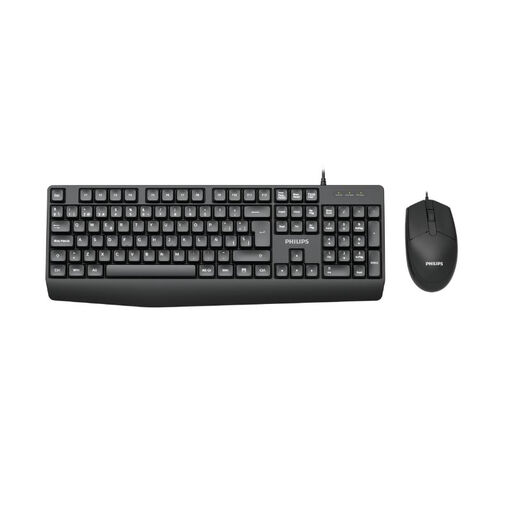
This wired USB set is an option when you need both a keyboard and a mouse at a fixed workstation. Before choosing it for log inspection, check its keyboard layout, whether it has a number pad, the connector type and how many host ports the set requires. Confirm compatibility with your console or KVM.
 No image available
Consider this wired 65% UK ISO keyboard if desk width matters and you can work without a dedicated number pad. Its listing describes arrow and navigation keys and dual USB-C connectivity. It specifies Windows 10/11 compatibility; check your actual operating system and console or KVM setup before relying on it there.
 No image available
Consider this wireless option if you want a UK full-size layout and number pad without keeping a keyboard cable connected. The listing describes Bluetooth pairing with up to three devices and USB-C charging. Confirm Bluetooth support along your workstation or console path, and do not assume the charging connection also works as a wired keyboard connection.
The wired USB models discussed here connect through a host USB port rather than a separate mains outlet. Logitech describes the K120 as USB plug-and-play, for example. You still need an available, compatible port on the workstation, dock or KVM.
Choose the layout you habitually use, then check the exact product variant before ordering. Dell lists separate UK and US International QWERTY versions of the KB525C; a product photograph alone may not establish which one is offered.
Check compatibility for the exact keyboard and your host setup. Dell lists Red Hat Enterprise Linux 8 among the KB525C’s compatible systems, while Keychron describes Linux support for its C3 Pro 8K browser-based Launcher configuration. Launcher support is not a substitute for checking basic input through your particular workstation, KVM and security setup.
For a product supplied in Great Britain, check which marking and documentation apply to that product. Department for Business and Trade guidance says Great Britain continues to recognise CE marking alongside or instead of UKCA marking where the applicable product regulations permit it. That guidance does not establish whether a particular listing complies, and Northern Ireland follows different processes.