Quiet shared-desk reviewers
If you type comments and corrections next to someone else, unobtrusive key noise may matter more to you than pronounced mechanical feedback.


For report review beside another person, start with a keyboard whose typing sound and key layout suit the shared desk. RTINGS describes scissor and rubber-dome membrane switches as generally among the quieter options; choose a mechanical keyboard for its distinct feel only after checking the exact switch variant and sound. Balance a compact footprint against the editing keys you use, and position the keyboard as part of the whole workstation rather than treating an ergonomic shape as a complete fix.
If you type comments and corrections next to someone else, unobtrusive key noise may matter more to you than pronounced mechanical feedback.
If you review reports for extended periods, check that the navigation keys fit your editing routine and that the keyboard can sit comfortably within your workstation setup. The Health and Safety Executive advises considering keyboard and screen position together.
If you move between desks or work across a computer, laptop and tablet, a smaller keyboard or device switching may be useful—provided the layout retains the keys you regularly need.
Decide how much typing noise your neighbour can tolerate, then check your editing keys and available desk space. Finish by confirming the exact physical layout, connections and workstation position.
| Concern | What to check | Who this matters to |
|---|---|---|
| Typing noise | Look for an explicit quiet-key description; for mechanical models, check the precise switch variant and sound. | If I am adding comments beside a colleague, I want my typing to draw as little attention as practical. Around 29% of consumers put unobtrusive typing first. |
| Editing keys | Inspect the exact position of arrows, Home, End, Delete and function keys; decide whether you need a number pad. | When I move repeatedly through a long draft, I do not want essential shortcuts buried in unfamiliar key combinations. Roughly 23% of consumers make editing-key access their primary concern. |
| Desk space | Check the keyboard's dimensions against the space left for your mouse and documents, and inspect what a compact layout omits. | If the workstation is crowded or I pack my keyboard away, a smaller footprint matters more than a number pad. About 18% of consumers prioritise desk space or portability. |
| Extended-use comfort | Check keyboard height and placement alongside the chair, screen and mouse; assess whether a shaped layout feels workable for you. | For a lengthy review session, I need a setup I can position comfortably, not just a keyboard marketed as ergonomic. Around 18% of consumers put sustained-use comfort first. |
| Device and UK layout fit | Confirm the exact SKU's physical key layout, operating-system support and connection methods. | If I switch devices or rely on familiar UK punctuation keys, the wrong connection or physical layout interrupts my work. Roughly 12% of consumers place compatibility and layout first. |
Low-profile describes the keyboard's height, not the sound of every switch variant. Logitech, for example, offers MX Mechanical with Tactile Quiet, Clicky and Linear switches.
For close shared seating, check the exact switch option and seek a useful sound demonstration or independent test where available. RTINGS describes scissor and rubber-dome membrane switches as generally among the quieter types.
Enter, left Shift and symbol-key positions can differ between ANSI and the UK-ISO arrangement, making familiar punctuation and shortcuts less convenient.
Inspect photographs of the exact variant and confirm its physical layout rather than relying on a keyboard family name or a general UK listing title.
Keyboard shape alone does not determine screen, chair or mouse position. The Health and Safety Executive advises keeping the keyboard just below elbow height and central with the screen.
Adjust the workstation together. For prolonged laptop work, the Health and Safety Executive advises a separate keyboard and mouse so the screen can be raised.
Its UK range includes full-size and compact low-profile keyboards, mechanical switch variants, and shaped or split layouts.
Keychron UK presents low-profile mechanical options in different sizes, including the K1 Max UK-ISO TKL and the smaller K3 Max 75% layout.
Rapoo positions its E9350L as a low-profile, multi-device office keyboard with scissor keys.
These keyboards offer full-size, split-layout and compact options for report review. Match each one to your editing keys, available space and shared-desk noise requirements; check the exact physical layout before ordering.
 No image available
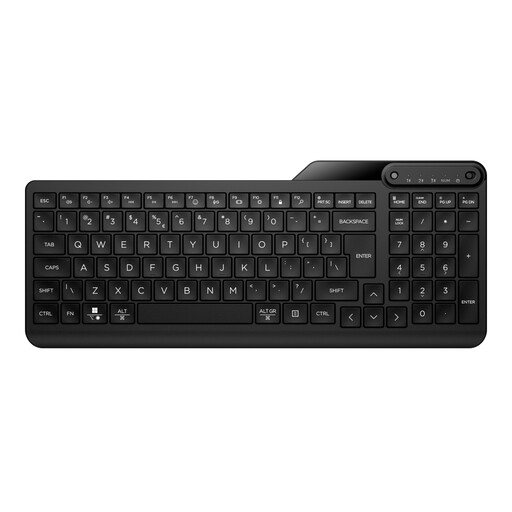
Consider this for a fixed report-review desk if you want a full-size arrangement rather than a compact one.
It is a wireless, UK-labelled variant. Confirm the physical key layout and typing sound if either is important at your shared desk.
 No image available
Consider this if changing between devices is part of your report-review routine.
Check the exact key arrangement, dimensions and physical UK layout against your desk and editing habits; assess typing sound if a colleague sits nearby.
 No image available
Consider the split layout if you want to assess a different hand position during longer editing sessions and can allow time to get used to it.
Check the exact physical layout and compatibility with your computer. A padded wrist rest does not replace suitable chair, screen, keyboard and mouse positioning.
 No image available
Consider this for wireless text entry if its exact key arrangement fits the shortcuts you use when reviewing reports.
The title identifies a Bluetooth, UK-labelled variant. Inspect the physical layout and establish the switch type and typing sound before choosing it for a noise-sensitive desk.
 No image available
Consider this compact option if desk space matters and a QWERTY US layout works for your editing routine; it is not a substitute for a required UK physical layout.
The product title specifies 78 keys, 2.4 GHz and Bluetooth 5.0/4.0 connections, and support for four devices. Inspect the positions of the navigation and symbol keys before buying.
A scissor or rubber-dome membrane keyboard is a sensible starting point: RTINGS describes these switch types as generally among the quieter options. Sound still varies by keyboard, so check the exact model; if you prefer mechanical feedback, identify the switch variant rather than assuming a low-profile model is quiet.
Choose a compact keyboard when room on the shared desk or carrying it between desks matters more than dedicated keys. If you regularly use a number pad or particular navigation and function keys, inspect the exact compact layout before giving up a larger arrangement.
Position the keyboard as part of the full workstation, with the screen central and the keyboard just below elbow height. For prolonged laptop use, the Health and Safety Executive advises a separate keyboard and mouse so the laptop screen can be elevated.
A UK-labelled listing does not tell you every key position on the exact variant. Logitech's layout guidance identifies the tall, L-shaped Enter key and shorter left Shift as ISO features; inspect photographs and the specific SKU if those keys and UK symbol positions matter to your work.