What matters when choosing?
For timetable comparison at a shared desk, decide whether the laptop screen must carry the whole task or whether a desk monitor will provide the extra viewing space. Then check the connections and configuration needed for that setup.
| Concern |
What to check |
Who this matters to |
| Built-in viewing space |
Compare screen size, resolution and aspect ratio on the exact configuration. ASUS United Kingdom lists a 16.0-inch, 1920 × 1200, 16:10 display for Vivobook S16 S3607 variants. |
If I need a timetable beside a map or spreadsheet without another screen, I would put built-in viewing space first. Around 40% of consumers place that need above the other desk-setup concerns here. |
| Monitor and accessory connections |
Match the laptop’s display-output ports and charging method to the intended monitor, cable or dock; a USB-C connector alone does not establish what it can do. |
When I can use a desk monitor, I need the laptop to connect to it and my other accessories. Roughly 30% of consumers prioritise that desk-expansion need. |
| Shared-desk footprint |
Check the space available for the open laptop and any peripherals. If calls are part of the setup, check privacy controls on the exact variant. |
At a crowded desk, I would favour a laptop I can position without displacing other equipment, while keeping any call controls practical. Around 20% of consumers put shared-desk fit first. |
| Software and box contents |
Confirm required applications, VPNs and browser extensions work with the operating system; check the keyboard option and whether a compatible charger is supplied. |
If I move between desks or rely on workplace software, an unsuitable system or missing charging equipment could prevent me using the laptop as planned. About 10% of consumers make configuration certainty their primary concern. |
Joybuy laptop choices
These laptops offer different ways to work at a shared desk: larger built-in screens for viewing timetables on the laptop, and a compact 14-inch option for consumers considering a monitor. Check each configuration against your software and desk equipment rather than treating screen size alone as the decision.
 No image available
ASUS ProArt P16 H7606WW-SE006W, 16-inch OLED touchscreen
Consider this configuration if you plan to compare timetables on the laptop screen and have room for a 16-inch device at the shared desk.
The product name specifies a 4K OLED touchscreen, AMD Ryzen AI 9 HX 370, NVIDIA GeForce RTX 5080 16GB, 64GB RAM, a 2TB SSD and Windows 11 Home. Check the exact listing’s box contents if you need a supplied power adapter.
View on Joybuy
 No image available
HP OmniBook X Flip 16-as0004na, 16-inch 2-in-1 touchscreen
This is a larger-screen Windows option for comparing timetable pages on the laptop itself. If you also intend to connect a desk monitor, check this configuration’s ports against that monitor or dock.
The product name specifies an Intel Core Ultra 5 226V, 16GB RAM, a 512GB SSD and Windows 11 Home. Confirm the exact display specification before ordering.
View on Joybuy
 No image available
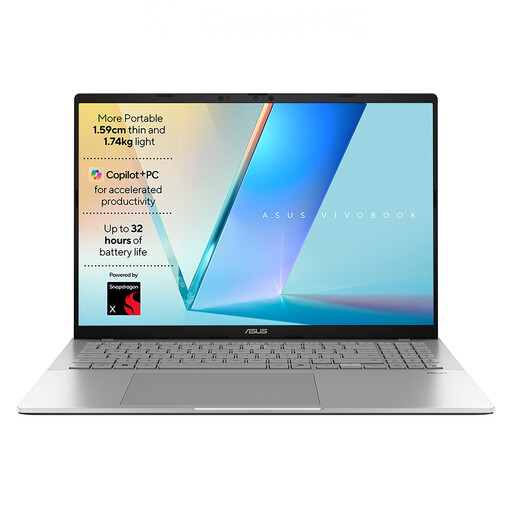
ASUS Vivobook S3607QA-PL004W, 16-inch WUXGA
A 16-inch built-in screen makes this configuration relevant if you want timetable pages visible on the laptop, provided its footprint fits the shared desk.
The product name specifies a 1920 × 1200 display, Qualcomm Snapdragon X1-26-100, 16GB memory, a 512GB SSD and Windows 11 Home. Check the exact ports and display-output support before planning a monitor connection; do not assume that every S3607 variant has the same screen or connections.
View on Joybuy
 No image available
Apple 15-inch MacBook Air, M5, 16GB, 1TB, Silver
Consider the 15-inch MacBook Air if you want a larger built-in screen and have confirmed that your timetable services and required workplace tools work with macOS.
The product name specifies an M5 chip with a 10-core CPU and 10-core GPU, 16GB memory and a 1TB SSD. Apple UK describes external-display support for its MacBook Air range; check the connections needed for your desk and the exact listing’s box contents.
View on Joybuy
 No image available
Acer Chromebook Plus 514 CB514-5H, 14-inch WUXGA
This compact option merits a look if desk space is limited, particularly when you can use an external screen. Confirm that every required timetable service, extension and workplace tool works with ChromeOS before choosing it.
The product name specifies a 1920 × 1200 display, Intel Core i3-1315U, 8GB RAM and a 256GB SSD. Traditional Windows and macOS desktop-native applications are not compatible with ChromeOS.
View on Joybuy
Frequently asked questions
Should I choose a 14-inch or 16-inch laptop for comparing timetables?
Choose a 16-inch laptop if the built-in screen must show several timetable views and the shared desk has room for it; consider 14 inches if compactness matters more and you can use a compatible monitor. Check resolution and aspect ratio as well as diagonal size: ASUS United Kingdom lists a 16.0-inch, 1920 × 1200 display for Vivobook S16 S3607 variants, while the cited HP Store UK ProBook 440 G11 configuration has a 14-inch, 1920 × 1200 display.
Will any USB-C laptop connect to my desk monitor?
No: check the exact laptop port, monitor, cable and any dock before relying on a USB-C connection for video. ASUS United Kingdom specifies display-output support on USB-C ports for listed S3607 variants, and Apple describes external-display support for its MacBook Air range; the connector’s shape alone does not establish those capabilities for another configuration.
Will a charger come with the laptop?
Check the box contents of the exact configuration you are ordering rather than assuming a charger is included. The cited HP Store UK ProBook 440 G11 listing says a charger is not included, and Apple’s UK MacBook Air purchase page says it does not include a power adapter; another retailer’s listing needs its own check.
What should I do with an old laptop?
Use an appropriate electrical-equipment collection or reuse route rather than putting an old laptop in a household bin. Coventry City Council’s electrical-waste guidance describes household recycling and reuse centres; check your local collection arrangements and whether working equipment is accepted for donation.


