What matters when choosing?
Start with the area you actually need to see. That determines whether a doorbell position works, whether a separate camera is warranted, or whether video is necessary at all.
Video doorbell
Choose it when: Seeing or speaking to callers at the threshold is the main task.
Bear in mind: A doorway mounting position can still include a shared path or pavement in the image.
Outdoor camera
Choose it when: A set-back entrance, driveway or approach needs a viewpoint the doorbell position cannot provide.
Bear in mind: Mounting for a wider approach may also bring neighbouring or shared space into view.
No camera
Choose it when: A visitor notification or entry-control measure meets your need without video.
Bear in mind: You will not have footage or a remote live view to check.
| Concern |
What to check |
Who this matters to |
| Unnecessary capture |
Plan the mounting angle and image boundary. If an area must be excluded, confirm a true privacy mask for the exact model rather than relying on an alert zone. |
If my door faces a shared path, I want a useful doorway view without monitoring neighbouring space. About 33% of consumers put limiting unnecessary capture first. |
| Doorstep coverage |
Compare doorway framing, mounting height and the area visible below the doorbell; consider a separate camera only if the required approach cannot be seen from that position. |
When I need to answer callers or check a parcel at the threshold, I care about that immediate view more than a broad driveway image. Roughly 27% of consumers make doorstep coverage their primary concern. |
| Recording choices |
Confirm the model's card or hub compatibility, recording mode, retention controls and any cloud-plan requirement. |
I want to retrieve recordings without choosing a storage arrangement I cannot maintain. Around 20% of consumers put recording location and upkeep first. |
| Remote-access security |
Check the stated security-update period and available account protections; plan to use a unique password and updates. |
If I view my entrance remotely, protecting access to its live feed and recordings is my main requirement. About 20% of consumers prioritise remote-access security. |
Joybuy video doorbells for entrance monitoring
These video doorbells address caller and doorstep monitoring, with different power, framing and recording considerations. Choose the mounting position and required privacy controls for your entrance before comparing them.
 Image unavailable
TP-Link Tapo D230S1 battery video doorbell
Consider this doorbell if you need to frame callers at the threshold while excluding part of a shared-space view. The Joybuy product description identifies a 2K 5MP model with a chime, and TP-Link's D230S1 guidance covers a Privacy Zones setting. Check the final mounting angle as well as the setting; battery runtime will vary with activity.
View on Joybuy
 Image unavailable
eufy Security Video Doorbell C31, 2K FHD, battery or hardwired
This C31 suits a doorway where choosing between battery and hardwired installation matters. Its product description specifies 24/7 recording for hardwired use, not as a battery-mode promise. eufy documents microSD or HomeBase recording for C31/C30; confirm the storage arrangement and any privacy-masking function needed for your installation.
View on Joybuy
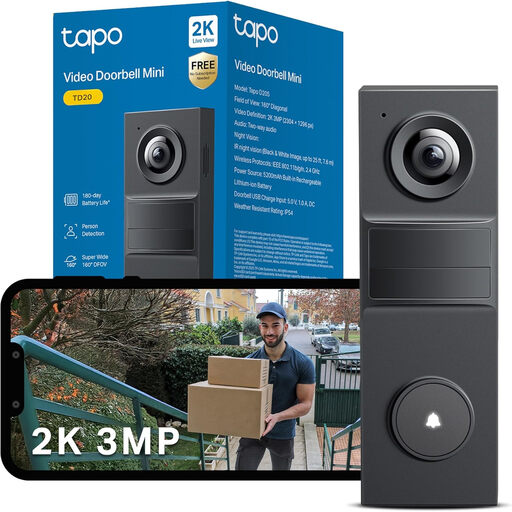 Image unavailable
Tapo TD20 3MP HD video doorbell with night vision
Consider the TD20 for visitor monitoring at the door, but establish its installation requirements before ordering: the supplied power details conflict. Check whether its available zones mask the image or merely control alerts, and confirm the security-update period for the device.
View on Joybuy
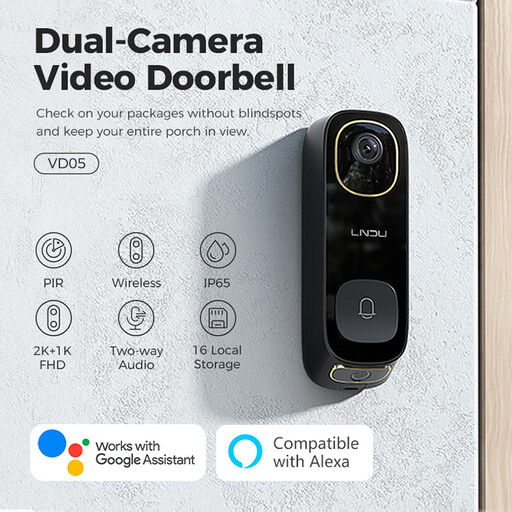 Image unavailable
LNDU VD05 2K HD dual-PIR video doorbell with monitor
The VD05 is a doorstep option to assess if the stated monitor and doorbell arrangement meets your visitor-checking needs. Its weather-resistance information differs between the product title and description, so confirm the applicable rating before outdoor installation. Also check its local-storage requirements and whether it can mask any shared area in view.
View on Joybuy
 Image unavailable
BOTSLAB R810 5MP video doorbell with 32GB SD card
This R810 is worth comparing if local recording at the doorway is a priority; its product name specifies a 32GB SD card. If you need to check a live view while away, confirm that function before buying rather than inferring it from Wi-Fi or app alerts. Check the installed view and any privacy-masking controls separately.
View on Joybuy
Common questions
Does UK data-protection law apply to a camera at my front door?
The Information Commissioner's Office says it applies when home CCTV captures another person's property, a public area or communal space. Position the camera to capture only your own property where possible. The ICO states that its domestic-CCTV guidance is under review following changes made by the Data (Use and Access) Act, so check its current guidance when planning installation.
Will an activity zone stop a shared path appearing in recordings?
Not necessarily: an activity or detection zone may control notifications rather than hide the area. Google Nest describes Activity Zones as notification controls, while TP-Link describes its supported Privacy Zones as areas that cannot be viewed or monitored. Check the exact model's function and physically aim the camera to limit its view.
Should I leave audio recording on at a shared entrance?
Do not assume that speaking to a visitor requires routine recording of other conversations. The Information Commissioner's Office says CCTV audio facilities should not normally record conversations between members of the public because that is highly intrusive and unlikely to be justified without robust supporting evidence.
How do I protect remote access to a doorbell camera?
Use a strong unique password, enable two-factor authentication and automatic updates where offered, and keep the device and app updated. The National Cyber Security Centre also advises considering whether remote viewing is needed, while noting that turning it off may affect movement alerts or smart-home functions.
Does local recording remove the need for a cloud plan?
A supported local-recording option can let you record without a cloud-recording subscription, but check what the exact model needs. TP-Link says compatible microSD capacity varies by camera and hardware version; eufy describes card or HomeBase recording arrangements for its C31/C30 doorbells. Confirm the required storage device and how you will access recordings before choosing.


