Choose the account setup before comparing tablet specifications: an Android tablet may offer separate device users, an iPad uses individual Apple Accounts and Family Sharing, and a Fire tablet offers child profiles through Amazon Kids. Check those arrangements on the exact device, then weigh its screen, storage, battery specification and protection options against your household’s usual activities; sharing a tablet does not automatically make it a laptop substitute.
Who is a shared tablet for?
Households needing separate everyday spaces
If adults or older children regularly use their own apps, messages and settings, account separation matters more than it does for occasional shared viewing. Google describes separate Android user profiles on devices that support them; Apple advises using individual Apple Accounts for family members.
Families supervising younger children
When children use the tablet for games, video or browsing, adults may need age-appropriate accounts and controls for content, time and purchases. UK government guidance recommends setting controls to the appropriate level and checking that they work.
Casual shared-screen households
For entertainment, video calls, simple games and light tasks, compare the exact tablet’s display, storage, battery specification and size. Apple’s iPad comparison illustrates how specifications vary even within one range; check the particular model rather than relying on its operating-system name.
What matters when choosing?
Android tablets
Consider when: Regular users need their own device spaces and the exact tablet can add separate users.
Check: Google says a device without an Add user option cannot use that arrangement; on-device parental controls can also interact with multiple profiles.
iPadOS tablets
Consider when: The household can organise child use through individual Apple Accounts, Family Sharing and Screen Time controls.
Check: Apple says UK children under 13 need a parent or guardian’s help and consent to create an account and must join Family Sharing; this is not the same setup as separate device-user spaces.
Amazon Fire tablets
Consider when: Child profiles, age filters and parent-managed entertainment are the main requirements.
Check: Amazon directs under-13 users to child profiles and warns that parental controls do not remove all mature material from every content area or store search result.
For one tablet used across entertainment, calls, games and light tasks, start with the need most likely to change your choice of operating system or model.
| Concern | What to check | Who this matters to |
|---|
| Separate accounts |
Confirm whether the exact tablet supports separate device users and how each regular user’s apps and settings will be managed. |
If several of us regularly use personal apps and messages, I want each person’s space kept distinct; around 33% of consumers would put account separation first. |
| Supervised child use |
Check the required child account or profile, purchase approvals and content controls on the intended software version. |
When a child uses our shared screen, I need controls that fit their age and the services they use; roughly 27% of consumers would make supervision their primary concern. |
| Entertainment and calls |
Compare the exact model’s display, storage, speakers, front camera and stated battery specification against the apps you intend to use. |
For regular video, games and family calls, I care most about whether the screen and device suit those activities; about 20% of consumers would prioritise media and games. |
| Protection and storage |
Check storage capacity and expansion options, then match any case or screen protector to the precise model and generation. |
If the tablet will be passed around often and hold shared downloads, I want it protected and practical to keep using; around 20% of consumers would put resilience and storage first. |
Common buying mistakes
-
Assuming every tablet has the same shared-user setup
Google says an Android device without an Add user option cannot create separate device users. Apple advises giving a child their own Apple Account rather than sharing another family member’s account.
Check the exact Android model’s user settings or plan the intended Apple Account and Family Sharing arrangement before buying.
-
Treating parental controls as a one-time switch
Controls need to fit the child’s actual apps and activities. UK government guidance recommends checking settings, while Amazon warns that Fire controls do not filter every content area.
Test the relevant profiles, browsing, downloads and purchase restrictions after setup, and revisit them as apps or needs change.
-
Using an adult Fire profile for a younger child
Amazon describes its standard Fire parental controls as intended for adult profiles used by people aged 13 and over; it directs under-13 users to child profiles.
Create and test a child profile for an under-13 regular user rather than relying only on restrictions on an adult profile.
-
Ordering protection before settling on a model
A case or screen protector needs to fit the chosen tablet’s dimensions and openings.
Match protection to the exact model and generation, and check access to its camera and ports.
Brands to consider for a shared tablet
Apple
iPadOS tablets suit households prepared to manage family use through individual Apple Accounts and Family Sharing.
- Apple documents Screen Time controls for apps, content, communication and use times.
- Apple says a UK child under 13 needs parental help and consent to create an account and must be in a Family Sharing group. Displays, storage and other specifications also vary by iPad model.
Samsung
Galaxy Tab tablets are an Android route for households considering Samsung Kids and Galaxy family-account tools.
- Samsung describes controls for children’s apps, content, camera access and contacts in Samsung Kids.
- Samsung says its child-account parental controls require a Galaxy device with One UI 6.1 or later; check the exact tablet and software version.
Amazon
Fire tablets offer Amazon Kids child profiles and Parent Dashboard controls for child-focused shared use.
- Amazon documents per-child content settings, age filters, daily limits and bedtime controls.
- Amazon distinguishes child profiles from adult-profile controls and cautions that controls do not remove all mature material from every content area.
Joybuy tablet choices
These Android tablets offer different screen sizes and storage options for shared viewing and everyday tasks. Check the account and supervision features of the exact model before choosing one for regular family use.
 Image unavailable
Samsung Galaxy Tab A11+ 11-inch 128 GB Wi-Fi, grey
Consider its 11-inch screen for a household that regularly shares video, games and calls. Confirm the intended user-profile setup and package contents before buying.
View on Joybuy
 Image unavailable
TABWEE T20 10.1-inch, 256 GB tablet with keyboard, mouse and stylus
The 10.1-inch format and listed accessories may suit shared entertainment alongside light typing. Check the shipped Android version and multi-user function, as the software-version information differs across the listing; confirm any child-supervision arrangement separately.
View on Joybuy
 Image unavailable
TABWEE T80 10-inch Android 16, 128 GB tablet with keyboard
Consider this 10-inch model for shared viewing and everyday browsing. The RAM descriptions differ, so confirm how much is physical and how much is virtual memory; check multi-user and child-supervision features if your household needs them.
View on Joybuy
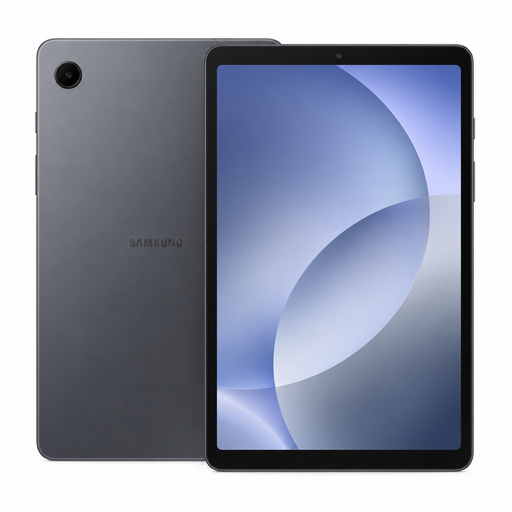 Image unavailable
Samsung Galaxy Tab A11 Wi-Fi, 64 GB
Its 8.7-inch display offers a smaller shared-screen option; the listing also specifies microSD expansion up to 2 TB. Confirm the family-account setup and check that you have a compatible charger.
View on Joybuy
 Image unavailable
TABWEE W90 11-inch Android 16, dual 4G SIM, 256 GB
The 11-inch display and stated 4G connectivity are relevant if the shared tablet will be used beyond home Wi-Fi. Battery and camera details differ across the listing; confirm those specifications and the required household profiles before buying.
View on Joybuy
Frequently asked questions
Should everyone use the same account on a shared family tablet?
Not if household members need distinct personal accounts or a child needs supervised access. Apple advises giving a child their own Apple Account; Google describes separate Android device users where supported, while Amazon provides Fire child profiles. Set up the accounts your household intends to use before making the tablet a regular shared device.
What account-age rules matter for a child using an iPad or Android tablet?
Apple says a child under 13 in the UK needs a parent or guardian’s help and consent to create an Apple Account and must join Family Sharing. Google states that 13 is the minimum age to manage a Google Account in countries not listed with a different age requirement; younger children can use a parent-managed account through Family Link. Check the relevant account-country setting and setup requirements.
Can parental controls be left alone after initial setup?
No. UK government guidance recommends checking that controls work and reviewing them as children get older or use new services. Amazon also warns that Fire controls do not remove all mature material from every content area, so test the child’s actual apps and profile.
How should a household maintain its tablet setup?
Give an adult responsibility for accounts and purchases, and retest child-profile restrictions after relevant changes to apps or settings. Keep the parental-control password accessible to that adult: Amazon says forgetting a Fire parental-control password can require a factory reset to restore full access.


