Who is shared-home audio for?
Start with who will use the room and whether they want to speak to the device or choose audio from a phone or app.
Households sharing radio and music
A kitchen or living-room device can serve people who switch between radio stations, music and podcasts. Ofcom’s 2025 UK audio research found that 71% of voice-assistant users used one for both radio stations and other types of audio.
Homes with several listeners
If people want their own music defaults or libraries on a shared device, compare the account and voice-recognition setup. Google documents individual defaults through Voice Match, while Apple documents recognition for multiple HomePod users; each requires the relevant household setup.
Homes considering child and privacy controls
Decide who can make requests, change playback or access personal content. Check the exact device’s microphone controls alongside its account activity settings and any child media filters you intend to use.
What should you check before choosing?
Check the services your household uses, then the account and control setup, before deciding whether playback needs to reach more than one room.
| Priority |
What to check |
Your needs |
| Radio and services |
Check direct UK voice support for your radio stations, music and podcasts on the exact platform. Confirm account linking and whether another device is needed to start playback. |
I want the same setup to handle radio and on-demand audio. Ofcom’s 2025 UK audio research found that 71% of voice-assistant users used one for both radio stations and other types of audio. |
| Personal accounts |
Check who can set a music default, access a personal library and manage the home. Test each person’s requests after setting up the relevant profiles or voice recognition. |
Different people in my home want their own listening choices without giving every visitor control of a personal account. |
| Children and access |
Check the platform’s child-account requirements, media filters and permissions. Confirm which controls apply to the device and services you will use. |
Children may use the shared room, so I need to decide what they can play and which account settings they can reach. |
| Microphone controls |
Check how to stop voice activation and what controls remain available afterwards. Review voice-activity settings separately from the device’s listening control. |
I may want to use phone, app or touch controls at times rather than leave voice requests enabled. |
| More than one room |
Check that the intended devices and service support grouped playback. For Alexa multi-room problems, Amazon advises checking the Wi-Fi network and speaker-group setup. |
Music should reach the rooms we actually use, and the household needs a manageable way to start playback in the right group. |
| Existing devices |
Check whether your TV or speaker works with the intended voice or casting route. If considering a non-voice speaker, establish which phone or app will control it. |
I would rather use equipment already in one room, or choose device-led playback, than add voice control where we will not use it. |
Which audio ecosystems are relevant?
These ecosystem references help narrow the control method and services to investigate; their features should be checked against the exact device you plan to use.
Amazon Echo / Alexa
An Alexa speaker or display is a voice-led route for a shared room, with documented BBC Sounds and Spotify options in the UK Amazon ecosystem.
- The BBC Sounds Alexa skill describes multi-room playback, and the Spotify skill supports music and podcasts.
- Check the service’s account requirements and the intended devices’ Wi-Fi and speaker-group setup before relying on multi-room playback.
Google Nest / Google Home
Google speakers and displays offer voice media playback, with a route to compatible Google Cast TVs and speakers.
- Google says Voice Match can let household members choose their own default music services and reach saved music on a shared device.
- Set up the relevant Google accounts and check the requirements for any child media filters or downtime you need.
Apple HomePod
HomePod combines Siri with Apple Home membership and playback sent from an iPhone or iPad.
- Apple documents recognition for multiple household voices and settings governing who can send audio to HomePod.
- Apple says not all music services support direct HomePod playback; check Siri support separately from playback sent through AirPlay.
Sonos
A wireless multi-room speaker route to consider when selecting audio by phone or app is more important than making requests to the speaker.
- Sonos describes placing its wireless speakers in several rooms for home audio over Wi-Fi.
- Check the exact model’s services and controls; the Sonos range should not be assumed to be entirely microphone-free.
Joybuy wireless speaker options
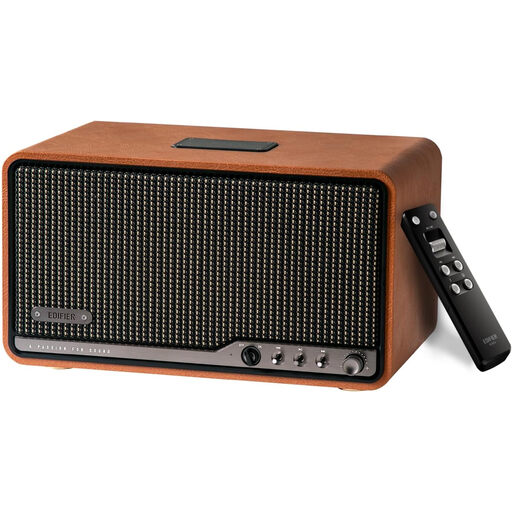
This tabletop wireless speaker is an option for shared-room listening if device-led playback suits your household. Check its service, voice-control and multi-room setup against what you intend to use.
 No image available
Edifier S300 Hi-Fi wireless multi-room tabletop speaker, brown
For a shared room, consider whether playback controlled from another device meets your needs. Confirm that your intended radio, music and podcast services work with your setup, and check voice control and playback across rooms if either matters to you.
View on Joybuy
Shared-home audio questions
Which services should I check before buying a smart speaker?
Check the radio stations, music services and podcasts your household actually uses on the exact UK platform and device. BBC Sounds and Spotify document Alexa options, while Apple says not all music services support direct HomePod playback; being able to send audio from a phone is a separate question from starting it by voice.
Can everyone use their own music account on one speaker?
Personal listening is possible with some household setups, but it is not automatic. Google says Voice Match can provide individual music defaults and access to saved music; Apple documents recognition for multiple HomePod users. Check each person’s account and the selected service before relying on separate playback.
What should a household with children check?
Check the child-account requirements and the media controls that apply to your chosen platform and services. Google documents media filters and downtime, while Amazon documents child-profile and music-service controls for Alexa; review who can change settings on the shared device.
Can I turn off wake-word listening?
Check the control on the exact device, because turning off listening changes how you make requests. Apple says HomePod can stop listening for Siri while still allowing touch-and-hold activation. Also review account activity settings separately; they are not the same as a device listening control.
What should I do after setting up a shared smart device?
Review household permissions, account activity controls and device and app updates. UK government guidance identifies smart speakers as internet-connected devices that need active management to help protect household information.


