Check the services and predicted speeds available at your property, then compare performance on a device connected directly to the router with Wi-Fi performance in the rooms you use. If the incoming connection struggles when household activities overlap, consider the broadband package; if the wired connection is adequate but particular rooms or fixed devices struggle, look at router placement, mesh coverage or Ethernet instead. Ofcom distinguishes property-level service information from the Wi-Fi link inside the home, which can itself become a bottleneck.
Who needs to make this choice?
Households using the connection at the same time
When work calls, streaming, gaming and downloads overlap, check whether the incoming service meets the household's combined needs before buying more Wi-Fi equipment. Ofcom identifies simultaneous use as a reason to consider a higher-speed service.
Homes with weak Wi-Fi in particular rooms
If the connection works well near the router but falters farther away or on another floor, investigate placement and coverage. Ofcom notes that the router-to-device wireless link can become a bottleneck even when the broadband connection is adequate.
Homes with important fixed devices
A stationary work computer or console may be able to use Ethernet instead of relying on Wi-Fi. Ofcom recommends a direct Ethernet connection where a faster, more reliable local link is needed.
What should you check first?
For a shared home, establish what service reaches the property, then separate incoming-line problems from room-by-room Wi-Fi and fixed-device needs. Ofcom's availability information gives predicted speeds, not a guarantee of performance throughout the home.
| Concern |
What to check |
Who this matters to |
| Incoming capacity |
Check services and predicted speeds at the exact property, then review the provider's speed information against times when use overlaps. |
When calls and large downloads coincide with streaming or gaming, I need to know whether the connection reaching the router can keep up. About 33% of consumers put incoming capacity first. |
| Coverage across rooms |
Compare Wi-Fi close to the router with problem rooms at similar times; consider placement before choosing a replacement router or mesh. |
If Wi-Fi works near the router but drops away where I work or watch, a faster package alone does not address that room. For about 27% of consumers, coverage is the primary concern. |
| Fixed-device connection |
Identify devices that can use Ethernet and check available ports and cable routes; verify backhaul support for any shortlisted mesh system. |
A fixed computer or console needs a dependable local link even when the rest of the home has usable Wi-Fi. Local connection reliability comes first for about 27% of consumers. |
| Available service |
Check fixed-service availability at the property; if choices are limited, assess local wireless alternatives and their service terms. |
Where the fixed options do not meet my needs, I need to establish which connection I can actually obtain. About 13% of consumers prioritise finding a viable service. |
Ofcom describes services of 300 Mbit/s or more as more suitable for several people online at once and heavier activities, but that is a general guide, not a requirement for every household or a promise about Wi-Fi in each room. Ethernet and mesh can improve different parts of the home network; neither increases the broadband speed supplied to the property.
Mistakes that can lead to the wrong upgrade
-
Treating a property speed prediction as a whole-home Wi-Fi guarantee
Ofcom's availability checker shows predicted speeds subject to service availability. The wireless link to a device in another room is a separate part of the connection.
Check the exact property and the provider's speed information, then compare performance near the router with the rooms causing trouble.
-
Adding mesh when the incoming line is the constraint
Mesh is intended to improve wireless coverage, not the capacity of the broadband service entering the home.
Test a main device directly by Ethernet at times when household use overlaps. If that connection is also constrained, investigate the available packages before expanding Wi-Fi coverage.
-
Overlooking mesh-node links and Ethernet ports
Distance and thick walls can affect a wireless link between mesh nodes. TP-Link's Deco guidance says Ethernet backhaul can provide a faster, more stable node-to-node link where the specific system supports it.
Check the shortlisted model's ports, backhaul support and permitted wiring arrangement before planning where nodes will go.
A wired layout may also require cable routing or an additional network switch.
-
Assuming wireless-to-home service works equally well everywhere
Fixed-wireless, mobile-broadband and satellite options require a location-specific assessment; their performance should not be treated as equivalent to an available fixed service without checking.
If wired choices are limited, confirm local availability, expected performance, data allowances and equipment terms with the provider.
Mesh brands to consider
TP-Link Deco
A whole-home mesh range with different Wi-Fi generations and configurations.
- TP-Link provides Ethernet-backhaul guidance for Deco systems and identifies multi-storey layouts and thick walls as situations where wired node links can help.
- Check the exact Deco model for its ports, node count, backhaul support and compatibility; TP-Link's guidance is not an independent comparison of models.
eero
An app-managed mesh range that includes multi-node configurations.
- The eero 7 retail listing describes two 2.5 GbE ports per unit for that model.
- Port details and coverage claims belong to the listed configuration, not every eero system or every building; check the chosen pack and broadband-equipment compatibility.
NETGEAR Orbi
A mesh range that includes tri-band Wi-Fi 7 models with multi-gigabit Ethernet.
- NETGEAR describes tri-band Wi-Fi 7 and 2.5 Gig Ethernet for its Orbi 770 series.
- Those are Orbi 770 series details, not specifications for every Orbi model. Check the precise system and whether its features match the service and layout.
Joybuy home-networking options
These products address coverage with mesh Wi-Fi, wired connections for fixed devices, or a 5G home-router option where local mobile service is suitable. Choose the broadband service available at your property separately.
 Image unavailable
NETGEAR Orbi 370 RBE373 Wi-Fi 7 Mesh, 3-pack
Consider this three-unit system when Wi-Fi coverage is the problem across several rooms. The listed variant is dual-band BE3600 with 2.5Gbps Ethernet; check the required modem or gateway connection and plan node positions for your building.
View on Joybuy
 Image unavailable
TP-Link Deco BE22 BE3600 Wi-Fi 7 Mesh, 3-pack
This three-unit mesh option is for homes considering coverage beyond a single router. If wired devices or Ethernet links between nodes matter, check the exact unit's ports and backhaul arrangements before choosing it.
View on Joybuy
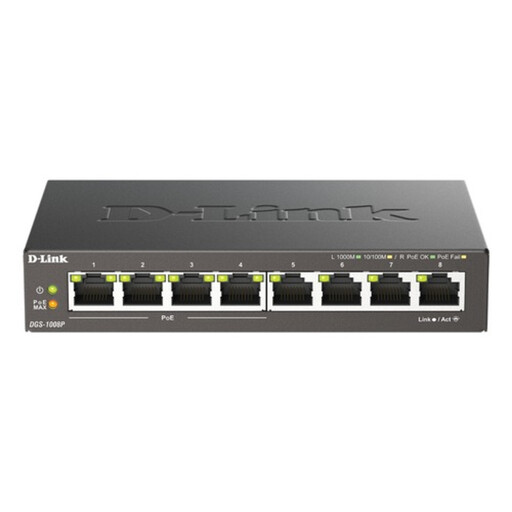 Image unavailable
D-Link 8-Port Gigabit PoE Desktop Switch
An unmanaged switch is an option when several fixed devices need wired network connections. This is a PoE Gigabit switch, not a broadband router or Wi-Fi access point; plan its connection to your existing network and the Ethernet cables needed.
View on Joybuy
 Image unavailable
TP-Link Archer NX500 5G AX3000 Router
Consider a 5G home-router route where fixed-broadband choices are limited and a suitable mobile service is available. This is a dual-band Gigabit router; check provider and SIM compatibility, local coverage, expected performance and data terms before buying.
View on Joybuy
 Image unavailable
TP-Link Deco BE65 BE9300 Wi-Fi 7 Mesh, 3-pack
This tri-band three-pack is another option for planning Wi-Fi coverage across rooms. If fixed-device connections or wired links between nodes are part of the plan, confirm the exact variant's Ethernet ports and backhaul support before purchase.
View on Joybuy
Common questions
Why does one room feel slow despite a fast broadband package?
The Wi-Fi link to that room can limit performance even when the connection reaching the router is adequate. Ofcom identifies the router-to-device wireless link as a possible bottleneck; compare a direct router connection, Wi-Fi near the router and Wi-Fi in the affected room before changing the package.
Should I replace the router or add mesh Wi-Fi?
Consider a replacement or better placement when one router can reach the rooms you need but the existing unit is old, disconnects or is poorly positioned. Mesh is worth considering when the incoming connection is adequate yet distant rooms or another floor need coverage; neither option increases the speed delivered to the property.
Will Ethernet help with video calls or gaming?
Ethernet can provide a more reliable local connection for a fixed computer or console. Ofcom recommends connecting a computer directly to the router by cable for a faster, more reliable link than Wi-Fi, but the connection remains limited by the incoming broadband service.
What if a suitable fixed broadband service is not available?
Check availability at the exact property and assess locally available wireless alternatives rather than assuming they will perform the same everywhere. Ofcom also says that a property unable to obtain at least 10 Mbit/s download and 1 Mbit/s upload may be eligible to request an upgraded connection under the UK broadband universal service; check the property's eligibility and applicable conditions.


