For shared home use, check whether slowdowns happen near the router or mainly in distant rooms before choosing equipment: Ofcom explains that in-home networking cannot make the incoming broadband service faster. Mesh can suit several weak rooms when nodes have workable positions; Ethernet is a direct option for a fixed device, while routers, powerline kits and extenders address different problems and bring their own setup or placement considerations.
Who may need a different home network setup?
Multi-room households
If calls, streaming or browsing become unreliable across rooms or floors, compare node positions and whether a system supports wired backhaul. Ofcom’s guidance notes that Wi-Fi experience can be affected by signal conditions and where devices are used.
Fixed-desk workers and gamers
If one stationary computer or console needs a dependable connection while others share the network, check whether Ethernet can reach it and whether you need more LAN ports. Ofcom identifies video calls, streaming and gaming as activities that can compete for connection capacity in a shared home.
One-room problem solvers
If most rooms have usable Wi-Fi but one does not, compare an extender placed where it can still receive a signal with a powerline kit that uses the home’s electrical wiring. Ofcom notes that powerline results depend on the wiring.
What should you check before choosing?
Mesh Wi-Fi
Consider it: when Wi-Fi works near the router but several rooms need better coverage, and you can place the nodes where they retain a useful connection.
Trade-off: you need to plan for multiple units and their positions; mesh does not increase the speed of the incoming broadband service.
Wi-Fi router
Consider it: when replacing an older router may address the local network or features you need, and its location can serve the rooms in question.
Trade-off: distant rooms may still have weak Wi-Fi, and Ofcom cautions that a separately purchased router can be harder to set up or may not receive provider troubleshooting support.
Ethernet and switches
Consider it: for a stationary computer, television or console when a cable route and suitable ports are available.
Trade-off: a switch adds wired ports, not wireless coverage; check the number of ports and their stated speeds.
Powerline networking
Consider it: for a distant room when running Ethernet is impractical and suitable wall sockets are available.
Trade-off: results depend on the electrical wiring. Ofcom highlights this limitation, and TP-Link specifies a same-circuit condition for its adapters.
Wi-Fi extender
Consider it: for one weak spot if an intermediate position still receives a usable signal.
Trade-off: an extender placed where the signal is already weak may affect speed and responsiveness; mesh behaviour depends on compatible equipment.
| Concern |
What to check |
Who this matters to |
| Coverage across several rooms |
Map weak rooms; check node positions and whether the exact system supports wired backhaul. |
If I need Wi-Fi across several rooms or floors, I want nodes that can connect from useful positions. Around 31% of consumers put multi-room coverage first. |
| A fixed device’s connection |
Check the device’s Ethernet connection, cable route and available router LAN ports; add a switch only if more ports are needed. |
When one desk computer or console needs a steady wired link, I would check whether a cable can reach it. Around 25% of consumers prioritise a fixed device’s connection. |
| Slowdowns during shared use |
Compare performance near the router or over Ethernet with performance in affected rooms; check the replacement router’s connection and operating requirements. |
If calls, streams and downloads slow down at the same time, I want to identify where the bottleneck is before buying equipment. Around 19% of consumers focus first on diagnosing shared-use slowdowns. |
| One Wi-Fi weak spot |
Check whether an intermediate extender position receives a useful signal, or whether an Ethernet-fed access-point mode is available. |
If the rest of my home works but one room has weak Wi-Fi, I want a targeted option that can receive a usable connection. Around 13% of consumers prioritise one isolated weak spot. |
| A distant room without a cable run |
Check the kit’s adapter requirements, socket guidance and whether the remote unit provides Wi-Fi, Ethernet or both. |
When Ethernet is impractical but a distant room needs a connection, I would check whether powerline suits the sockets and wiring. Around 12% of consumers prioritise reaching a room without laying cable. |
Buying pitfalls
-
Buying mesh solely because everyone slows down at once
Ofcom explains that home Wi-Fi cannot outperform the incoming broadband service, and that data-heavy activities can compete for capacity.
Compare performance near the router or over Ethernet with performance in the affected rooms before choosing a coverage product.
-
Expecting a powerline kit to deliver its labelled rate in every room
Ofcom says results depend on the home’s wiring. TP-Link’s setup guidance specifies that its adapters need to be on the same electrical circuit.
Check the exact kit’s setup requirements and whether the intended sockets are suitable before relying on it for a particular room.
-
Assuming a router, mesh node or extender will work in any role
Products can have different ports, operating modes and network requirements. For example, the eero 6+ router and eero 6+ Extender do not have the same Ethernet capabilities.
Check the exact unit, its ports and operating mode, and how it will connect to your existing hub or network.
Relevant brands to know
TP-Link
TP-Link models in these examples cover distinct routes, including mesh, extenders and wired switches; they are not interchangeable upgrades.
- TP-Link lists optional Ethernet backhaul for Deco X20, access-point mode on RE705X and five Gigabit ports on TL-SG105.
- These are model-specific capabilities, not independent performance findings or features of every TP-Link product.
ASUS
The RT-AX58U is a standalone router example for buyers considering router replacement or access-point operation.
- ASUS lists one Gigabit WAN port, four Gigabit LAN ports and several operating modes for the RT-AX58U.
- Check the exact hardware version: ASUS lists different processor specifications for V1 and V2.
NETGEAR
The Orbi 770 is a mesh example for households comparing a tri-band Wi-Fi 7 system.
- NETGEAR describes the Orbi 770 series as tri-band Wi-Fi 7.
- Advertised speed and coverage figures are manufacturer claims, not guarantees of performance in every room.
devolo
devolo Magic powerline products are an option to consider where using the home’s electrical wiring may suit the layout.
- devolo describes Magic adapters as transmitting data over electrical wiring, with remote Wi-Fi available on applicable models.
- Results in a particular home depend on its wiring; broad speed or reliability claims do not establish how a specific socket pair will perform.
eero
The eero 6+ is a mesh example for households considering app-managed Wi-Fi alongside wired connections for selected devices.
- eero specifies two 1 GbE ports on the eero 6+ router unit.
- The separately named eero 6+ Extender has no Ethernet ports and needs an existing eero network; check which units a pack contains.
Joybuy product choices
These Joybuy choices cover mesh Wi-Fi, wired connections, extenders, powerline networking and router replacement for shared-home use.
 No image available
TP-Link Deco BE22 3-Pack BE3600 Whole Home Mesh Wi-Fi 7 System
A three-unit mesh option for households looking to extend Wi-Fi across several rooms.
Three-pack; BE3600; Wi-Fi 7. Plan node positions where they can maintain a useful connection; coverage depends on the home layout.
View on Joybuy
 No image available
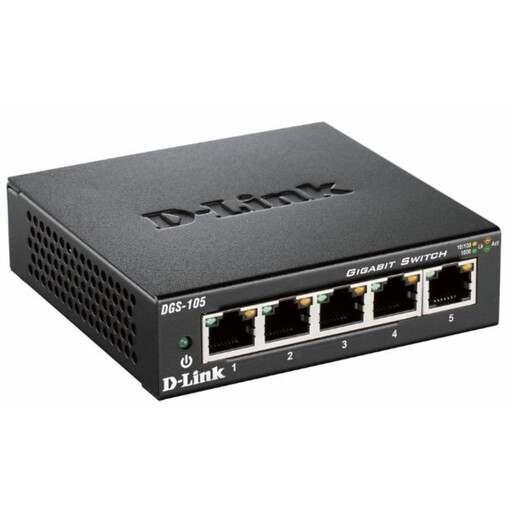
D-Link 5-Port Gigabit Unmanaged Desktop Switch DGS-105
A wired-network option when stationary devices need connections in one location.
Five ports; Gigabit; unmanaged desktop switch. A switch adds wired ports, not wireless coverage.
View on Joybuy
 No image available
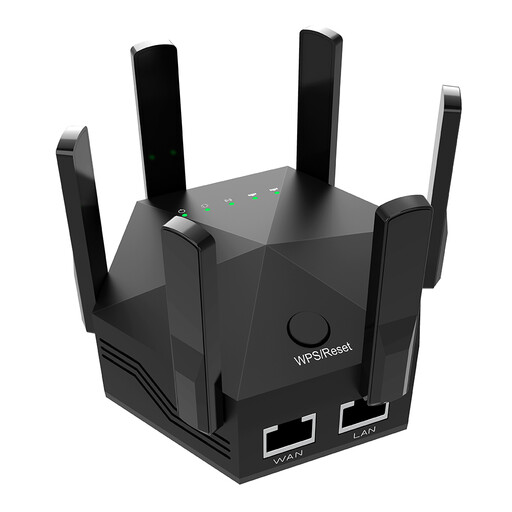
Dual-Band 1200Mbps Wi-Fi Signal Extender with 6 Adjustable Antennas, UK Plug
A targeted option for one weak spot if an intermediate position receives a usable existing signal.
Dual-band; 1200Mbps; six adjustable antennas; UK plug. For indoor use; placement affects whether it can receive a useful signal.
View on Joybuy
 No image available
TP-Link TL-WPA8631P KIT AV1300 Gigabit Powerline Wi-Fi Extender Kit
A powerline option for reaching a distant room without running a long Ethernet cable.
AV1300; Gigabit; Wi-Fi powerline kit. Results depend on the home’s wiring; TP-Link’s setup guidance specifies adapters on the same electrical circuit.
View on Joybuy
 No image available
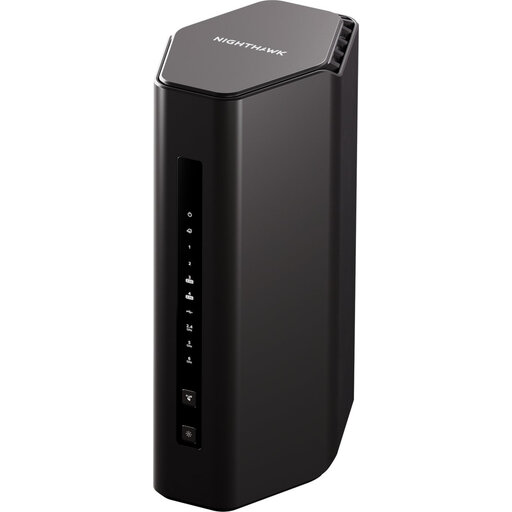
Nighthawk Wi-Fi 7 BE9300 Router (RS300)
A router option for households considering a replacement for shared home use.
Wi-Fi 7; BE9300; model RS300. Check how it connects to your existing modem or provider hub before choosing a replacement.
View on Joybuy
Home Wi-Fi questions
How can I tell whether new Wi-Fi equipment will address a slowdown?
Compare performance near the router, preferably over Ethernet where possible, with performance in the affected rooms. If the incoming connection itself is inadequate, better in-home Wi-Fi cannot make it faster; this check helps identify the issue rather than suggesting a change of contract.
Can I put a mesh node or extender in the room with no signal?
A wireless-fed node or extender still needs a workable connection to the main network. Try an intermediate position with usable signal, or check whether a supported Ethernet-backhaul or access-point arrangement could reach the room by cable.
Does a powerline kit automatically provide Wi-Fi?
Not necessarily. TP-Link says TL-WPA-prefixed models broadcast Wi-Fi, while TL-PA-prefixed models provide Ethernet only. Its setup guidance also specifies at least two adapters on the same electrical circuit, so check the exact kit and intended sockets.


