What to prioritise when buying
For consumers choosing home connectivity for shared calls, gaming and streaming, start by identifying the main problem: coverage in particular rooms, a fixed device's connection, or capacity during overlapping use.
| Concern |
What to check when buying |
Who this matters to |
| Coverage across several rooms |
Map the weak rooms and check where powered mesh units can connect to the main unit; confirm whether the exact kit offers Ethernet backhaul or access-point mode if needed. |
If calls and streams need to work in several rooms, I want to know whether coverage reaches each occupied space; around 31% of consumers put multi-room coverage first. |
| Connection for one fixed device |
Check the router and device ports and whether an Ethernet cable can reach. If considering powerline, check the kit type and household wiring. |
At a fixed gaming or call desk, I would prioritise a wired route over improving wireless throughout the home; around 25% of consumers put one device's connection first. |
| Capacity during simultaneous use |
Compare the connection near the router with performance in weak rooms during typical shared use; check available broadband services at the address. |
When calls, game downloads and streaming overlap, I want to know whether the connection is still limited beside the router; around 19% of consumers prioritise shared-use capacity. |
| Low-disruption coverage for one weak spot |
Check the extent of the weak area and whether an extender can receive a usable signal where it would be placed. |
If only one nearby room is affected, I would rather avoid a long cable run or a multi-unit setup; around 13% of consumers prioritise a simple fix for one weak spot. |
| Replacing the main router |
Confirm compatibility with the broadband service and existing equipment, the required operating mode and the exact model's support information. |
If the main router appears to be the limit, I need to check service compatibility and setup before replacing it; around 12% of consumers prioritise changing the main router. |
Ofcom explains that Wi-Fi cannot outperform the broadband service, that extenders can affect speed and responsiveness, and that powerline results depend on household wiring. Treat advertised wireless rates as product specifications, not as a promise of internet speed in every room.
Relevant Wi-Fi brands
These brands illustrate different equipment approaches; suitability depends on the specific model, kit and household setup, not on a brand name alone.
TP-Link
The Deco X50 V2 is a mesh option for several rooms, with wireless links and optional Ethernet backhaul.
- TP-Link lists three Gigabit ports per unit for this model.
- Check the hardware version, pack and operating mode. Ethernet backhaul also requires a cable route, and the feature alone does not provide one.
NETGEAR
The Orbi RBK763S is a tri-band Wi-Fi 6 mesh kit comprising a router and two satellites.
- The kit provides a router-and-satellite mesh arrangement for a household considering multi-room coverage.
- NETGEAR's advertised 5.4 Gbps is a Wi-Fi specification, not a guaranteed internet speed. Check the exact kit and its fit with existing broadband equipment.
ASUS
The RT-AX86U is a replacement-router option with a gaming port, a 2.5 Gbps port and AiMesh support.
- ASUS lists AiMesh support for use with compatible additional hardware.
- ASUS's feature claims do not establish lower latency on a particular broadband service. A third-party router may take more setup and may receive less provider support.
devolo
Magic 2 WiFi next offers a powerline-based Wi-Fi route where running Ethernet between rooms is impractical.
- The cited variant has two Gigabit LAN ports. devolo states that Magic adapters work with its Magic series.
- devolo says its Magic adapters are not compatible with its dLAN series. Powerline results depend on the household wiring, rather than being guaranteed by an advertised link rate.
BT
BT's Whole Home Wi-Fi family is relevant to households considering Wi-Fi discs rather than replacing the broadband service.
- The product family offers a disc-based approach to home Wi-Fi.
- BT says Whole Home, Mini Whole Home and other Whole Home product-family variants are not mutually compatible. Check the exact family before buying an add-on.
Joybuy products for shared-home Wi-Fi
This selection covers mesh systems, Wi-Fi extenders and mesh-capable routers for shared-home coverage. It does not include every route, such as a direct Ethernet connection or changing broadband service.
 No image available
NETGEAR Orbi 370 RBE373 WiFi 7 Mesh System (3-Pack)
Consider this kit if several rooms need Wi-Fi coverage and a router-and-satellite arrangement suits the home.
The described pack has one router and two satellites. Its listed features include dual-band Wi-Fi 7, BE3600 and 2.5Gbps WAN and LAN ports; each satellite is described as having a 2.5Gbps LAN port.
Joybuy
 No image available
TP-Link RE220BE BE3600 Wi-Fi 7 Range Extender
Consider it for a nearby weak spot where the extender can still receive a usable signal from the existing router.
Listed features include dual-band Wi-Fi 7, EasyMesh compatibility and a 1Gbps LAN port. Placement within range of the existing router's signal is required.
Joybuy
 No image available
TP-Link Deco BE22 BE3600 Whole Home Mesh Wi-Fi 7 System (3-Pack)
Consider this three-unit mesh system when several rooms need coverage and the household wants wired or wireless backhaul options.
Listed features include dual-band Wi-Fi 7, MLO and Ethernet ports. The described system supports wired and wireless backhaul.
Joybuy
 No image available
D-Link BE9500 Wi-Fi 7 Smart Mesh Router M95
Consider this router if replacing the main unit fits the household's broadband setup and compatible mesh expansion is relevant.
Listed features include tri-band Wi-Fi 7, MLO and three 2.5Gbps LAN ports. The described system can expand with compatible routers or extenders.
Joybuy
 No image available
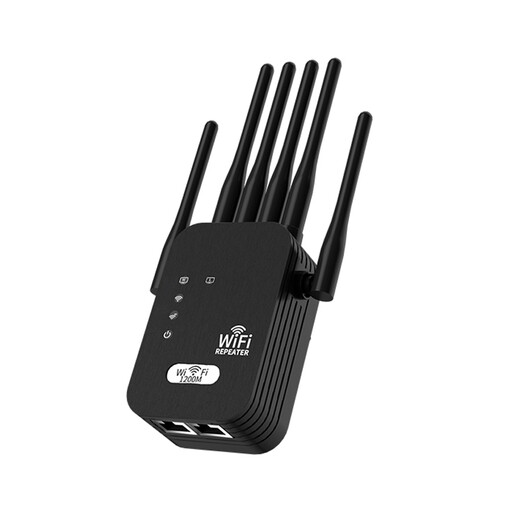
Wi-Fi Signal Booster, 5G Extension, 1200M, 6-wire, Black, UK Standard
Consider it for an in-home Wi-Fi weak spot if it can be placed where the existing wireless signal is still available.
The description identifies extension of an existing Wi-Fi network on 2.4GHz and 5GHz bands. Placement within range of the existing Wi-Fi signal is required; this is described as a Wi-Fi extender, not a mobile-phone signal repeater.
Joybuy
Frequently asked questions
Will mesh fix slow video calls if every room is slow?
Not necessarily. Ofcom explains that better home Wi-Fi cannot outperform the underlying broadband service. Compare the connection near the router with performance in other rooms before buying.
Can I improve a rented home's Wi-Fi without installing long Ethernet cables?
Yes, a wireless mesh kit or a suitably positioned plug-in extender can avoid a long data-cable run. Ofcom says powerline results depend on the home's electrical wiring, and each powered unit still needs a suitable location.
Can I add any BT Whole Home disc to an existing set?
No. BT Help says its Whole Home Wi-Fi product families are not compatible with one another; for example, Whole Home discs cannot be combined with Mini Whole Home discs. Identify the existing family before buying an expansion.
What product-safety requirements should I check for a Wi-Fi router or extender in the UK?
For radio equipment, check the applicable conformity information for the product's intended destination. The Office for Product Safety and Standards' GOV.UK guidance on the Radio Equipment Regulations 2017, published on 16 December 2025, describes the Great Britain rules; the corresponding Northern Ireland guidance notes that some provisions apply differently there. GOV.UK's consumer-connectable-product security guidance, published on 17 March 2025, identifies a Northern Ireland exception, so check whether that regime applies to the specific product and destination.
Will a faster broadband package solve a weak signal in one bedroom?
Not by itself. Ofcom advises comparing the connection near the router with Wi-Fi in the affected room and checking which services are available at the address. Ofcom's address-checker guidance notes that predicted speeds may differ from the speeds received at a property.


