What matters when choosing?
Start with the content everyone watches, then decide whether the TV’s built-in sound and controls will work for the people who use them. Consider a soundbar alongside the TV if speech remains the deciding problem.
TV with built-in speech and accessibility controls
Consider it when: A one-device setup matters and the exact TV provides the speech, menu and viewing aids your household needs.
Bear in mind: A speech mode cannot ensure that every programme is comfortable to hear, while audio description depends on the content providing it.
TV paired with a soundbar
Consider it when: Dialogue is the main difficulty, particularly if quiet speech and loud scenes prompt repeated volume changes.
Bear in mind: The separate unit needs a suitable connection and manageable daily controls. Which? describes soundbars as a way to improve TV audio, not as a guarantee of clear speech in every setup.
| Concern |
What to check |
Who this matters to |
| Picture quality |
Compare independent assessments of colour, contrast, clarity and motion for the exact model; consider the programmes and room in which you will watch it. |
If films, sport and everyday programmes all use the main screen, I want a picture that works for our usual mix rather than choosing by size alone. Roughly 29% of consumers would make shared picture quality their primary concern. |
| Dialogue and accessibility |
Try speech settings where possible, and check the exact model’s subtitles, voice guidance, magnification and menus. Confirm that preferred content provides audio description if needed. |
When quiet conversations are hard to follow or a viewer needs to navigate the TV independently, those needs shape the whole setup. Around 29% of consumers would put dialogue or accessibility first. |
| Gaming compatibility |
Match the TV’s HDMI connections, supported resolution and refresh-rate modes, VRR and ALLM to the console or PC you intend to use. |
If our shared screen also serves a console or PC, I need its gaming modes to work with that device, not merely appear in a feature list. Roughly 21% of consumers would prioritise gaming responsiveness. |
| Smart-TV use and privacy |
Review account requirements, data-sharing and permission controls, and the manufacturer’s stated security-update support for the exact model. |
When several people use apps or voice features, I want to understand which accounts and permissions the TV requires. Around 21% of consumers would make manageable smart-TV use and privacy their primary concern. |
Which? evaluates TVs across picture, sound, setup, personal-data handling, accessibility and gaming. For connected TVs, the Information Commissioner’s Office also advises considering personal-information and privacy choices. These checks are separate from any feature claims made for a particular model.
Brands to consider
These brands offer features relevant to shared viewing, but availability and operation must be checked on the exact TV rather than inferred from a brand or range name.
Samsung
Worth investigating when accessible TV controls and an integrated gaming platform are both on the household checklist.
- Samsung UK describes Voice Guide, audio description, magnification and high-contrast options for supported Smart TVs.
- Samsung UK says Gaming Hub content and access depend on the model, country and requirements such as an account, internet connection, compatible controller or gaming-service subscription.
LG
Relevant when comparing speech controls and gaming features within the same TV choice.
- LG UK describes Clear Voice as a setting for enhancing human voices and identifies VRR and ALLM among its gaming features.
- LG UK says features and regional support vary by model and screen size; a feature guide does not establish what one TV includes.
Panasonic
Relevant when connected-device gaming is important alongside conventional viewing.
- Panasonic UK describes VRR, HDMI 2.1, ALLM and high-refresh-rate support on named TV series.
- Those descriptions are series-specific. Check the exact model, size and gaming device before relying on a mode.
Sony
Relevant when dialogue controls or accessible navigation are priorities.
- Sony UK describes Voice Zoom for adjusting commentary and ambient sound and documents features such as TalkBack, captions and text magnification on supported BRAVIA TVs.
- These are manufacturer feature descriptions, not independent sound comparisons; support varies by model.
Joybuy TVs for shared viewing
These televisions offer different screen sizes and listed display or smart-TV features for a shared main screen. Compare each exact model with your household’s speech, accessibility, privacy and connected-device needs before settling on a setup.
 No image available
TCL 55P8K-UK QLED 4K HDR PRO TV
Consider this model if a shared TV also needs the Google Cast or Miracast options named in its product title.
The title lists QLED, 4K HDR PRO, an ONKYO 2.1 sound system and a Game Accelerator. Check the supported gaming refresh modes for your device rather than relying on the accelerator label, and assess speech clarity separately from the audio-system name.
View on Joybuy
 No image available
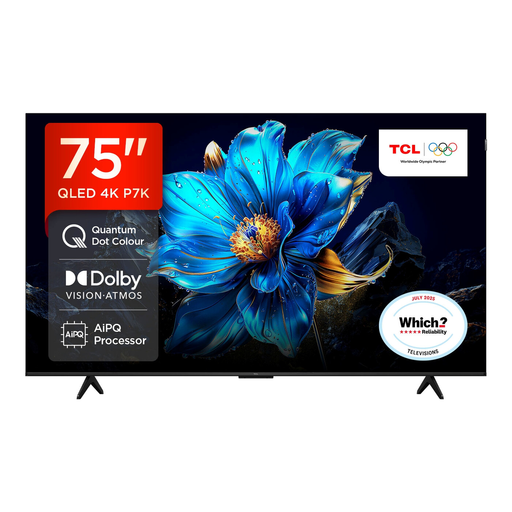
TCL 75P7K 75-inch QLED Direct LED 4K TV
This is a 75-inch option for a household considering a larger shared screen and Google TV.
Its title lists 4K HDR, Dolby Vision, Dolby Atmos and hands-free voice control. If gaming or voice use is important, confirm the exact modes, device compatibility and account or privacy choices before buying; the audio labels do not establish dialogue clarity.
View on Joybuy
 No image available
TCL 65V6C 65-inch Direct LED 4K HDR TV
Consider this 65-inch Google TV if the household wants one screen for everyday viewing and occasional gaming.
The title specifies Direct LED, 4K HDR and a 120Hz Game Accelerator qualified as Full HD. Check whether that resolution and mode suit your gaming device, and assess dialogue and accessible controls on the exact TV.
View on Joybuy
 No image available
TCL 65Q7C 65-inch QD-Mini LED 4K HDR TV
This 65-inch Google TV is relevant if display technology and the listed refresh rate are prominent parts of your shortlist.
The product title lists QD-Mini LED, up to 2048 local dimming zones, a 144Hz native refresh rate and audio by Bang & Olufsen. Those labels do not establish measured picture or speech performance; confirm the gaming modes and accessibility controls you intend to use.
View on Joybuy
 No image available
Coocaa 40CTQH38ZUK 40-inch Full HD QLED TV
This 40-inch option suits a household considering a smaller main screen, provided Full HD meets its viewing needs.
The title lists QLED, HDR10, Dolby Audio, Freely and TiVo. Check that the desired services and accessible controls work on this exact model; Dolby Audio alone does not establish how clearly it reproduces dialogue.
View on Joybuy
Questions about shared-household TVs
Should we choose a soundbar with the TV or try the TV’s settings first?
Try or assess the TV’s relevant speech settings first, but compare a soundbar as part of the same decision if dialogue remains unclear or viewers keep changing the volume between speech and action. Which? identifies that contrast as a TV-sound difficulty; before pairing devices, check their connection and whether everyday control will be straightforward.
Which accessibility features should we check on a shared TV?
Check the controls the household will actually use, including navigation to accessibility settings, voice guidance, subtitles, audio description, text magnification and high-contrast menus. Confirm support on the exact TV and preferred broadcast or streaming source, because audio description requires the content to provide it.
What privacy choices matter when setting up a smart TV?
Review what the TV and associated apps collect, which accounts or permissions are needed, and what security-update support the manufacturer states for the model. The Information Commissioner’s Office identifies connected TVs as smart products; make deliberate data-sharing choices during setup and revisit the settings as household use changes.


