Buying priorities
Start with the room and regular viewers, then map sound and device needs before comparing optional gaming and smart-TV features.
| Priority |
What to check |
Your needs |
| Screen placement |
Measure sofa-to-screen distance from every regular seat. Check the furthest and most off-axis position, room lighting, and whether a stand, tilt mount or full-motion mount is needed. |
I want everyone to have a comfortable view, not just the person in the centre seat. BBC Research & Development recorded a median absolute viewing distance of 2.63 m in its historical UK viewing-conditions survey, but your room layout should set the final choice. |
| Dialogue and sound |
Try speech or dialogue settings first. If adding a soundbar, check ARC or eARC compatibility, reserve the relevant HDMI port and allow space to centre the bar in front of the TV. |
Voices need to remain understandable without constant volume changes during action scenes. A soundbar can be worth considering if the built-in speakers do not meet that need. |
| Connections |
Count consoles, set-top boxes, disc players, streamers and audio equipment. Identify which HDMI input handles ARC/eARC and which inputs support the gaming functions you need. |
I need the TV to accommodate regular devices at the same time, without disconnecting a console or soundbar whenever another device is used. |
| Access and setup |
Check voice guidance, captions, audio-description controls, high contrast, text enlargement and the steps needed to activate them. Review account, microphone and personalised-content settings during smart-TV setup. |
Everyone who uses the TV should be able to find programmes and adjust essential settings with confidence. Exact menu controls and privacy choices can differ by model and software version. |
Joybuy product options
These Joybuy options cover television and soundbar choices for a shared living-room setup, with different screen sizes, connection arrangements and dialogue-focused audio considerations.
 No image available
TCL 55P8K QLED 4K HDR PRO Smart TV
A 55-inch option for shared viewing where several devices and a possible soundbar need connection headroom.
The listing states four HDMI 2.1 ports, 35W 2.1 audio, Dolby Atmos, Google TV, VRR and ALLM. Check the exact supported resolution, HDMI input and console or game conditions because the listing uses different refresh-rate wording.
Confirm required accessibility controls in the manual and review Google TV account, microphone and voice-control privacy settings during setup.
Joybuy
 No image available
TCL 50Q6C QD-Mini LED 4K HDR Smart Google TV
A 50-inch TV to assess for rooms combining films, broadcast viewing, console play and a soundbar.
The listing states four HDMI inputs including eARC, 30W audio, Google TV, VRR, ALLM and an Onkyo 2.1 Hi-Fi system. Verify the gaming mode, resolution and HDMI-port allocation, as the listing gives different refresh-rate descriptions.
Check voice guidance, captions, audio-description controls and menu access for the people who will use it. Test speech-focused sound settings before deciding whether to add a soundbar.
Joybuy
 No image available
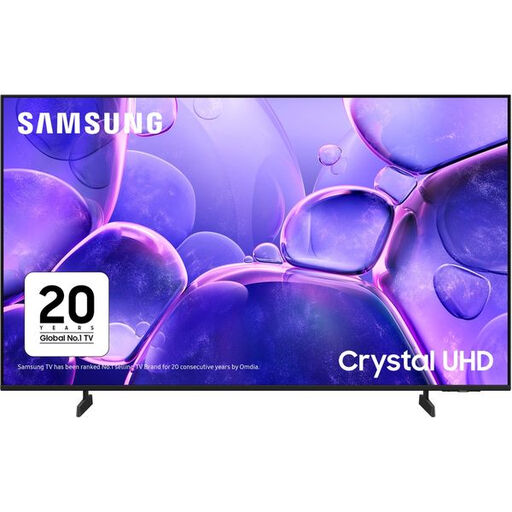
Samsung U8000F UE55U8092FU 55-inch 4K Smart TV
A 55-inch choice to consider where accessible menu support and a defined wall-mount plan are important.
The listing states Voice Guide, VESA 200 x 200 mm, three HDMI ports, eARC, 20W 2.0 audio, Adaptive Sound, Wi-Fi, Ethernet, ALLM and VRR. Its stated native refresh rate is 50 Hz, so check whether the gaming functions suit the household’s console and games.
Reserve the eARC port if using a soundbar, and verify captions, audio-description controls, magnification, high contrast and setup steps for regular users.
Joybuy
 No image available
Bose Smart Ultra Soundbar Arctic White
A soundbar option for households where voices remain difficult to follow after trying the TV’s own speech settings.
The listing states A.I. Dialogue Mode, HDMI eARC, optical input, nine transducers, Dolby Atmos processing and ADAPTiQ room calibration. Confirm that the selected TV’s ARC or eARC connection meets the intended setup.
The soundbar is listed as 104.5 cm wide; check the TV unit and ensure it will not obstruct the screen or remote-control receiver. Review microphone and voice-assistant privacy settings during setup.
Joybuy
 No image available
TCL 75Q7C QD-Mini LED 4K HDR Smart Google TV
A large-screen candidate for a living room where measured seating distances support a 75-inch display.
The listing states QD-Mini LED, 4K, Google TV, 144 Hz native refresh, HDMI 2.1 connectivity including eARC, and audio by Bang & Olufsen. Check the exact HDMI count and port-by-port feature allocation before planning consoles and audio.
Measure each regular viewing position before buying. Verify the applicable ALLM and VRR input, accessibility controls, VESA pattern, stand dimensions and privacy settings for the exact model.
Joybuy
Frequently asked questions
How should a shared household choose TV size?
Measure the normal viewing distance from each regular seat before selecting a screen size. BBC Research & Development found a median absolute distance of 2.63 m in a historical UK viewing-conditions survey, but room size and screen position should guide your own shortlist rather than a universal size rule.
Do we need a soundbar if the TV has dialogue settings?
Not necessarily. Try the TV’s dialogue-focused sound setting first, then consider a soundbar if voices remain unclear or people repeatedly change the volume between speech and action scenes. Check ARC or eARC compatibility and allow space to place the soundbar centrally in front of the TV.
Which gaming features need exact-model checks?
For a PS5 setup, check the exact TV model and relevant HDMI input for 120 Hz output, VRR and ALLM. PlayStation documentation states that 120 Hz output depends on compatible TV and game support, while Sony UK’s feature tables show that HDMI 2.1 functions vary by model and series.
What accessibility functions should be checked before purchase?
Check whether the exact TV offers usable voice guidance, captions, audio-description controls, high contrast, text or menu enlargement, and an accessible shortcut. RNIB notes that initial activation may not be obvious, while programme audio description depends on broadcaster support.
Can any wall mount be used with any television?
No. Match the TV’s published VESA pattern and weight to the mount’s stated compatibility. Choose a fixed, tilt or full-motion mount according to whether the screen needs to angle down or towards different seating positions.


