Households replacing their main TV
One screen has to serve broadcast programmes, streaming, films and sport. Consider the seats people actually use, as well as whether the picture, sound and controls work for everyone sharing the room.


Start with the room: measure the main seating distance and TV location before choosing a screen size, as Which? advises. For shared viewing, check the exact model’s sound, required apps and accessibility controls; consider a separate soundbar if its built-in audio does not meet the household’s needs. If console gaming is regular, check the required gaming features on the exact model rather than relying on an HDMI 2.1 label, as Sony UK’s model guidance shows that feature support varies.
One screen has to serve broadcast programmes, streaming, films and sport. Consider the seats people actually use, as well as whether the picture, sound and controls work for everyone sharing the room.
If speech is hard to follow or someone uses subtitles, audio description or signing, check both the TV controls and the services they watch. Ofcom identifies these as access services for TV and on-demand programmes.
Regular console or cloud gaming makes model-specific features and service requirements relevant. Sony UK lists gaming-related HDMI capabilities by TV series, while Samsung UK identifies account, connection and controller requirements for its Gaming Hub.
Settle the screen’s position and everyday viewing requirements first. Then decide whether built-in sound is enough and whether gaming features match equipment the household uses.
Consider it when: A simpler setup matters and the exact TV’s dialogue and sound meet the household’s needs.
Trade-off: Picture quality or a display label alone cannot tell you how clearly that model reproduces speech; Which? assesses TV sound separately.
Consider it when: The TV’s own sound does not give viewers the speech clarity or room sound they want.
Trade-off: Allow space and a power socket for another device, and check that the TV and soundbar support a compatible connection and audio format.
| Priority | What to check | Your needs |
|---|---|---|
| Screen and room fit | Measure from the main seats to the planned screen position, then check the TV’s dimensions with its stand or intended mount. Which? recommends starting with the sofa-to-screen distance. | Everyone needs to see comfortably from the seats they use, without the screen overwhelming the available space. |
| Picture and dialogue | Compare independent picture, motion and sound assessments for the exact model. Check speech clarity separately from display technology or advertised speaker features. | If films, sport and everyday programmes all share this screen, I want the picture and dialogue to work for that viewing mix. |
| Apps and privacy | Confirm the required services on the exact UK model and check how accounts and consent choices work. The Information Commissioner’s Office says smart TVs can collect data for targeted advertising. | Our usual programmes should be easy to reach, and I want to understand the data choices when setting up a connected TV. |
| Accessibility | Check how the TV and each required service present subtitles, audio description and signing, including the available controls and customisation. | Someone sharing the screen may need access features they can find and use without relying on another household member. |
| Soundbar connections | If adding a soundbar, compare the TV’s and soundbar’s HDMI ARC/eARC or other connections and supported audio formats. Check where each device will sit. | Clearer dialogue matters to us, but an extra device also has to fit the room and connect to the chosen TV. |
| Gaming support | For a compatible console, check the exact model’s supported resolution, refresh rate, VRR and ALLM, plus suitable HDMI ports. Sony UK’s compatibility guidance shows these capabilities vary by series. | If gaming is a regular use, I need features that match our console and games—not just an HDMI 2.1 label. |
A TV’s size does not establish whether it will suit the seating positions or fit its planned location.
Measure the viewing distance and installation space before narrowing down screen sizes, as Which? recommends.
Picture and sound are separate considerations. Which? assesses TV sound by model, so a display description cannot settle whether its speakers meet your needs.
Check the exact TV’s sound assessment. If considering a soundbar, compare its connections and supported audio formats with the TV.
A later soundbar addition also means finding space, a power socket and a suitable connection.
Required apps, gaming services and their conditions need to match the particular TV and the household’s use. The Information Commissioner’s Office also warns that smart TVs can collect data for targeted advertising.
Check the services needed on the exact UK model, review privacy choices during setup and confirm any controller, connection or subscription requirements for cloud gaming.
Sony UK’s model compatibility table distinguishes features such as 4K120, VRR and ALLM; the label alone does not identify which the chosen TV supports.
Match the exact TV’s modes and ports to the console and games used regularly, while keeping room fit and shared viewing in the decision.
A brand range can help narrow a search, but features still need checking on the exact UK model and size.
LG’s OLED living-room TVs are relevant if smart-TV features and gaming specifications are part of the decision.
Samsung’s UK catalogue includes OLED, Neo QLED and other TV categories, giving households different display and size options to examine.
Sony’s UK BRAVIA catalogue spans several display types for households comparing TV setups.
These smart TVs offer 40-inch to 65-inch screen options for comparing shared-room viewing and streaming needs. Measure the room and check the exact model’s sound, services and any gaming modes that matter to your household.
 No image available
The 55-inch screen and Google TV platform offer a starting point for a household that streams and shares a main TV. The listing also specifies an integrated ONKYO 2.1 audio system, four HDMI 2.1 ports, VRR and ALLM. Check which resolution and refresh-rate modes work with your console; the stated 120Hz, up-to-144Hz VRR and 288Hz Game Accelerator descriptions are not interchangeable panel rates.
 No image available
The 40-inch size is worth comparing with a smaller TV position and the distance to shared seats. This TiVo OS model is specified as Full HD (1920 x 1080), rather than 4K; its listing describes Freely viewing over Wi-Fi and HDMI with eARC. Confirm that the required UK services and access controls work as needed on this model.
 No image available
This 50-inch 4K Google TV is an option to measure against the room and check for the household’s streaming services. The listing states VRR and ALLM, but qualifies its 120Hz Game Accelerator mode as FHD. If gaming matters, confirm the resolution and refresh rate supported for the intended console rather than treating that mode as 4K at 120Hz.
 No image available
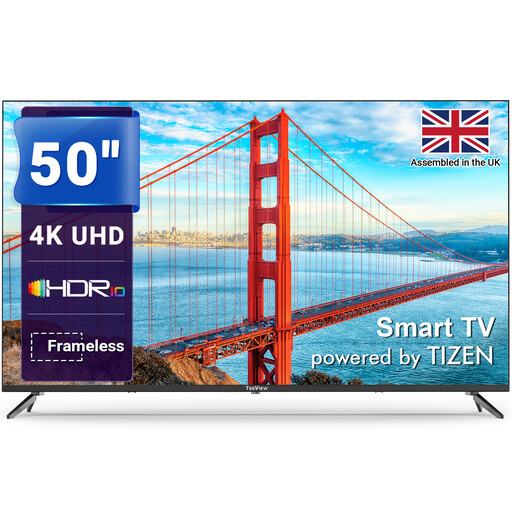
The 50-inch 4K screen and Tizen OS provide a size and smart-TV platform to compare with the household’s room and services. The listing specifies three HDMI ports and mentions Gaming Hub; check the exact console modes separately if gaming is important. Confirm its stand dimensions before choosing its position.
 No image available
The 65-inch diagonal makes room measurements particularly important before choosing this shared-screen option. The listing specifies QD-Mini LED, 4K, Google TV and a 144Hz native refresh rate. Check its installation dimensions and the exact HDMI gaming features needed for your setup; refresh rate alone does not establish console compatibility.
Measure from the main seating position to the planned screen location before comparing sizes, as Which? advises. Also check the TV’s physical dimensions and the other seats people use; the diagonal alone does not tell you whether it fits the room.
Not automatically: judge the exact TV’s sound against the household’s dialogue and viewing needs. If you add a soundbar, check that both devices support a compatible connection and audio format, as Which? advises in its soundbar guidance.
Check how the chosen TV and each required service provide and control subtitles, audio description and signing. Ofcom identifies these as access services for TV and on-demand programmes; whether they are easy to reach matters when several people share the screen.
GOV.UK says you need a TV Licence to watch or record programmes as they are broadcast, and to watch on-demand BBC programmes on iPlayer. Whether you need one therefore depends on what you watch, not simply on owning a smart TV.
For regular compatible-console gaming, check the exact model’s 4K120, variable refresh rate (VRR) and auto low-latency mode (ALLM) support against your console and games. Sony UK’s compatibility table shows that these features vary by TV series, so an HDMI 2.1 label is not a substitute for the model specification.