Choose a Windows 2-in-1 if maintaining the renovation budget means sustained, keyboard-led spreadsheet work. A large Android tablet or iPad may suit colleagues who chiefly review plans, add notes and make shorter updates while moving around the site. Whichever route you consider, check the team’s Excel features and Microsoft 365 entitlement, the accessories needed for the job and access to any sensitive workbook.
Who needs which setup?
Spreadsheet-first budget owners
If you build and repeatedly revise the main renovation workbook, prioritise the keyboard setup and the Excel features your team actually uses. Microsoft’s Excel guidance also makes the co-authoring arrangement worth checking before everyone adopts the same device.
Mobile site reviewers and note-takers
If you move between the office and renovation areas, consider the screen space needed for plans and costs alongside the tablet’s size and compatible note-taking accessories. Apple and Samsung list large-screen models with pen support in the product lines discussed below.
Shared-workbook coordinators
If you arrange access for colleagues, contractors or temporary project roles, check both the workbook-sharing setup and who can edit it. The Information Commissioner’s Office advises setting end dates for access that is not needed permanently.
What matters when choosing?
Windows 2-in-1
Choose when: The main job is frequent workbook editing and you want to move between tablet use and a keyboard-and-trackpad setup. Microsoft describes these interaction options for Surface Pro, 13-inch (12th Edition).
Allow for: Check the chosen configuration for its keyboard and software entitlement rather than assuming they are included.
Large Android tablet
Choose when: Reviewing plans and making pen-based notes away from a desk take priority. Samsung lists a 13.1-inch display and S Pen support for the Galaxy Tab S10 FE+.
Allow for: Check the exact workbook functions, Microsoft 365 plan and keyboard arrangement before relying on it for regular spreadsheet entry.
iPad with keyboard
Choose when: The team uses iPadOS and wants tablet-based document review with an optional typing setup. Apple lists 11-inch and 13-inch iPad Air models with compatible Pencil and Magic Keyboard accessories.
Allow for: The keyboard is separate, and Microsoft’s iOS editing conditions make the organisation’s Microsoft 365 entitlement important to check.
| Concern |
What to check |
Who this matters to |
| Spreadsheet entry |
Try the team’s actual workbook and confirm a suitable keyboard setup and Excel entitlement. |
If I enter changing quotes and totals throughout the project, I need a workable way to type and navigate the budget. Around 36% of consumers put spreadsheet entry first. |
| Shared editing and access |
Check the workbook’s sharing location, supported Excel apps and how temporary editing rights will be removed. |
When colleagues and contractors contribute, I need changes to remain coordinated without leaving access open indefinitely. For around 28% of consumers, shared editing and access are the primary concern. |
| Mobile plan review |
Compare screen size and confirm the pen arrangement needed for annotations. |
If I take plans around the renovation area, I want enough room to read them and record notes away from my desk. Around 18% of consumers prioritise mobile review and annotation. |
| Complete setup |
List the required keyboard, pen, charging equipment and software alongside the tablet variant. |
I need to know what the working setup requires before choosing a device, particularly if accessories and software are separate. The complete setup comes first for around 18% of consumers. |
Mistakes to avoid
-
Comparing tablets without the equipment needed to use them
A touchscreen-only configuration may not match a setup intended for sustained budget entry. Microsoft lists configuration choices for Surface Pro, while Apple sells a compatible iPad Air keyboard separately.
Decide whether each editor needs a keyboard, pen and Microsoft 365 entitlement, then compare complete setups.
-
Assuming every contributor gets the same Excel features
Microsoft’s co-authoring guidance depends on a supported workbook-sharing arrangement and compatible Excel apps. Editing features can also depend on the device and Microsoft 365 entitlement.
Try the real renovation workbook, its storage location and a contributor’s account on the proposed device before standardising on it.
-
Leaving temporary project access in place
A shared workbook may contain personal or commercially sensitive information. The Information Commissioner’s Office advises assigning end dates to permissions that are not needed permanently.
Give contributors individual access appropriate to their role, and set a date to review or remove temporary permissions.
-
Choosing a keyboard by tablet brand alone
Accessory compatibility can depend on the tablet generation and screen size; Apple identifies specific iPad Air models for its Magic Keyboard.
Match the full tablet model and the keyboard layout before ordering.
An incompatible keyboard can also mean arranging a replacement before regular workbook entry is practical.
Brands and product lines to consider
Microsoft
Surface Pro, 13-inch (12th Edition), is a Windows 2-in-1 option for a renovation budget managed through a keyboard-led workflow.
- Microsoft describes keyboard, touch, voice and pen interaction options for this model.
- Check the selected configuration for its keyboard, Microsoft 365 entitlement and other accessories.
Samsung
Galaxy Tab S10 FE and FE+ are Android options for mobile document review; Samsung lists a 13.1-inch screen for the FE+.
- Samsung specifies S Pen support, up to 2TB microSD support and an IP68 rating for the Galaxy Tab S10 FE+ line.
- Check the exact variant, compatible keyboard arrangement and Excel features needed by the team.
Apple
iPad Air offers an iPadOS route for shared-document review and mobile office work, with 11-inch and 13-inch M4 models listed by Apple.
- Apple lists Apple Pencil Pro and compatible Magic Keyboard support for these iPad Air models.
- The keyboard is sold separately; check the organisation’s Microsoft 365 entitlement for the required editing tasks.
Joybuy tablet options
These iPad and Android tablet options are relevant to reviewing renovation documents, taking notes or updating a shared budget. If sustained spreadsheet editing is the main task, compare their keyboard and Excel arrangements with a Windows 2-in-1 before choosing.
 Image unavailable
Apple iPad Pro 13-inch (M5), Wi-Fi + Cellular, 1TB, Standard Glass, Silver
Consider this 13-inch iPad for reviewing plans and making shorter budget updates while away from a desk.
The title specifies Wi-Fi + Cellular and 1TB storage. Confirm the exact connectivity configuration, compatible keyboard and Pencil, and the team’s Excel entitlement before relying on it for shared editing.
View on Joybuy
 Image unavailable
TABWEE T20 10.1-inch tablet, 256GB, with keyboard, mouse and stylus
The named keyboard and stylus arrangement makes this a tablet to examine if the job combines cost entry with handwritten notes.
The title specifies a 10.1-inch display and 256GB storage. Confirm the bundle contents and shipped Android version, then try the team’s workbook and Excel account.
View on Joybuy
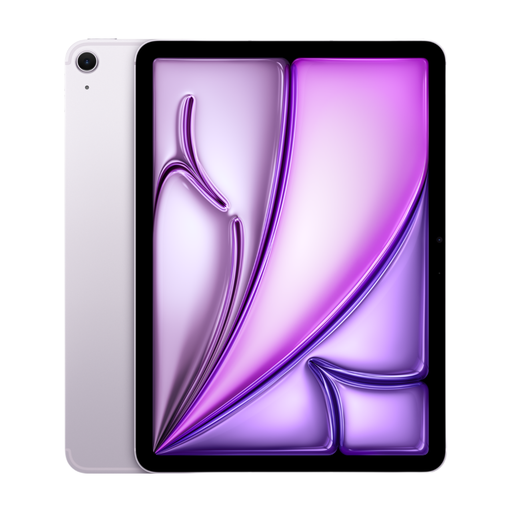 Image unavailable
Apple iPad Air (M4), Wi-Fi, 256GB, Purple — listed as 13-inch
This iPad Air is a candidate for document review and occasional shared-budget updates if your team uses iPadOS.
The title says 13-inch, but the description also says 14-inch: confirm the model and screen size before matching a keyboard or Pencil. Check accessories separately and verify the Microsoft 365 entitlement needed for editing.
View on Joybuy
 Image unavailable
Xiaomi Pad 8, 8G RAM, 128GB, Wi-Fi, Gray
Consider this tablet for carrying renovation documents between locations and checking what annotation setup is available.
The title specifies 8G RAM, 128GB storage and Wi-Fi. Confirm compatible stylus and keyboard options, what comes with the tablet, and whether the team’s workbook works as required.
View on Joybuy
 Image unavailable
TECLAST ArtPad Pro 2025 Edition, 12.7-inch, 256GB, with stylus
The listed screen and included stylus suit a setup centred on viewing plans and making handwritten annotations.
The title specifies a 12.7-inch 2K display, 256GB storage, dual-SIM 4G LTE and 5G Wi-Fi. Check keyboard options and test the required Excel features and account before choosing it for regular budget entry.
View on Joybuy
Questions about shared budgeting
Can several people update the renovation budget from different tablets?
Yes, if they use a supported Excel co-authoring setup for the shared workbook. Microsoft says colleagues can work on the same workbook; check its storage arrangement, each contributor’s app and the team’s Microsoft 365 entitlement before buying devices around that workflow.
Do I need a keyboard to manage the renovation budget?
A keyboard is worth prioritising if you regularly enter costs, formulas or supplier details; occasional review may not need one. Check whether the keyboard fits the exact tablet model and whether it forms part of the setup you plan to use.
Can I edit the budget on a large iPad without a Microsoft 365 subscription?
Do not assume that the editing features you need will be available without one. Microsoft states that basic editing is free on iOS devices with screens of 10.1 inches or less; for an 11-inch or 13-inch iPad Air, confirm the organisation’s entitlement and test the required workbook functions.
How should we control access to a budget shared with contractors?
Give each contributor access appropriate to their role and review temporary permissions when that role ends. If the workbook contains personal data, the Information Commissioner’s Office says the UK GDPR requires appropriate technical and organisational security measures; it also advises setting end dates for access that is not needed permanently.


