Desk gamers in a compact bedroom or study
If your desk also serves work or study, the screen's footprint, viewing distance and cable routes matter alongside its gaming features. Headphones can keep game audio away from someone else using the room.


Choose the display around where you sit and who shares it: a monitor generally suits close desk play, while a TV suits viewing from a sofa or bed and wider household use. Then prioritise the disruption that matters in your room—private audio, safe cable organisation or controller charging—and add storage only when your console and games call for it.
If your desk also serves work or study, the screen's footprint, viewing distance and cable routes matter alongside its gaming features. Headphones can keep game audio away from someone else using the room.
If other people watch the same screen, consider where everyone sits and whether the display also needs to serve films and television. Check charging and storage accessories against the console and controllers you already use.
If someone nearby sleeps, studies or takes calls, private audio and accessible microphone controls may matter more than room speakers. Check how the headset connects and, for a wireless model, how it charges.
Settle the viewing position before choosing a screen; then address whichever shared-room constraint most affects your next purchase.
Choose it when: you mainly play close to a desk and need the display to fit alongside other desk use.
Trade-off: a monitor may not serve sofa viewing or household entertainment as well as a larger TV.
Choose it when: you play farther from the screen or share it for viewing beyond games.
Trade-off: a TV needs enough physical space, and close desk viewing can make its pixel density more noticeable.
| Concern | What to check | Who this matters to |
|---|---|---|
| Private audio and voice chat | Check the headset's connection to your gaming device and how easily you can adjust volume or mute the microphone. | If someone else is sleeping or studying, I want game sound and voice chat under my control rather than coming through room speakers. Around 33% of consumers put private audio and voice-chat control first. |
| Display fit and viewing distance | Measure the viewing position and available surface; check stand or mounting requirements and the exact display's inputs. | When my screen must fit a desk or serve people watching from a sofa, where it goes determines what I can comfortably use. For around 27% of consumers, display fit is the primary concern. |
| Cables and power | Check the marked rating of any extension lead against the connected load; keep plugs accessible and never join extension leads together. | If several devices share a small area, I need to organise their leads without hiding damage or overloading a socket. Cable and power organisation comes first for around 27% of consumers. |
| Charging and storage compatibility | Match charging accessories to the exact controller; for extra storage, check the console generation and whether games must run from it. | If controller power or full console storage keeps interrupting play, I want an accessory that works with the equipment I own. Around 13% of consumers prioritise that compatibility need. |
A large TV can suit shared sofa viewing yet feel awkward at a close desk; a compact monitor may not serve as the household's main screen.
Measure the viewing position and usable desk, wall or TV-unit space. Check the stand depth or mounting requirements as well as the panel specifications.
Neat-looking cables do not make an overloaded or daisy-chained extension lead safe. Electrical Safety First warns against exceeding an extension's marked rating and plugging one extension lead into another.
Check the planned electrical load, use one extension device per wall socket and replace damaged leads rather than putting them in a cable box. Follow the reel's instructions on unwinding it for use.
Charging ports and battery systems vary. Microsoft specifies that its Rechargeable Battery + USB-C Cable is for Xbox Wireless Controllers with a USB-C port.
Identify your controller's exact model and port before choosing a dock, battery pack or cable.
Xbox says Series X|S-optimised games must be installed on the console's internal SSD or a Storage Expansion Card to play; compatible USB storage can hold games and apps.
If you want to play those optimised games from added storage, check that the accessory is a compatible Storage Expansion Card.
Relevant to PS4 and PS5 households considering private audio and accessible headset controls.
Relevant when controller power or console storage is the next constraint to solve.
A monitor-focused reference for desk gaming where viewing distance and screen footprint shape the choice.
These choices cover private-audio headsets, a Switch 2 Joy-Con charging dock and TVs for shared viewing. Choose by the room constraint and device you need to address, rather than treating them as parts of one required setup.
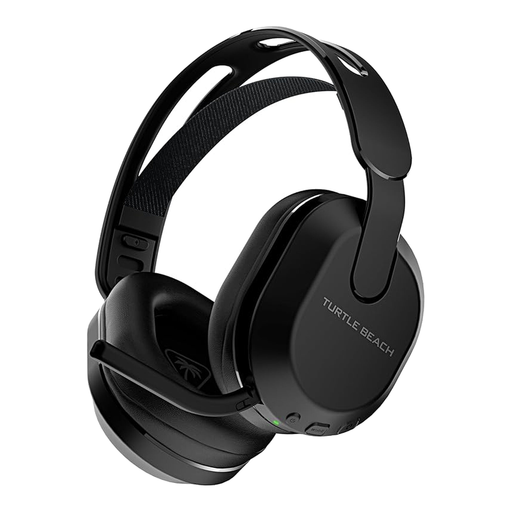 No image available
For private game audio when someone else uses the room. The product name specifies wireless use with PC, PS5 and PS4; confirm that its connection and microphone controls suit your device, and allow for charging.
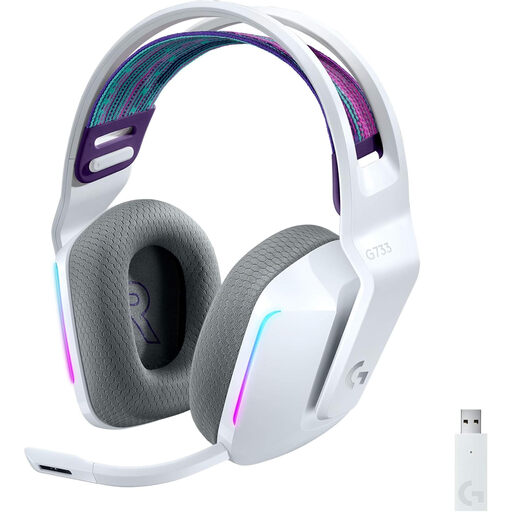 No image available
A wireless headset option for keeping game audio off room speakers. If you plan to use it with a console, confirm the connection method and available audio and microphone controls; wireless use also requires charging.
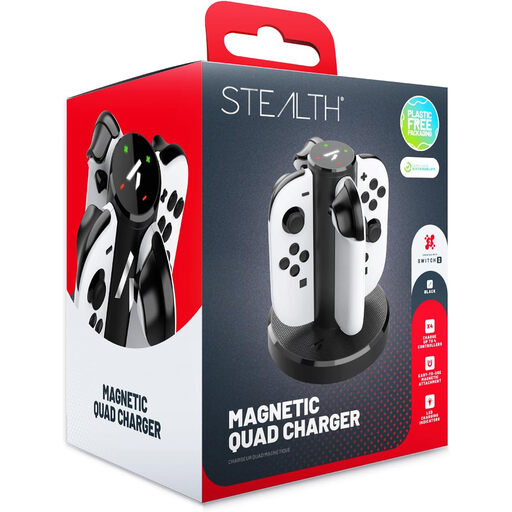 No image available
Consider this dock when charging Switch 2 Joy-Cons is the problem you need to solve. Its stated compatibility is with Switch 2 Joy-Cons, not other controller types; check that you have a suitable power source for the dock.
 No image available
A TV option when gaming shares a screen with household viewing. The product name specifies a 43-inch 4K HDR display and a 120Hz Game Accelerator for FHD; that wording does not establish a 120Hz 4K mode. Check the stand footprint and supported modes for your console before buying.
 No image available
Consider this 65-inch TV if the shared viewing position and available space call for a larger screen. Its product name lists 4K HDR and a 120Hz Game Accelerator for FHD, not a confirmed 120Hz 4K mode. Measure the intended placement and check the modes your console can use.
Choose a monitor for close desk play and a TV for longer-distance viewing or a screen shared for films and television. BenQ UK and RTINGS both discuss these viewing-use differences; check the exact model's dimensions, inputs and supported gaming modes before deciding.
A headset can keep game audio off room speakers when someone else needs quiet. Check that its connection works with your gaming device and that volume and microphone mute are easy to control; a wireless model will also need charging.
They can share an extension only if their combined load stays within its marked rating. Electrical Safety First advises against overloading extensions or plugging one extension lead into another; check the rating, keep damaged leads out of use and follow a cable reel's unwinding instructions.
Not directly from ordinary USB storage: Xbox says those games must be installed on the console's internal SSD or a Storage Expansion Card to play. Compatible USB storage can still hold games and apps, so decide whether you need extra space for storage or for playing directly from the added device.