Choose a voice-controlled smart speaker if hands-free radio and communal playback matter most, but agree household profiles and privacy settings before using it in a shared room. An app-led Wi-Fi speaker suits a more permanent setup, while Bluetooth suits occasional listening when someone is happy to control playback from a paired device. If you plan to add rooms, check compatible grouping, accounts and service subscriptions before choosing the first speaker.
Who is sharing the speaker?
Households wanting hands-free audio
In a kitchen or lounge, a voice request can start radio or music without passing a phone around. Decide whether everyone is comfortable with voice access in that room, and review personal results and recording controls before setting it up.
Homes with separate listening accounts
Family members or housemates may want different music accounts on a shared system. Check how the particular speaker platform handles profiles and whether each intended content service allows the account switching you need.
Homes adding speakers in other rooms
If several rooms should play the same audio in sync, choose the first speaker with the intended grouping system in mind. Amazon, Google and Sonos describe grouping for compatible devices; a Wi-Fi or Bluetooth label alone does not establish that two speakers can form a group.
What should you check before choosing?
Voice-controlled smart speaker
Choose when: People regularly want to start radio, music or podcasts by speaking in a communal room.
Allow for: Shared-account and privacy decisions; Google and Amazon provide controls and profiles, but their settings need to suit the household.
App-led Wi-Fi speaker
Choose when: Playback will usually be managed through an app in a fixed room, with compatible room grouping a possible next step.
Allow for: Wi-Fi and app setup, service compatibility and household access to the controlling account.
Portable Bluetooth speaker
Choose when: Listening moves between rooms or outside, and phone-led playback is acceptable.
Allow for: A paired source device and charging; compatible multi-speaker features do not mean arbitrary Bluetooth speakers will synchronise.
Start with who controls playback, then check the services, privacy settings and room-grouping arrangements that everyone will actually use.
| Priority | What to check | Your needs |
|---|
| Radio and on-demand audio |
Confirm the intended radio stations, music and podcast services on the chosen speaker or connected source. Check the required account and subscription for each service. |
I want the shared device to handle radio as well as other audio. In Ofcom’s 2025 UK audio survey, 71% of people who use a voice assistant used it to listen to both radio stations and other types of audio; that figure is not a share of all adults. |
| Hands-free control |
Check which requests the voice assistant supports and how someone can control playback without speaking. Place the speaker where household members can use those controls. |
Radio should be easy to start in a shared room without finding someone’s phone. Ofcom reported in 2025 that 54% of voice-assistant users who listen to radio made voice requests using a smart speaker. |
| Shared-room privacy |
Review personal results, guest access and recording settings on the exact platform. Google says guests can activate shared devices and some interactions may be stored in the owner’s account; its Guest Mode has availability limits. |
I do not want a communal speaker to reveal private reminders or account information to visitors. The household should agree which voice features belong in shared rooms. |
| Individual accounts |
Check profiles, linked services and simultaneous-stream rules. Sonos documents multiple accounts for the same service where supported; Amazon says individualised Alexa experiences require profiles on the same Alexa account. |
Different people may want their own listening choices without making one person’s account the default for everyone. |
| More than one room |
Verify the exact models and grouping method before expanding. Amazon, Google and Sonos describe synchronised playback among compatible devices; Amazon notes that separate subscriptions may be required. |
We may want the same station or playlist in several rooms, rather than a collection of speakers that cannot be grouped. |
| Changing locations |
For a portable Bluetooth speaker, check its paired-source requirements, charging routine and any stated battery conditions. For a fixed setup, check placement, power and network requirements. |
Sometimes the speaker needs to move to another room or outside; at other times, having it ready in one communal room matters more. |
What can complicate shared listening?
-
Assuming Bluetooth makes playback phone-free
A portable Bluetooth speaker ordinarily relies on a paired device to start and control playback. If that device leaves the house, it may recreate the problem of one person managing everyone’s audio.
Choose this route when phone-led listening and charging suit the household; otherwise compare how a smart or Wi-Fi speaker accesses the intended services.
-
Leaving personal voice results on in a shared room
Google warns that guests may activate shared devices and that some interactions may be stored in the owner’s account. Amazon provides choices for retaining or deleting Alexa voice recordings, with a possible effect on the experience.
Review personal results, guest features and recording settings with regular users before placing a voice speaker in a communal space.
-
Assuming any two speakers can play in sync
Amazon, Google and Sonos document grouping for compatible devices within their respective systems. A speaker bought without checking the intended group may not join it.
List the rooms you plan to cover, then confirm compatible models, grouping controls and service-stream rules before buying the first speaker.
Expansion also means acquiring compatible speakers; Amazon notes that some multi-room listening may require separate subscriptions.
-
Reading maximum battery life as everyday playtime
JBL describes Flip 7 playtime as up to 16 hours. That maximum is not a promise for every listening condition, and a portable speaker needs charging.
If audio will play daily in one room, compare the practical charging routine with the power arrangements of a speaker intended to stay there.
Which brands illustrate the options?
Amazon Echo / Alexa
A voice-controlled route for shared rooms, with the option to build a group of compatible Echo devices.
- Amazon says compatible Echo devices can group for music, radio, podcasts and Audible.
- Individualised Alexa experiences require profiles on the same Alexa account; some multi-room listening may need separate subscriptions.
Google Home / Nest
A voice-controlled option for households considering compatible Google Home speaker groups.
- Google documents synchronised groups across compatible speakers, displays and streaming devices.
- Google says guests can activate shared devices and some interactions may be stored in the owner’s account. Review device-specific personal results and Guest Mode availability.
Sonos
An app-led shared-audio route with compatible room grouping.
- Sonos says Era 100 supports Wi-Fi, Bluetooth and line-in with the required adapter; compatible Sonos rooms can play the same content in sync.
- Multiple accounts for a content service depend on that service being supported and connected. Voice-service availability varies by country and language.
JBL
A portable Bluetooth route for occasional listening in different places.
- JBL states that Flip 7 has IP68 dust and water protection and can connect with compatible Auracast speakers.
- Playback ordinarily depends on a connected source; JBL’s up-to-16-hour playtime is a maximum, not a guaranteed duration.
Joybuy options for shared listening
These options cover a tabletop speaker for a shared room and a portable Bluetooth speaker for listening in different places. Choose between them according to how your household will control playback.
 No image available
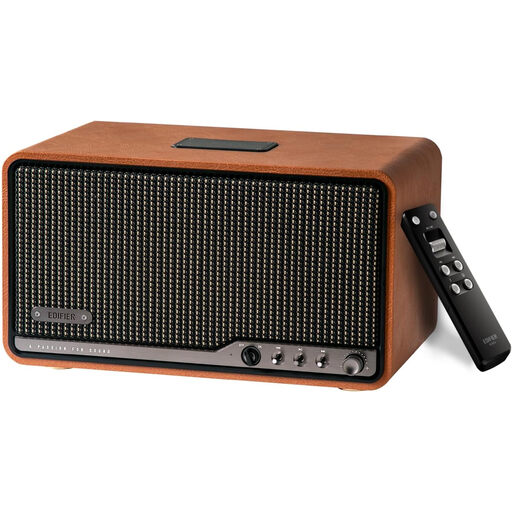
Edifier S300 wireless multi-room tabletop speaker, Brown
A tabletop option for shared-room listening. Before relying on it for household radio or podcasts, confirm your intended services and playback sources; also check compatible multi-room grouping and power arrangements for its planned location.
View on Joybuy
 No image available
JBL Flip 7 Bluetooth speaker, Squad Camo
A portable choice for occasional shared listening when a paired device can control playback. JBL states that Flip 7 has IP68 dust and water protection and up to 16 hours of playtime; allow for charging, and check that the paired source can play your intended radio and podcasts.
View on Joybuy
Common questions
Should a shared home choose a smart speaker or an app-led Wi-Fi speaker?
Choose a voice-controlled smart speaker when hands-free requests are central and the household is willing to manage shared profiles and privacy controls. An app-led Wi-Fi speaker makes more sense when people prefer to manage playback through an app; check the actual services and grouping support on either option.
Can everyone use their own streaming account?
It depends on both the speaker platform and the content service. Sonos documents adding multiple accounts for the same service where supported; Amazon’s individualised Alexa experiences require profiles on the same Alexa account. Check the intended service, subscription and account-switching rules before buying.
How can we limit private results on a communal voice speaker?
Review the controls on the specific device before placing it in a shared room. Google offers device-specific personal-results controls and Guest Mode, subject to availability; Amazon offers Alexa recording-retention choices and notes that deleting recordings may affect the experience. Agree settings with the people who regularly use the room.
Will speakers from different brands play together in sync?
Do not assume they will. Amazon, Google and Sonos each document grouping for specified compatible devices; confirm the exact combination and intended audio service before planning a mixed-brand setup.


