Choose a powered desktop HDD for a photo catalogue that normally stays in the studio, a portable SSD for frequent transfers and an off-site copy, or a portable HDD when movable capacity and a repeatable backup routine matter most. Whichever format you choose, check capacity, computer compatibility and access controls, then keep a recoverable copy separate from the drive in everyday use.
Who needs which setup?
Studio archive custodians
If you maintain the master catalogue in one location, plan for enough capacity, regular copies and a way to restore files after a workstation failure. The National Cyber Security Centre also advises storing an external backup securely and disconnecting it when it is not in use.
Teams rotating copies between locations
If the backup travels between the studio, shoots and secure off-site storage, portability and the time needed to copy large image sets both affect the choice. A drive that moves easily still needs careful handling and a separate storage routine.
Studios handling client-identifiable images
If a portable or shared backup contains personal information, decide who can unlock it and how access will be recovered. The Information Commissioner’s Office identifies encryption of backup media as protection against unauthorised access, particularly if a device is lost or stolen.
What matters when choosing?
Powered desktop HDD
Choose it when: the catalogue normally stays in one studio location and mains power is available.
Trade-off: its power requirement makes it less convenient for rotating a copy off-site.
Portable SSD
Choose it when: staff frequently move the copy and transfer large sets of images.
Trade-off: the quoted maximum transfer speed depends on the host connection and cable.
Portable HDD
Choose it when: the studio wants a movable catalogue copy and a straightforward recurring backup routine.
Trade-off: check the exact model for scheduling and encryption rather than assuming every portable HDD includes them.
| Concern |
What to check |
Who this matters to |
| Recoverable backups |
Check that the backup can run regularly, be checked afterwards and be stored separately when not in use. The National Cyber Security Centre warns that viruses can affect connected backup devices. |
If a workstation fails or files are deleted, I need a copy I can actually restore, not just another drive left attached. Around 36% of consumers would put recovery and separation first. |
| Portable transfers |
Check the drive capacity and the USB ports and cables on computers used for backups; a quoted maximum SSD speed depends on the connection. |
When I move recent shoots or a catalogue copy off-site, lengthy transfers interrupt the handover. Around 29% of consumers would prioritise transfer speed and portability. |
| Mac and Windows access |
Choose the shared file system before copying files. Apple documents ExFAT for a disk over 32 GB intended for Mac and Windows use; formatting erases existing files. |
If colleagues use both Macs and Windows PCs, I need them to write to the shared copy without reformatting it. For around 21% of consumers, mixed-device access would come first. |
| Content protection |
Check encryption on the exact drive or volume and agree who holds its password or recovery key. The Information Commissioner’s Office recommends considering encryption for stored personal information. |
If the backup holds identifiable client images, I need to limit access if the drive is misplaced or borrowed. Protecting sensitive content would be the primary concern for around 14% of consumers. |
Backup mistakes to avoid
-
Treating an always-connected drive as the whole backup plan
The National Cyber Security Centre warns that viruses can affect storage left connected to an infected computer. A connected copy may therefore fail to provide the separation needed for recovery.
Check each completed backup, disconnect the drive when it is not in use and keep another copy in a separate secure location or use an additional online backup.
-
Reformatting the only working catalogue copy
Formatting erases files, as Apple notes. Changing a drive’s format to make it usable across Mac and Windows computers can destroy the existing copy.
Decide the shared file system before loading the catalogue. If a drive must be reformatted, make and check another complete copy first.
-
Expecting maximum SSD speed from every USB-C port
Samsung specifies a compatible USB 3.2 Gen 2 host, cable and UASP for the quoted maximum speeds of its T7 Shield. The connector shape alone does not establish the available transfer speed.
Check the ports and cables on the computers that will regularly perform backups before making transfer speed a deciding factor.
-
Relying on a drive password without an access plan
Encryption can protect a misplaced backup, but authorised staff still need a secure way to unlock it. The Information Commissioner’s Office advises keeping passwords separate from encrypted devices.
Agree who may access the catalogue, store recovery information securely and review access when staff or collaborators change.
If recovery information is lost, restoring the catalogue can be delayed.
Brands to consider for these drive types
LaCie
The d2 Professional is a desktop-drive reference for a stationary photo library or large-asset archive.
- Seagate’s LaCie d2 Professional page states USB-C connectivity, transfers of up to 290 MB/s, scheduled backup tools and a five-year limited warranty for the referenced product.
- The drive needs a live power outlet. Check the specifications and warranty of the exact model being considered rather than applying this model’s terms to another drive.
Samsung
The portable T7 Shield SSD is relevant when a catalogue copy needs to travel between locations.
- Samsung states maximum sequential read and write speeds of 1,050 and 1,000 MB/s for the referenced T7 Shield, subject to a USB 3.2 Gen 2 host, suitable cable and UASP.
- Samsung’s IP65 and 3 m drop claims come from controlled-condition testing; resistance can vary in use, and related damage is excluded from its warranty coverage.
Seagate
The One Touch family offers portable-drive options for recurring catalogue copies.
- Seagate describes one-click and daily, weekly or monthly scheduled backups for the One Touch family, alongside Windows, Mac and Chromebook support.
- Seagate describes AES-256 hardware encryption for password-protected variants. Confirm both encryption and software compatibility on the exact variant before choosing it for shared or sensitive files.
External drives on Joybuy
These drives cover portable SSDs for moving a catalogue copy, a portable HDD for a movable backup and a desktop HDD for storage that normally stays in the studio. Check that the chosen capacity fits the catalogue and that its connection and backup routine work with the studio’s computers.
 No image available
Samsung MU-PG2T0B 2 TB portable SSD, black
Consider this portable SSD when the catalogue copy needs to move between locations; check that 2 TB allows for the files you intend to back up.
USB Type-C and USB 3.2 Gen 2x2 are stated in the product name. Check the studio computers’ ports and cables before relying on that connection standard.
View on Joybuy
 No image available
Samsung Portable SSD T7 2 TB, grey
This portable SSD is an option for a catalogue copy that staff need to carry; check that 2 TB covers the catalogue and expected additions.
The product name specifies USB Type-C and USB 3.2 Gen 2. Confirm the connection available on the computers used for backups.
View on Joybuy
 No image available
Samsung T7 Shield Portable SSD 1 TB, blue
Consider this portable drive for an off-site catalogue copy if the files and expected growth fit within 1 TB.
The product name specifies USB 3.2 Gen 2. Samsung’s T7 Shield durability claims do not replace careful handling or a separately stored backup.
View on Joybuy
 No image available
Western Digital My Passport Ultra portable HDD 5 TB, blue
This portable HDD is an option when staff need to move a catalogue backup; check that 5 TB fits both the current files and planned additions.
Before loading files, confirm the file system and any backup or encryption software needed by the studio’s computers.
View on Joybuy
 No image available
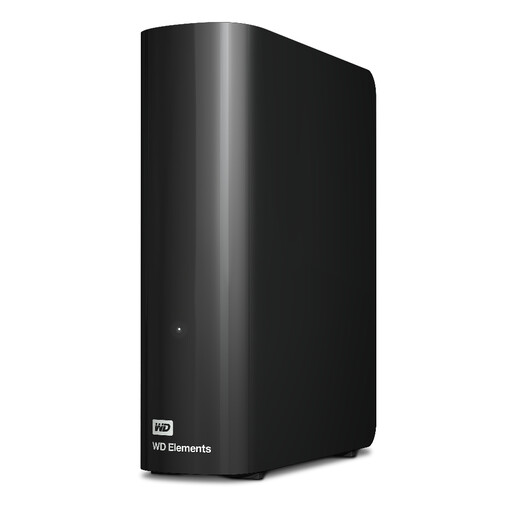
Western Digital WD Elements 12 TB desktop HDD
Consider this desktop drive for a catalogue copy that normally stays in the studio; check that 12 TB provides enough room for the backup plan.
The product name specifies USB 3.2 Gen 1. Confirm the required power connection, shared file system and arrangements for a separately stored copy.
View on Joybuy
Common questions
Is one external drive enough for a shared studio photo catalogue?
One external drive can be a backup destination, but it should not be the only recovery plan. The National Cyber Security Centre advises securing the device and disconnecting it when it is not in use because viruses can affect connected storage; it also suggests combining device and online backups where practical.
Can Macs and Windows PCs use the same catalogue drive?
Yes, if the drive is formatted for the intended shared workflow. Apple documents ExFAT for a disk over 32 GB used with Mac and Windows computers, and warns that formatting erases files. Apple also notes that a Mac may read NTFS even though Disk Utility does not support writing to it.
Should a studio encrypt its backup drive?
Consider encryption when the backup contains personal information, especially if the drive travels or could be lost. The Information Commissioner’s Office identifies encryption of backup media as protection against unauthorised access; the studio still needs secure password handling and clear rules for authorised staff.
When does a portable SSD make more sense than a desktop HDD?
A portable SSD suits frequent catalogue transfers and movement between locations, provided its capacity fits and the studio’s connections can support the speed it needs. A powered desktop HDD suits a copy kept mainly in one place; Seagate positions the LaCie d2 Professional for photo libraries, while Samsung qualifies the T7 Shield’s stated maximum speeds by the host, cable and connection conditions.


