What to consider before buying
For a tablet used around the home, settle the account and app questions first; then compare the screen, charging arrangements and controls for the people who will use it.
Android tablets
Consider when: Household members need separate apps and settings on a personally used tablet.
Trade-off: Check the exact model’s user-management options; workplace-managed devices may have different restrictions.
iPads
Consider when: One device-level account arrangement works for your household and FaceTime or Apple accessibility features suit the intended users.
Trade-off: Apple’s Shared iPad requires organisation-issued accounts and device management; Family Sharing is not a household profile switcher.
Amazon Fire tablets
Consider when: Your household’s needs fit the supported Amazon app ecosystem and media use is a priority.
Trade-off: Google Play is unsupported, and an app listing alone does not establish compatibility with a particular Fire model or child profile.
| Concern |
What to check when buying |
Who this matters to |
| Calling apps and hardware |
Check the app’s supported operating system and installation route, then consider camera position, speakers and microphone provision on the exact model. |
If the household relies on one calling service, you will want it to work on the intended device and account setup. About 28% of consumers put calling-app compatibility first. |
| Accounts and child access |
Decide whether you need separate adult user spaces, managed child access or only shared media, and check the model’s profile options. |
If different people need private settings or children need controlled access, the platform’s account tools matter. About 28% of consumers prioritise account separation or child access. |
| Screen and everyday use |
Compare screen size and resolution, speaker provision and the exact memory and storage configuration. |
If browsing, email and shared viewing are the main tasks, you will want a screen and setup that suit those uses. Around 17% of consumers put viewing and browsing first. |
| Battery and charging |
Check the conditions behind battery claims and what charging equipment is included for the exact variant. |
If the tablet will be passed between people away from its charging spot, convenient charging and realistic battery expectations matter. About 16% of consumers prioritise unplugged use and charging. |
| Accessible, manageable controls |
Try the relevant accessibility settings and calling workflow, and decide who will administer accounts and restrictions. |
If an intended user needs simpler controls or a particular accessibility feature, assess that workflow before choosing. Roughly 11% of consumers put accessible setup first. |
Joybuy tablet options
These Joybuy options are Android tablets for shared household use, including general-use and child-labelled models. Check the exact app, account and accessory requirements that matter to your household.
 No image available
Samsung Galaxy Tab A11+ 11-inch Wi-Fi, 128GB, Grey
Consider it for shared browsing and calls if its account setup suits your household; check the calling app on the exact model.
The product information specifies an 11-inch 1920 × 1200 display, 90Hz refresh rate, dual speakers and a 5MP front camera.
The product information says the 25W charger is sold separately.
Joybuy
 No image available
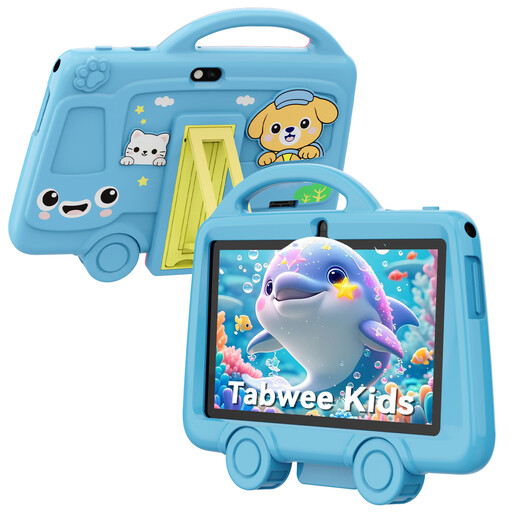
TABWEE K8 7-inch Kids’ Tablet, 3GB RAM, 32GB storage, blue
Consider it if you want a child-labelled tablet, but check the calling apps and account controls rather than assuming they are included.
The product title specifies 3GB RAM, 32GB storage, a front camera and Wi-Fi. The product information lists a protective case and headphone jack.
The product information says it is not suitable for children under 3 and should be used under adult supervision.
Joybuy
 No image available
TABWEE K8 7-inch Kids’ Tablet, 2GB RAM, 32GB storage
Consider it if you want a child-labelled tablet, and check whether its app and account arrangements fit your intended use.
The product title specifies 2GB RAM, 32GB storage, a front camera and Wi-Fi. The product information lists a protective case and headphone jack.
The product information says it is not suitable for children under 3 and should be used under adult supervision.
Joybuy
 No image available
TECLAST P50T 11-inch Android 16 Tablet, 4GB RAM, 128GB storage
Consider it for everyday browsing and calls if its app support and account setup meet your household’s needs.
The product information specifies an 11-inch 1920 × 1200 display, 4GB RAM, 128GB storage and a 5MP front camera.
The product title uses the wording “5G WiFi”; check the exact wireless specification if network-band compatibility matters to you.
Joybuy
 No image available
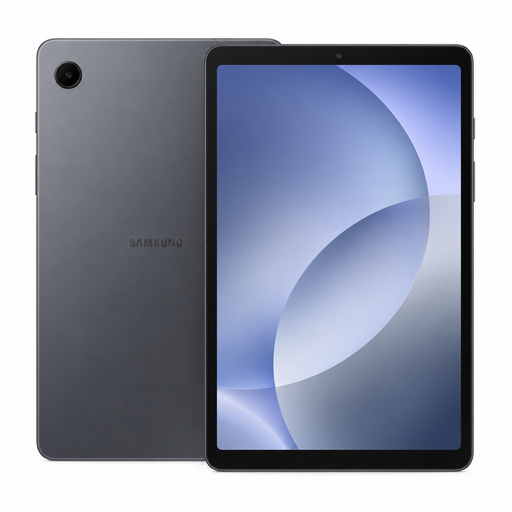
Samsung Galaxy Tab A11 Wi-Fi, 64GB
Consider it for shared browsing and calls if the screen size and account options suit the people who will use it.
The product information specifies an 8.7-inch 1340 × 800 display, 90Hz refresh rate, 4GB RAM, 64GB storage and a 5MP front camera.
The product description says the travel adaptor is not included.
Joybuy
Frequently asked questions
Can everyone have a separate login on a shared tablet?
Some personally used Samsung Galaxy tablets support separate user accounts, but check the exact model and setup. Apple’s Shared iPad requires organisation-issued Managed Apple Accounts and device management; Family Sharing is for eligible purchases and subscriptions, not ordinary household device logins.
Which calling apps have documented installation routes?
Google documents Meet for tablets through the App Store and Play Store, and Zoom documents mobile apps for iOS and Android. An Amazon Appstore listing for Zoom does not establish compatibility with a particular Fire tablet, software version or child profile, so check the intended configuration.
How should I prepare a tablet for a child?
Use the applicable platform’s child-access settings rather than relying on an adult’s unrestricted account. Amazon documents child profiles on compatible Fire devices, Apple Screen Time manages apps, websites and communications, and Google cautions that Family Link filters are not perfect.
Does an up-to-13-hour battery claim mean 13 hours of video calls?
No. Amazon’s Fire HD 10 listing advertises up to 13 hours, but that rating is not a continuous video-call endurance result. Do not use it as a promise of call runtime.
What if someone finds standard tablet menus difficult?
If cognitive accessibility is relevant, consider trying Apple’s Assistive Access workflow with the intended user. Apple describes larger onscreen items and more focused features, but suitability depends on the person and the apps they need.
Should I rely on older guides that recommend Skype?
No. Microsoft states that consumer Skype retired on 5 May 2025. Choose a currently supported calling service and check its compatibility with the tablet and account setup you plan to use.


