Choose a tablet around who will sign in, which apps each person needs and how often the child handles it, rather than relying on a “kids” label alone. A child-focused bundle may include a case and child-profile tools, while a general Android tablet or an iPad may suit different app and account needs. Check account separation, app availability, case fit and any separately needed accessories or services before buying.
Who this setup may suit
Families sharing one tablet
Adults and a child need to take turns. Check how the child enters a restricted experience and whether adult and child access are genuinely separated; a family account does not necessarily create separate users on the device.
Families planning for frequent handling
If a child will handle the tablet often, compare a fitted case included with a bundle against a case bought separately. Check the exact model and generation, and read any cover or guarantee terms.
Families with specific apps or media needs
Learning, entertainment and communication plans may depend on particular apps, a headphone connection or enough space for downloaded content. Check the exact tablet variant and app store against what the household intends to use.
What to prioritise when choosing a child’s shared tablet
For a tablet used by a child at home, decide how it will handle separate access and planned activities before comparing cases and accessories.
| Concern |
What to check when buying |
Who this matters to |
| Accounts and supervision |
Try the sign-in and profile-switching steps; check purchase permissions, age settings and supervision compatibility on the exact device. |
If I need the child’s access to be distinct from adult use, I will check how that works on the tablet itself. About 31% of consumers in this setup prioritise account separation and supervision. |
| Protection and case fit |
Check that the case fits the exact model and generation, leaves ports and cameras accessible, and is included if the bundle promises one. |
When a child handles the tablet often, I want a case that fits and clear terms for any included cover. Roughly 25% of consumers put handling protection first. |
| Apps and storage |
List essential apps, then check the exact model’s app store, internal storage, microSD support and Wi-Fi or cellular configuration. |
If the tablet needs to run particular learning or entertainment apps and keep content available, I will check those requirements against the exact variant. Around 19% of consumers prioritise app access and storage. |
| Charging and listening |
Check what charging accessories are supplied, adaptor compatibility and the tablet’s headphone connection or supported wireless options. |
For regular home use, I want compatible charging and headphones without guessing what is in the box. About 13% of consumers focus first on completing that setup. |
| Whole-setup cost |
Compare the complete basket, any optional paid service and guarantee terms; consider statutory rights separately from voluntary cover. |
If I am balancing the device with a case, storage or ongoing content access, I will compare the whole setup rather than the tablet alone. Approximately 12% of consumers make total setup cost their main concern. |
Buying pitfalls to avoid
-
Assuming a family account creates separate device logins
Account sharing, child controls and separate local device users are different features. A family group may not provide the sign-in arrangement you expect on an ordinary shared tablet.
Before choosing, try the exact sign-in or profile-switching process and check how the child’s restrictions apply.
-
Choosing a Fire tablet before checking required apps
Google Play is not supported on the cited Fire HD 8 listing, so an app available through Google Play may not be available for that tablet.
Check every essential app in the app catalogue supported by the exact model before buying.
-
Treating any children’s case as a match
Case compatibility can be limited to a particular tablet generation. A case that does not fit the chosen model may not provide the intended practical setup.
Match the case to the exact model and generation, and read any breakage-cover terms separately.
A replacement case may be needed if the one purchased does not fit the tablet.
-
Comparing tablets without checking what else is needed
A case, microSD card, suitable mains adaptor or paid content access may be separate from the tablet. Included items and service terms vary by setup.
Check the box contents and any ongoing service before comparing complete setups.
The final setup may involve separate accessory or content purchases, depending on what the household needs.
Relevant brands to compare
Fire tablets
Consider a Fire tablet or Kids bundle when child profiles and a case included with a particular bundle matter to the household.
- Fire documentation describes child profiles and parental time controls; some Kids bundles specify an included case.
- Google Play is not supported on the cited Fire HD 8 listing. Free Kids access and paid Kids+ are distinct offerings, so check app availability and service terms for the chosen model.
Apple
An iPad may suit a household that wants to use its existing Apple accounts, apps and Screen Time arrangements on a general-purpose tablet.
- Apple describes Child Accounts with Screen Time; the iPad 11-inch (A16) has 128 GB starting storage.
- Family Sharing does not itself create independent local users on an ordinary household iPad. Apple says Shared iPad requires device supervision; check case and accessory compatibility for the selected model.
Samsung
Galaxy Tab A models are general-purpose Android options; Samsung Kids may be relevant when a child uses a shared or adult Samsung device.
- Samsung describes PIN, activity and time controls for Samsung Kids. Its UK Galaxy Tab A11 specification lists a 3.5 mm jack and USB-C cable.
- Check the controls on the exact variant. A separately sold card or case is not included simply because the tablet supports it.
Lenovo
The UK Tab M11 is a general-purpose Android option for households comparing an 11-inch tablet with protection chosen separately.
- Lenovo lists a 128 GB Tab M11 UK variant.
- Folio-case add-ons are separate choices; check the exact fit and whether the case suits the household’s needs.
Joybuy product choices for a child’s home tablet setup
These Joybuy choices cover tablets and headphones for a child-used home setup; check app needs, included accessories and compatibility for the exact product.
 No image available
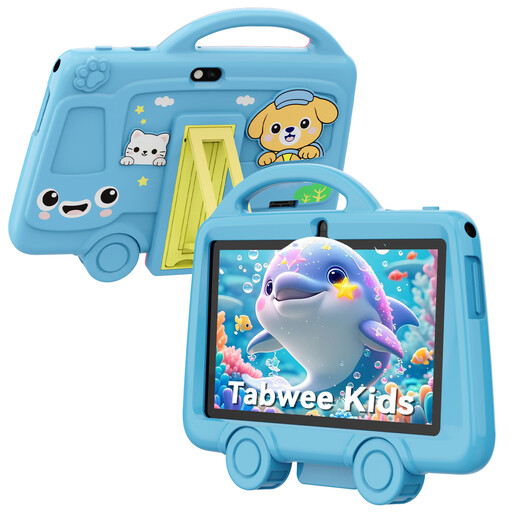
TABWEE K8 Kids’ Tablet, 7-inch, 3 GB RAM, 32 GB, blue
A child-focused tablet for home use when a case and headphone connection are relevant to the setup.
The title lists 3 GB RAM, 32 GB storage, 2.4 GHz Wi-Fi and a 3.5 mm headphone jack. The listing describes it as drop-resistant and lists a protective case.
The listing says it is not suitable for children under 3 and recommends adult supervision.
View on Joybuy
 No image available
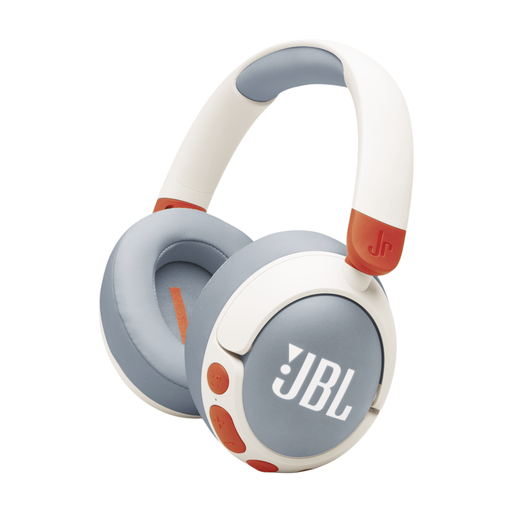
JBL Junior 470NC Kids’ Wireless Over-Ear Headphones, white
For a child’s tablet listening setup, check that the connection and listening controls suit the household’s needs.
The product title describes wireless over-ear headphones. The listing also describes Bluetooth, a 3.5 mm audio cable, USB-C charging and app controls for volume and listening time; check compatibility with the chosen tablet.
View on Joybuy
 No image available
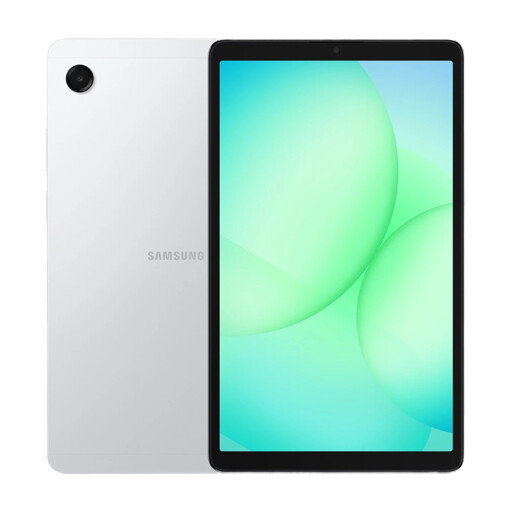
Samsung Galaxy Tab A11 X130, 8.7-inch Wi-Fi, 8 GB RAM, 128 GB, silver
A general-purpose tablet to consider when home use calls for local storage and Wi-Fi.
The listing specifies 8 GB RAM and 128 GB storage, with microSD expansion. It says a charging adapter is not included, so check what is needed for the household’s charging setup.
View on Joybuy
 No image available
Samsung Galaxy Tab A11+, 11-inch, 8 GB RAM, 256 GB, Wi-Fi, grey
Consider this variant if the household wants the listed internal storage and a larger display for shared home use.
The listing specifies 256 GB storage and microSD expansion, with access to Google Play and Galaxy Store. A compatible charging adapter is sold separately. The listing describes IP52 protection and says not to submerge the tablet.
View on Joybuy
 No image available
Alldocube Kido Children’s Tablet, 8-inch, Android 15, 3 GB RAM, 32 GB, blue case
A child-focused option when a listed child lock and case are relevant to the home setup.
The title lists Android 15, 3 GB RAM, 32 GB storage and a 3.5 mm socket. It also says no adapter is included; check the charging items needed separately.
View on Joybuy
Frequently asked questions
Can an adult and child have separate sign-ins on the same household iPad?
Do not assume that Family Sharing creates separate local users on an ordinary iPad. Apple describes separate Apple Accounts for family controls, while its multi-user Shared iPad feature requires device supervision; check the intended sign-in arrangement before choosing an iPad for shared household use.
Will Family Link supervise every tablet a child uses?
No. Google says most Family Link supervision tools will not work on devices that cannot be supervised. Check whether the exact tablet is compatible with the controls the family needs.
What should I check before choosing a Fire tablet for a child’s apps?
Check each essential app in the app catalogue supported by the exact Fire model. Google Play is not supported on the cited Fire HD 8 listing, so do not assume that an app available through Google Play will be available on that tablet.
How can I check whether a tablet case will fit?
Match the case to the tablet’s exact model and generation, then check that its openings align with the ports and cameras. Read any included cover terms separately; a fitted case does not guarantee protection from damage.
What should I check for charging and headphones at home?
Check the box contents, charging-adaptor compatibility and the tablet’s headphone connection or supported wireless options. London Fire Brigade advises using a supplied charger or a genuine replacement from a trusted supplier. For listening, Royal Free London NHS Foundation Trust advises using a comfortable volume no higher than needed and notes that exposure duration matters.


