What should you check before choosing?
Choose an account setup that works for the household, then compare the devices you are considering on viewing, calls and practical extras. Which?’s September 2026 UK tablet guidance treats screen quality, battery life and speed as separate factors to assess.
iPad and Apple services
Consider it when: Your household already uses Apple services and wants to share eligible purchases through Family Sharing while keeping separate Apple Accounts.
Keep in mind: Apple’s Shared iPad sign-in is for managed organisational devices, not separate local profiles on an ordinary home iPad.
Android tablet
Consider it when: Expandable media storage or separate spaces for people using one device matters; check which features the exact model offers.
Keep in mind: Google says some Android devices cannot add users, so Android alone does not guarantee private profiles.
| Priority | What to check | Your needs |
|---|
| Shared viewing |
Compare screen sharpness, viewing angles and speakers where the tablet will be used. Compare battery results on the same test basis if viewing away from a charger matters. |
I want more than one person to see and hear a programme comfortably, even when we move between rooms. |
| Video calls |
Check the front camera and microphone on the exact model, access to your calling app and account, and whether the home connection can handle calls alongside streaming. Ofcom notes that these activities share household bandwidth. |
For regular calls, I need the service my contacts use to work on the tablet, with a practical place to set it down. |
| Household accounts |
Check how people will sign in to apps and keep messages private. Confirm streaming-plan rules too: Netflix says its membership plan limits simultaneous viewing, not the number of devices you can own. |
Different people may use the same screen, but we do not want to share passwords, messages or viewing recommendations. |
| Storage |
Choose internal capacity for downloads and apps; check whether the exact model accepts a microSD card. Samsung UK lists microSD expansion up to 2TB for the Galaxy Tab A11+ and Tab S10 FE. |
We may save programmes or photos for use away from a connection, so the available capacity matters before we choose a configuration. |
| Accessories |
Match a stand, case or keyboard to the exact model and check the box contents. Apple lists Magic Keyboard Folio support for the 11-inch iPad (A16); Samsung identifies specific Galaxy Tab models for its keyboard covers. |
Hands-free calls or longer email replies would be easier with the right accessory, but I only want to include one if it fits the tablet we choose. |
Relevant brand references
These brand examples illustrate different account, storage and accessory choices; the features depend on the model, not the brand name alone.
Apple
An iPad route to consider when the household already uses Apple services.
- Apple UK lists 128GB starting storage for the 11-inch iPad (A16). Apple Family Sharing lets members use separate Apple Accounts for eligible sharing.
- Apple Support describes Shared iPad multi-user sign-in as a managed organisational setup, not a feature to assume on a home iPad.
Samsung
Galaxy Tab models offer Android options with different screens and accessory support.
- Samsung UK lists microSD expansion up to 2TB for the Galaxy Tab A11+ and Tab S10 FE.
- Check keyboard support against the exact Galaxy Tab model; a cover made for one model should not be assumed to fit another.
Lenovo
The Tab Plus is a viewing-led Android option for households considering the tablet’s built-in audio.
- Lenovo UK lists eight JBL speakers for the Tab Plus.
- For a particular configuration, check the calling app, software-update commitment and included accessories before relying on it for shared use.
Joybuy tablet options
These options span Android and iPad tablets for portable viewing, plus a tablet-and-keyboard bundle for occasional typing. Compare each with the household’s calling apps and account-sharing needs.
 No image available
Samsung Galaxy Tab A11+ SM-X230, 6GB/128GB, Silver
Consider this 11-inch Android model for portable viewing when expandable storage is useful. Samsung UK lists microSD expansion up to 2TB for the Galaxy Tab A11+. If people need private spaces on one tablet, confirm the separate-user setting on this exact device and software version.
View on Joybuy
 No image available
DOOGEE U11 PRO 11-inch tablet, 256GB, Black
The named 11-inch screen, 256GB storage and 90Hz display make this an option to examine for portable viewing. Its product name also lists an 8580mAh battery; capacity alone does not establish viewing time. Check screen clarity, the calling app you use and separate-user support on the exact model.
View on Joybuy
 No image available
TABWEE T20 10.1-inch tablet and keyboard bundle, 256GB
Consider the keyboard bundle if occasional messages, forms or documents are part of the plan alongside viewing. The product name lists a mouse and stylus as well as the keyboard. Confirm the delivered bundle, charger and Android version before buying, and check that your calling app works on the supplied configuration.
View on Joybuy
 No image available
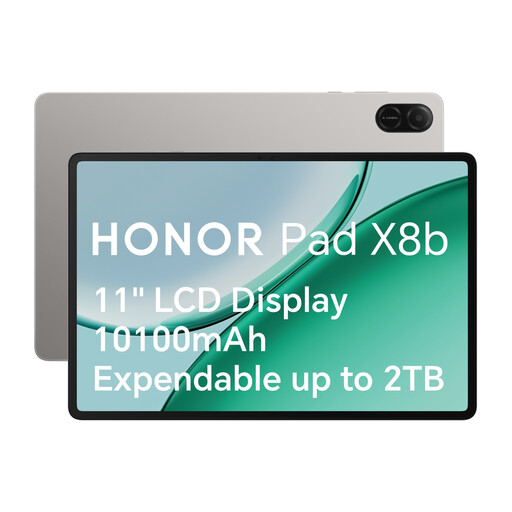
HONOR Pad X8b 128GB, Space Grey
This 128GB tablet is an option for portable household viewing. If video calls are a main reason to buy, check its front camera and compatibility with the exact calling service you use. Confirm separate-user support on the device if household members need private spaces.
View on Joybuy
 No image available
Apple 11-inch iPad Air (2026, M4), Wi-Fi 128GB, Starlight
Consider this iPad Air if the household uses Apple services and wants an 11-inch portable screen. Apple Family Sharing can share eligible purchases through separate Apple Accounts, but it is not separate local sign-in for everyone on this iPad. Check the calling app, model-specific battery results and compatible keyboard before relying on it for those uses.
View on Joybuy
Common questions
Can a tablet replace a phone for video calls?
A tablet can give you a larger screen for calls at home, but it is not automatically a phone replacement. Confirm the app your contacts use, the exact tablet’s front camera and a suitable connection; Google documents joining Meet from Android tablets, while Ofcom notes that calls and streaming share household bandwidth.
Can everyone have a private account on one tablet?
That depends on the device and what you mean by a private account. Apple Family Sharing uses separate Apple Accounts for eligible sharing, but Apple’s Shared iPad multi-user sign-in is for managed organisational devices. Android can provide separate user spaces where the feature is available; Google says some devices cannot add users, so confirm it on the exact model.
Will another tablet allow another person to watch Netflix?
Not if the household has already reached its plan’s simultaneous-viewing limit. Netflix says its membership plans allow one to four screens to watch at once, depending on the plan; adding a device does not itself change that allowance.
When is expandable storage worth checking?
Check it when you expect to keep substantial offline video or photos on the tablet, rather than relying only on the storage chosen at purchase. Samsung UK lists microSD expansion up to 2TB for the Galaxy Tab A11+ and Tab S10 FE; compare the exact configuration and compatible card before deciding.
Do I need a keyboard case for a shared tablet?
Only if longer messages, forms, email or documents will be regular tasks. Match the accessory to the exact tablet: Apple lists Magic Keyboard Folio support for the 11-inch iPad (A16), while Samsung identifies supported Galaxy Tab models for its keyboard covers. Check whether the keyboard is included or separate.


