Players who need a separate screen
If someone else is using the TV, you need a picture at a desk or in another room. Check how your console or supported dock will connect and where it will sit.


When someone else needs the main TV, choose a second television or monitor if you can connect the console directly and need an independent picture. Personal audio helps only when the screen remains available; remote play can free up the TV without moving the console, but it depends on a compatible device, console settings, account and connection.
If someone else is using the TV, you need a picture at a desk or in another room. Check how your console or supported dock will connect and where it will sit.
If you can still use the screen, private audio may solve the disturbance. The connection method, microphone needs and any controller limits matter more than buying another display.
If you have a compatible phone, tablet or computer, remote play may let you leave the console in place. Check the platform's account, console-setting and connection requirements before considering a dedicated device.
When the TV picture is unavailable, consider a directly connected display, a compatible remote-play device or a Switch model's own screen. If the picture is still available and only the sound is disruptive, start with personal audio instead.
| Concern | What to check | Who this matters to |
|---|---|---|
| An independent picture | Check the console or dock's video output, the display's HDMI input and where the console can sit. Nintendo says Switch Lite does not support TV mode. | If someone else needs the TV, I need a screen I can use without taking it back; around 33% of consumers put an independent picture first. |
| Private sound | Check the audio connection and whether chat needs a microphone. Xbox says a standard 3.5 mm headset can connect to a controller that has a 3.5 mm port. | When the picture is free but game sound disturbs others, I need to listen privately; private sound is the main concern for around 25% of consumers. |
| Playing without moving the console | Check the supported secondary device, account, Remote Play settings and connection. PlayStation specifies at least 5 Mbps broadband and recommends 15 Mbps for a better Remote Play experience. | I want to continue on another device while the console stays where it is, provided the setup works; around 25% of consumers prioritise that continuity. |
| A compact personal setup | Check whether your Switch model can be used in handheld mode or whether a portable display needs a supported dock, HDMI connection and power. | When space for another permanent screen is limited, I need a setup I can put away; compact personal play comes first for around 17% of consumers. |
Private audio reduces sound disruption, but it does not provide a picture when someone else is using the television.
Decide whether the conflict is about sound, access to the screen or both before choosing a headset, another display or remote play.
A display's advertised rate does not establish which modes a console can use. Xbox says Series X gaming at 4K and 120 Hz requires an HDMI 2.1 display and an Ultra High Speed HDMI cable; PlayStation makes PS5 120 Hz output conditional on TV and game support.
Check the exact console, display input, cable and games before choosing a screen for a particular video mode.
Nintendo says Bluetooth audio on Switch can introduce delay, does not support Bluetooth microphones and limits the console to two connected wireless controllers while in use.
If you need voice chat or local multiplayer, check the intended audio connection and controller arrangement before buying.
A separate device cannot remove the host console's account, setting or connection requirements.
Try the platform's remote-play route on an existing compatible device first, then decide whether dedicated hardware suits how you play.
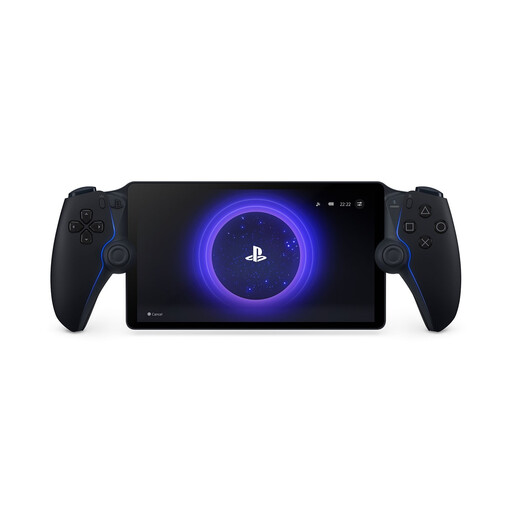
Relevant to PS4 and PS5 owners considering Remote Play on a compatible device, or PlayStation Portal with a PS5.
Relevant to Xbox owners considering remote play, a directly connected second display or controller-connected audio.
Relevant to Switch owners considering play on the console's own screen, a supported TV-mode setup or personal audio.
These products cover several ways to share the main TV: a PS5 remote-play device, a wired headset for private sound, and portable, desk-sized or television-sized second screens. Choose the route that solves your screen or sound conflict, then check it against your console and available space.
 No image available
Consider this PS5 remote-play device if you want to leave the console by the shared TV and play on a separate device. PlayStation says Portal requires a PS5, the same account and Remote Play enabled; check your connection before buying.
 No image available
A wired headset is worth considering when you can still use the screen but need private audio. Check its connection with your exact console or controller; a headset will not solve a conflict over the picture.
 No image available
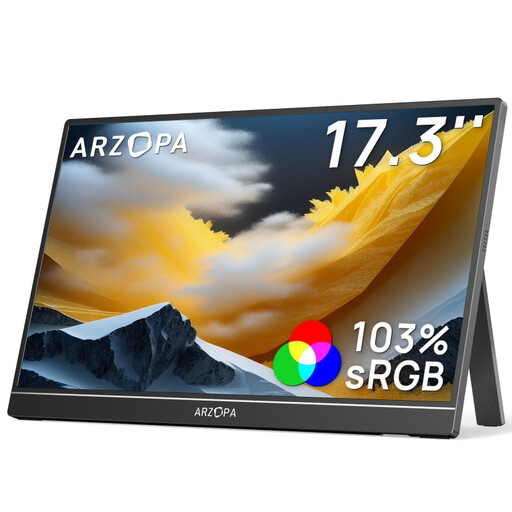
A movable second screen may suit a player who cannot reserve space for another television. The named model has a kickstand and HDMI and USB-C inputs; check the console's output, required cable and power arrangement.
 No image available
This second-TV route needs space for a 55-inch screen and a practical way to connect the console. Check the exact input and cable requirements for any console video mode you intend to use; the product title's gaming-rate claim does not establish a console refresh rate.
 No image available
A desk screen is worth considering if the console can be placed near it. The product title states 2560 × 1440 resolution and 220 Hz, but those figures do not establish which modes your console can use; check the monitor's HDMI input and the console's supported output.
Choose a second screen when you need an independent picture and can connect the console or supported dock directly. Remote play can leave the console in place, but only if your secondary device and the platform's account, settings and connection requirements are met.
Try PS Remote Play on an existing compatible device first. PlayStation says Portal requires a PS5 with Remote Play enabled and the same account; its Remote Play guidance specifies at least 5 Mbps broadband and recommends 15 Mbps for a better experience.
Yes, if the Xbox Wireless Controller has a 3.5 mm port and the headset has a standard 3.5 mm jack, according to Xbox. Check your controller and headset rather than assuming that every audio connection uses the same route.
They can affect the controller arrangement: Nintendo says no more than two wireless controllers can be connected while Bluetooth audio is in use, and a pair of Joy-Con counts as two. Nintendo also notes that Bluetooth microphones are not supported and some audio devices may have delay.