Choose a headset with a boom or voice-focused microphone when household noise could affect what callers hear; active noise cancellation mainly helps you hear the call and concentrate. A wired USB or supported USB-dongle model can suit dependable desktop controls, while Bluetooth and earbuds need checks for the meeting app, operating system, microphone selection and charging routine.
Who these headsets suit
Frequent callers in noisy shared homes
For recurring calls around household conversation, appliances or traffic, prioritise a voice-focused boom microphone. Consider wearer-side ANC separately if you also need help concentrating on the other person; Jabra and HP describe these as different functions.
Hybrid workers switching between laptop and phone
Look for stated multipoint or dual-device support, talk time under the settings you use and a charging routine that works around back-to-back calls. Logitech, HP and Jabra publish model-specific connection and runtime details for relevant headset ranges.
Teams, Zoom or Meet users
If headset mute, answer/end or call-status controls matter, check the precise platform, operating system and connection method. Microsoft, Zoom and Google Meet document differences between USB, dongle and Bluetooth setups.
Buying priorities
Start with the direction of noise you need to address, then confirm how the headset connects to your usual device and meeting app before comparing comfort and runtime.
| Priority |
What to check |
Your needs |
| Call noise handling |
Check separately for a boom or multi-microphone call feature and for ANC or passive isolation. Read the exact model description rather than relying on a general noise-cancelling label. |
I want colleagues to hear my voice clearly while I can focus on the meeting in a distracting room. |
| App compatibility |
Confirm that the headset is selectable as both microphone and speaker. For button controls, check Teams certification or the exact Zoom USB HID support and operating-system path. |
I need mute and call controls to behave predictably in the app I use for work. |
| Comfort and battery |
Compare talk-time figures under the stated ANC and indicator settings. Check charging connection, use while charging where relevant, and cushioning or headband design. |
Long meetings should not leave me searching for power or struggling with an uncomfortable fit. |
| Computer and phone use |
Check the number of simultaneous Bluetooth connections, not just remembered pairings. A USB dongle and direct Bluetooth can provide different connection paths for computer and phone. |
I want to move between a work computer and phone without repeatedly pairing devices or rebuilding my setup. |
Common buying pitfalls
-
Treating noise cancellation as one feature
ANC can make your own listening environment quieter while household sounds may still reach the outgoing microphone. That can leave colleagues hearing distractions even though the headset feels quieter to you.
Check separately for wearer-side ANC or isolation and for microphone-side voice or background-noise suppression. If caller intelligibility is the priority, favour an exact model with a boom or a published multi-microphone call feature.
-
Buying Bluetooth without checking the meeting app and computer
Basic Bluetooth pairing does not guarantee the intended microphone, strong meeting audio or full headset-button controls. Zoom and Google Meet both document setup and platform-specific limitations.
Try the exact headset in your normal Teams, Zoom or Meet workflow during the return period. Confirm microphone and speaker selection, mute behaviour, firmware status and operating-system support for the controls you expect.
-
Comparing wireless runtime without matching the conditions
Published talk time can change when ANC, busylights or online indicators are active, so broad all-day claims are not always directly comparable.
Compare talk time rather than music playback, and note the ANC and indicator conditions. For uninterrupted calls, check whether the manufacturer confirms wired operation or charging during use.
-
Assuming multipoint means every paired device is active
A headset may remember several devices but allow fewer simultaneous Bluetooth connections, which can limit switching between a phone and work laptop.
Check the simultaneous-connection figure separately from stored-pairing capacity. Jabra specifies that the Evolve2 65 Flex can store up to eight paired devices but has two simultaneous Bluetooth connections.
Relevant headset brand references
Jabra
Jabra’s business-oriented Evolve2 range includes wired, USB-dongle and Bluetooth options for hybrid work and virtual meetings.
- Jabra states that Evolve2 65 Flex combines hybrid ANC, ClearVoice microphone technology, Bluetooth multipoint and selected platform certifications.
- PCMag UK lists the Jabra Evolve2 75 as its noise-cancellation pick in its 2026 Bluetooth-headset roundup and highlights its boom-microphone clarity.
- Talk time varies with ANC and busylight use, and manufacturer specifications cannot establish fit or household-noise performance for every wearer.
Poly
Poly focuses on professional communications headsets, including wired and wireless models for buyers who want a boom microphone and USB-adapter options.
- HP states that Voyager Focus 2 combines three-level hybrid ANC for the wearer with Acoustic Fence microphone noise cancellation for callers.
- HP lists Bluetooth, USB adapter and cable connection options for the Voyager Focus 2 range.
- HP’s quoted talk time changes with ANC and the online indicator, so compare the conditions that match your working day.
Logitech
Logitech offers work-and-home crossover headsets for people who prefer a lighter consumer-style design with mainstream meeting use and multipoint Bluetooth.
- Logitech states that Zone Vibe 100 has a flip-to-mute noise-cancelling microphone, multipoint Bluetooth and up to 18 hours of talk time.
- The range can suit calls, media and switching between two Bluetooth devices in one day.
- Check the exact model and connection method if you need Teams or Zoom certification, USB HID controls or app-specific call functions.
Joybuy product options
Joybuy options for shared-home work calls, including Bluetooth, wired USB and platform-focused headset routes.
 No image available
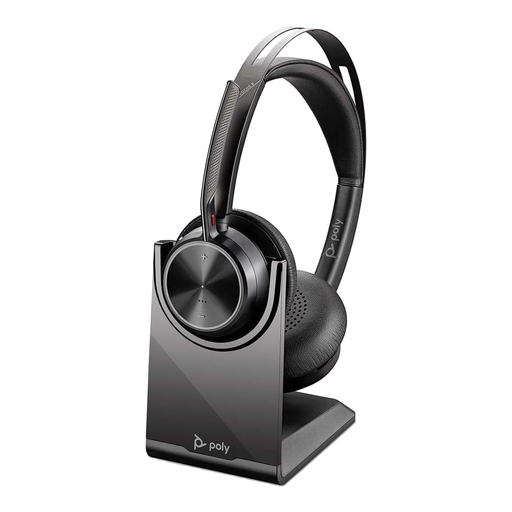
Poly Voyager Focus 2-M USB-C-C Headset with Charging Stand
A Bluetooth option for recurring calls where caller-side background-noise handling and computer-and-phone switching matter.
Stated features include Bluetooth 5.1, a BT700 USB-C dongle, USB-A adapter, two-device multipoint, a charging stand and three ANC levels.
HP lists up to 25 hours of talk time under stated conditions; talk time is lower when ANC and the online indicator are enabled. Check exact Teams, Zoom or Google Meet controls on your operating system.
Joybuy
 No image available
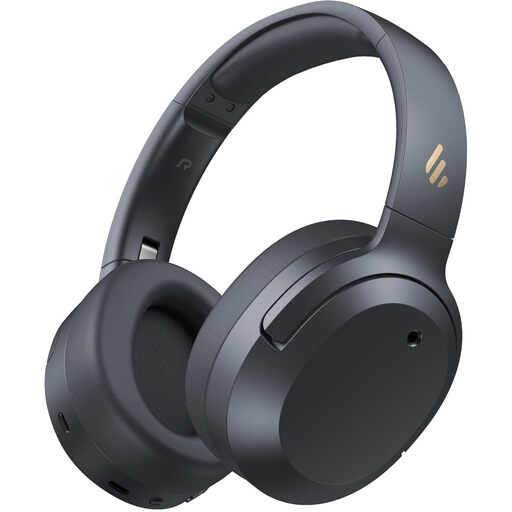
Edifier W820NB Plus Wireless Over-Ear Headphones
An over-ear option for shared rooms when you want wearer-side noise reduction alongside a stated call-noise feature.
The listing states hybrid ANC, AI noise cancellation for calls, two-device multipoint, Bluetooth 6.1, USB-C wired use, memory-foam ear cushions and playback while charging.
Check microphone results in your own household noise and confirm meeting-app certification or button-control support before relying on it for important calls.
Joybuy
 No image available
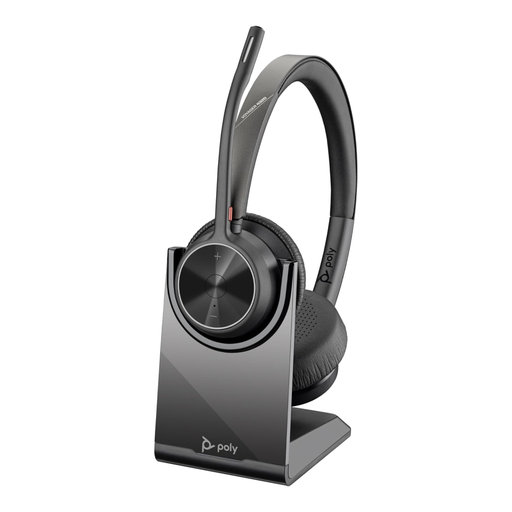
Poly Voyager 4320-M Wireless Headset with Charging Stand
A work-focused choice for frequent calls where Microsoft Teams use, PC connection options and a charging stand are important.
The listing states Bluetooth 5.2, a USB-A dongle, USB-A wired audio, Microsoft Teams certification, a Teams button, dual noise-cancelling microphones and up to 24 hours of talk time.
Wearer-side ANC is not stated. Teams certification does not automatically confirm Zoom or Google Meet controls on every operating system.
Joybuy
 No image available
Poly Blackwire 3220 Stereo USB-C Headset with USB Adapter
A wired desk-based option for remote meetings when you prefer plug-in use without a charging routine.
The listing states a direct USB-C connection, included USB-A adapter, adjustable noise-cancelling microphone, soft ear pads, and volume, mute and answer/end controls.
A cable can limit movement around the home. Check exact USB HID or certified call-control behaviour in your meeting setup.
Joybuy
 No image available
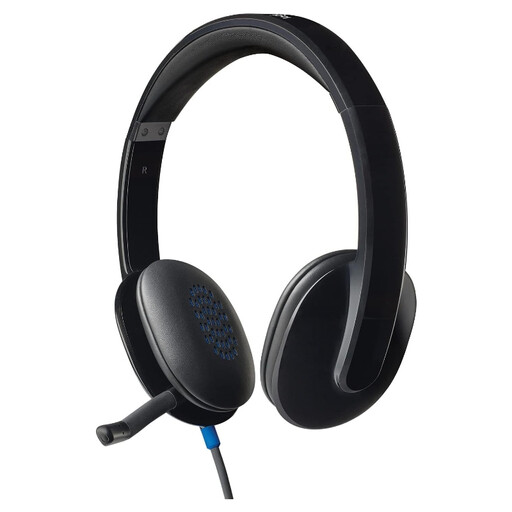
Logitech H540 Wired USB Headset
A straightforward wired option for fixed computer setups and regular video calls at home.
The listing states USB-A plug-and-play use, inline volume and mute controls, an LED mute indicator, a boom microphone, padded headband and compatibility with Windows, macOS and ChromeOS.
This design is less suitable when you need to move freely or switch directly between laptop and phone. Confirm app-specific button-control support before purchase.
Joybuy
Frequently asked questions
Does active noise cancellation stop colleagues hearing household noise on my calls?
Not necessarily. ANC mainly reduces what you hear so you can concentrate; for shared-home calls, also look for a stated boom, voice-focused or multi-microphone system intended to reduce surrounding sound picked up by the microphone.
Should I choose Bluetooth or a USB or dongle headset for Teams, Zoom or Google Meet?
Choose USB or a supported dongle route if dependable headset-button controls such as mute synchronisation or answer/end functions are important. Bluetooth can handle audio, but Zoom notes that participants may hear lower-quality Bluetooth microphone audio, while Google Meet advises checking the exact headset and selected devices.
How should I assess a wireless headset’s all-day battery claim?
Compare talk time under the settings you will actually use, especially ANC and call-status lights, then check charging time and wired operation where relevant. HP and Jabra both publish model-specific talk-time figures that change when ANC or indicators are enabled.
Can I rely on a headset being selected automatically as my meeting microphone?
No. Before an important call, confirm that the headset is selected as both microphone and speaker in the meeting app. Google Meet specifically advises checking the selected audio devices and keeping firmware updated where Bluetooth headset performance is poor.


