What to check before buying
Measure the workstation and decide how each person will position the screen before choosing resolution or laptop connections. The percentages below refer to consumers whose primary purchase need is the one described in that row.
| Concern |
What to check |
Who this matters to |
| Desk fit and adjustment |
Measure usable width and depth with the keyboard and papers in place; compare stand depth and height adjustment. |
When several people use my desk, I need to bring the screen back to a suitable position without crowding the work surface. Around 36% of consumers would put shared-desk fit first. |
| Laptop connection |
Check USB-C video capability, the laptop’s charging requirement and whether a suitable cable is included. |
If I connect a laptop each time I sit down, I want fewer separate connections without depending on charging that cannot meet my laptop’s needs. One-cable convenience would be the primary concern for around 36% of consumers. |
| Text and layout detail |
Compare screen size with native resolution, then check the computer’s output capability and a comfortable text-scaling setting. |
For editing copy, page layout and images, I need enough visible detail without making the text awkward to read. Roughly 28% of consumers would prioritise that screen-detail need. |
Joybuy monitor choices
These monitors offer different screen sizes, resolutions and connections for newsletter work. Match any choice to the space available, the way users will position it and the laptop or computer they will connect.
 No image available
ASUS ProArt PA24ACRV IPS QHD
Consider this QHD model if text and layout detail matter at the shared desk. Its product name identifies an IPS panel and USB-C; check its physical dimensions and your laptop’s USB-C video and charging requirements before ordering.
View on Joybuy
 No image available
ASUS ZenScreen MB249C IPS USB-C
If the monitor will move between shared work areas, establish how it can be positioned at each desk before choosing it. The product name identifies IPS and USB-C; confirm the mounting arrangement, desk permission and laptop connection requirements.
View on Joybuy
 No image available
Lenovo L32p-30 31.5-inch 4K UHD IPS USB-C Monitor
Consider this larger screen if detailed newsletter graphics are part of the work and the desk can accommodate it. The product name specifies 31.5 inches, 4K UHD, IPS and USB-C; check viewing distance, stand movement, computer output and comfortable text scaling.
View on Joybuy
 No image available
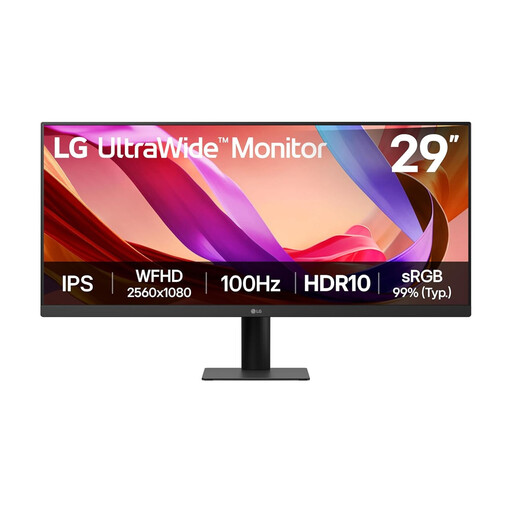
LG UltraWide 29U511A 29-inch UWFHD IPS Monitor
If a wide layout appeals for working with newsletter windows side by side, measure the desk before choosing a 29-inch ultrawide screen. The product name identifies an IPS panel, HDMI and DisplayPort; check the stand movement needed by different users and the connection available on their computers.
View on Joybuy
Questions about shared-desk monitors
Does a monitor at a shared desk need an adjustable stand?
An adjustable stand is useful when different people need to reposition the same screen. The Health and Safety Executive advises setting the screen top at eye level, about an arm’s length away and directly in front of the user; check whether the stand’s actual adjustment range will allow that at your workstation.
Should I choose 24-inch Full HD, 24-inch QHD or 27-inch QHD for newsletter writing?
Choose according to desk space and the amount of text or layout detail you need on screen. Dell’s cited P2425HE is a compact 23.8-inch Full HD USB-C option, while its 23.8-inch P2425D has QHD resolution; BenQ’s 27-inch QHD GW2790QT needs room for its wider screen and stand.
Can one USB-C cable run the monitor and charge my laptop?
It can when the laptop supports video over USB-C and can use the monitor’s stated power delivery. BenQ specifies up to 65 W for the GW2790QT, while Dell specifies up to 90 W for the P2425HE; compare the intended monitor and laptop specifications before relying on one cable.
Does buying a monitor settle the workstation requirements for regular work?
No: the whole workstation matters, not just the monitor. For workers using display-screen equipment daily for continuous periods of an hour or more, the Health and Safety Executive says employers must carry out a workstation assessment; its guidance includes hot-desking.


