A single 27-inch QHD monitor is a starting point for endurance practice when the rig cannot accommodate a wider or triple-screen layout. Choose between flat and curved screens according to the viewing position and space available; consider a 360Hz OLED model only if your PC and chosen connection can use its higher refresh rate. Measure the screen position from your normal driving seat before deciding, as iRacing uses physical measurements in its display setup.
Who this setup suits
Compact single-screen rig builders
If a triple-monitor array or wide display would extend beyond the rig or available floor space, start by measuring where one panel and its stand or arm can sit. iRacing’s triple-screen setup guidance also calls for matching screen resolutions and suitable graphics-card outputs.
Drivers planning long stints
A screen that can be positioned from the normal driving seat matters when setting up the view for endurance practice. iRacing advises measuring eye-to-screen distance; check the chosen monitor’s adjustment and mounting options before relying on its screen size alone.
Frame-rate-focused PC racers
A high-refresh QHD display is worth considering when the PC, monitor input and cable can deliver the intended mode. Published refresh limits differ by connection on some models, including Dell’s Alienware AW2725DF.
What to check before buying
Choose a position the rig can accommodate, then check the view from the driving seat and the refresh rate available through your intended connection. Flat and curved describe screen shape, while OLED describes panel technology; those are not mutually exclusive choices.
| Concern | What to check | Who this matters to |
|---|
| Physical fit |
Measure usable rig width and depth; compare the exact stand footprint or mount requirements. |
When my wheel and seat leave little room for a screen, I need its panel and mounting arrangement to clear the rig. Around 42% of consumers put physical fit first. |
| Seated view |
Check height adjustment or mounting options, then measure eye-to-screen distance and screen width for the sim settings. |
For long stints, I want a screen position I can adjust and enter accurately in the sim rather than relying on a preset. A measured view is the primary need for around 33% of consumers. |
| Refresh and connection |
Check native-resolution refresh limits for the intended input and whether the PC supports the desired mode. |
If my PC can deliver high frame rates, I want the monitor connection to make that refresh capability usable. Roughly 25% of consumers prioritise this need. |
Buying pitfalls
-
Assuming every input supports the advertised maximum refresh
Dell specifies QHD at 360Hz through DisplayPort but 144Hz through HDMI for the Alienware AW2725DF. The connection changes which of those modes is available.
Check the native-resolution refresh limit of the input you intend to use, along with your graphics output and cable.
-
Judging rig fit by screen diagonal alone
The stand or arm and the screen’s position in front of the driver also need space. iRacing uses actual eye-to-screen distance and screen width when configuring the view.
Measure the rig’s usable width and depth, then compare them with the chosen model’s physical dimensions and mounting requirements.
If the mount does not fit, changing the arm or the rig layout may be necessary.
-
Comparing GtG and MPRT figures as though they were identical
AOC gives separate GtG and MPRT response figures for the CQ27G4X. They use different measurement approaches, so the smallest headline number alone does not establish how models compare.
Compare response figures on the same basis and check the refresh and variable-refresh features needed for your setup.
-
Planning triples without checking the practical requirements
iRacing recommends equal-resolution screens for a triple-monitor setup and advises checking that the graphics card has enough suitable outputs.
If triples are a future possibility, check whether matching screens, outputs and mounts would be feasible without compromising the single-screen setup you need now.
A later triple-screen layout would also need space and mounting hardware for the additional displays.
Brands to consider
AOC / AGON
AOC’s researched 27-inch QHD options include the flat Fast IPS Q27G4X and curved Fast VA CQ27G4X, both listed at 180Hz.
- AOC describes the CQ27G4X as having a height-adjustable stand designed to reduce its desk footprint.
- Curvature, panel type and stand design differ by model; measure the exact option you intend to install.
ASUS ROG
The researched ROG Strix XG27ACS is a flat 27-inch QHD Fast IPS option with a stated 180Hz maximum refresh.
- ASUS lists Adaptive-Sync, height adjustment and 100×100mm VESA mounting for this model.
- ASUS specifies different maximum refresh rates across its inputs, so confirm the port you will use.
Alienware
Dell lists the Alienware AW2725DF as a 26.7-inch-viewable QHD QD-OLED monitor with a 360Hz refresh specification.
- Dell specifies QHD at 360Hz through DisplayPort on this model.
- Dell specifies QHD at 144Hz through HDMI; check whether the intended PC output and connection can use the mode you want.
Joybuy monitors for a single-screen rig
These single-screen options span compact Full HD, 27-inch QHD and larger curved formats. Check the dimensions and intended connection of the individual model against your rig before choosing.
 Image unavailable
MSI MAG 274QF 27-inch WQHD gaming monitor
Consider this for a one-screen rig where 27-inch WQHD and high refresh suit your intended PC setup.
The listing names a Rapid IPS panel, 180Hz refresh and Adaptive Sync. Check which input delivers your intended refresh rate, and measure the stand or mounting clearance.
View on Joybuy
 Image unavailable
Dahua 32-inch-class curved 4K OLED gaming monitor
Consider this larger single-screen format only if its physical dimensions and viewing distance work with your rig.
The listing names 3840×2160 resolution and 165Hz refresh. Check the exact panel size and stand dimensions before ordering; its size is described as both 32 inches and 31.5 inches in the product information.
View on Joybuy
 Image unavailable
CRUA 32-inch 1500R curved QHD gaming monitor
Consider this if you prefer a curved single screen and have room for a 32-inch panel and its mounting arrangement.
The listing states 2560×1440 resolution, 165Hz refresh, Adaptive Sync and 100×100mm VESA mounting. Confirm the refresh available through your chosen input.
View on Joybuy
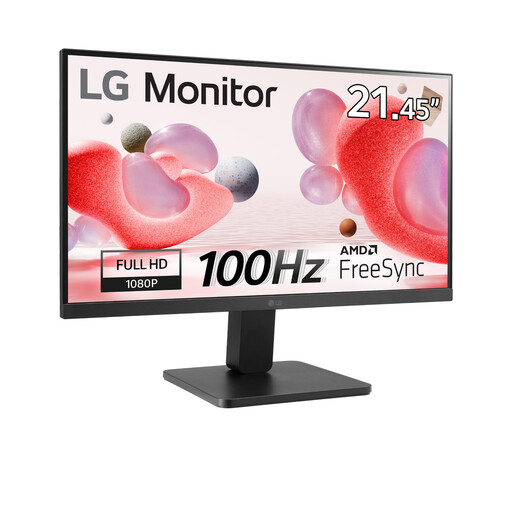 Image unavailable
LG 22-inch Full HD VA monitor
Consider this smaller screen when fitting one display takes priority over the 27-inch QHD route.
The listing states Full HD resolution, 100Hz refresh and HDMI. Decide whether that screen size and resolution give you the view you want from your driving position, and check the full stand footprint.
View on Joybuy
 Image unavailable
HKC G27H2DPro 27-inch QHD Fast IPS gaming monitor
Consider this 27-inch single-screen option if QHD and high refresh are priorities for your PC setup.
The listing states 2560×1440 resolution and 220Hz refresh. Check the refresh limit of your intended input and whether the stand or a compatible mount will fit your rig.
View on Joybuy
Common questions
Can I use triple monitors if floor space is limited?
Possibly, but measure room for all three panels and their mounts before planning the layout. iRacing recommends equal-resolution screens for triples and advises checking that the graphics card has enough outputs of the right types.
What should I measure for a single sim-racing monitor?
Measure from your eyes to the screen while seated in your normal driving position, and measure the screen width. iRacing uses physical measurements in display configuration; also check the stand or arm clearance against your rig.
Will a higher-resolution monitor make the sim run better?
Not necessarily: the PC must handle the chosen resolution and graphics settings. iRacing says resolution scaling can reduce graphics-card processing demand, but it also reduces image quality and does not reduce CPU load.
What if a newly bought monitor is faulty?
Keep your proof of purchase and contact the seller about the fault. Citizens Advice says you may be entitled to a refund, repair or replacement; the available remedy depends on the circumstances and where in the UK you bought it.


