What to check before choosing
Start with the tasks the person must complete, then check whether settings, hardware, support and local connectivity make those tasks manageable.
| Priority |
What to check |
Your needs |
| Everyday task confidence |
Test a focused home screen, larger text, magnification, spoken feedback and the accessibility controls on the exact handset. Keep only the essential apps and contacts visible where possible. |
I want calls, messages and regular online tasks to involve fewer unnecessary choices. In the Department for Science, Innovation & Technology’s 2025/2026 survey, 13% of UK internet users aged 85 and over reported being able to complete most digital tasks without difficulty. |
| Online services |
List required websites, authentication methods, apps and video calls before choosing a feature phone. Check that a simpler layout does not remove access to services that are still needed. |
Keeping access to important websites and apps matters more to me than removing every smartphone feature. |
| Handling and charging |
Compare touchscreen use with physical keys, display size, font controls and button spacing. If choosing a charging cradle, match it to the exact handset and confirm the included charging components. |
I need controls, text and charging steps that feel comfortable in day-to-day use. |
| Setup and support |
Set up contacts, accounts and essential apps with the person present. Plan how later changes to passwords, settings or apps will be handled. |
A working phone may need a more personal setup or practical help rather than replacement. |
| Local connectivity |
Use Ofcom’s postcode-based coverage checker for the intended provider, then test in the home and regularly visited places. Confirm SIM and network compatibility for the chosen handset. |
I need calling, messages and data to work where the phone will actually be used. |
Joybuy phone options
Joybuy feature-phone options for people whose main needs are calling, texting and physical controls rather than broad smartphone access.
 No image available
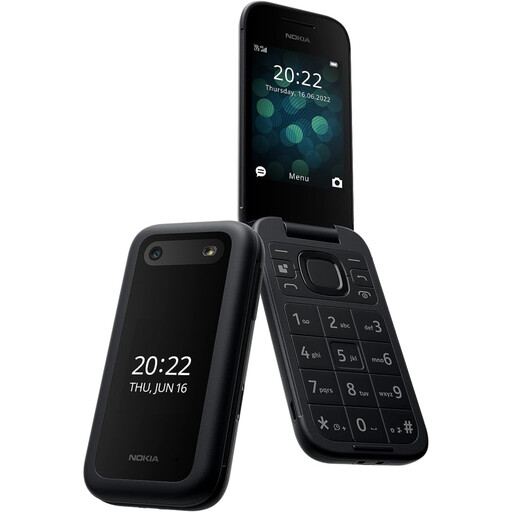
Nokia 2660 TA-1469
A feature-phone option for straightforward calling and texting with tactile controls.
Listed with a 2.8-inch display, big tactile buttons, Zoom UI, 4G connectivity, flip-to-answer/end operation and a removable battery.
Check required websites, authentication steps, video calls and app-based communication before choosing this route. Confirm intended SIM compatibility and postcode-level coverage.
Joybuy
 No image available
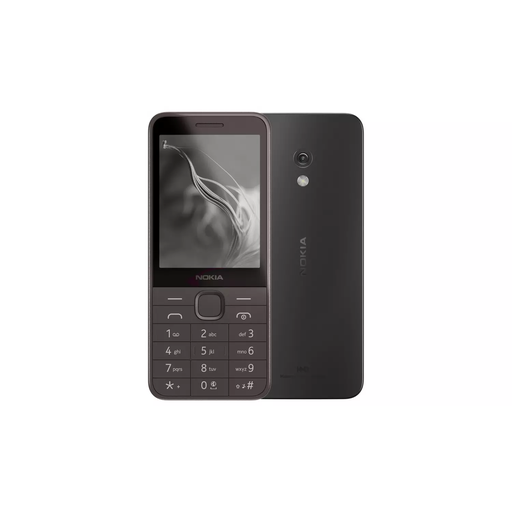
Nokia 235 4G TA-1614
A focused calls-and-texts option with a physical keypad and large-font display.
Listed with 4G calling, messaging, a 2.8-inch display with large fonts, dual Nano SIM, USB-C charging and a removable battery.
Check priority web services, banking or authentication apps, video calling and app-only communication before purchase. Confirm box contents, intended network compatibility and local coverage.
Joybuy
 No image available
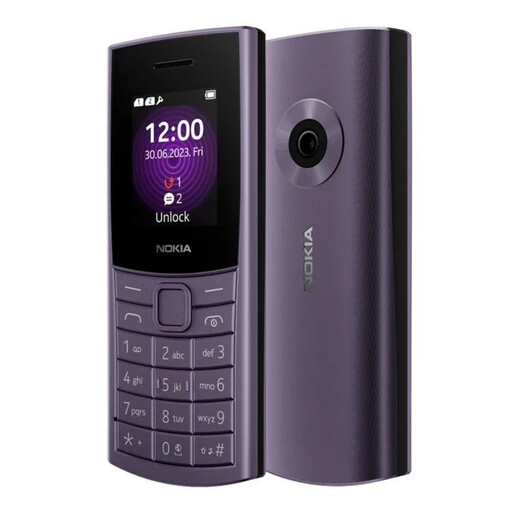
Nokia 110 4G TA-1543 DS Purple
A compact feature-phone route for calls and texts using tactile rather than touchscreen input.
Listed with a Series 30+ interface, physical keypad, 4G connectivity, a 1.8-inch display with adjustable font sizes and zoom, dual Nano SIM, Bluetooth 5.0, a textured grip and a removable battery.
The 1.8-inch display may not suit someone who needs a larger message-reading area. Check required online tasks, intended SIM compatibility and local coverage.
Joybuy
 No image available
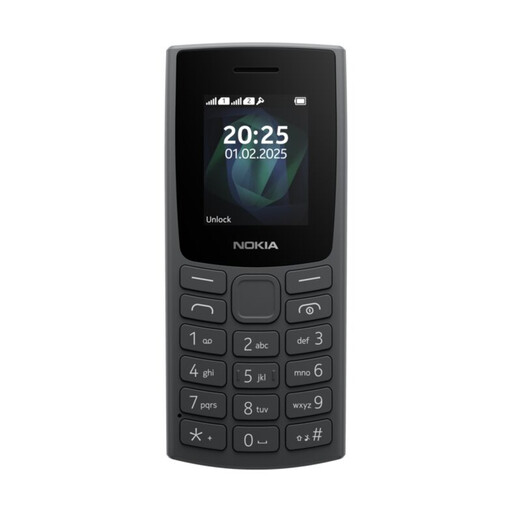
Nokia 105 TA-1557 DS Charcoal
A basic calls-and-texts option for someone who does not rely on smartphone apps.
Listed with a physical keypad, 1.8-inch display, removable battery, torch, wireless FM radio, up to 12 hours' talk time and up to 22 days' standby time, subject to use.
Check network technology, supported bands, UK SIM compatibility and local coverage. The small display may not suit a person who needs larger text or more reading space.
Joybuy
Frequently asked questions
How can you tell whether the problem is the phone or the setup?
List no more than five priority tasks, such as calling a contact, reading a message, using a website or joining a video call. Test larger text, focused apps, magnification, spoken feedback or a simplified home screen first; if those do not make the tasks manageable, consider a purpose-designed simple smartphone or a feature phone according to whether app access is needed.
When is a feature phone more suitable than a simplified smartphone?
A feature phone can suit someone whose core needs are calling and texting and who does not need regular web services, authentication apps, video calling or other smartphone-only functions. Check the exact model, as some feature phones add limited email or social functions but do not replace a full smartphone service set.
Should a charging cradle be bought with the phone?
Choose a cradle only when it matches the exact handset and provides a useful fixed place to charge and keep the phone. Doro states that its cradles are handset-specific and do not include USB cables or power adaptors, so check the box contents before purchase.
How should mobile coverage be checked in the UK?
Use Ofcom’s postcode-based mobile coverage checker to compare providers where the person lives and regularly travels. Treat the result as a guide and ask the provider about known maintenance or local service issues, as the checker cannot show maintenance or reported faults.


