Choose a 4G-capable keypad phone if calls and texts are enough and physical controls are easier to use; choose a simplified Android smartphone if WhatsApp, video calls or other apps are essential. A feature phone with extra functions can suit someone who still wants keys, but check each required function on the exact model. For UK use, Ofcom says 3G networks have switched off and 2G is being withdrawn, so check local coverage and network compatibility before buying.
Who needs a simpler phone?
People who mainly call and text
If a conventional smartphone feels unnecessarily complicated, physical keys and readable text may make everyday calling, messages and contacts easier to manage. Check the controls in person where possible rather than relying on the word “simple” in a product name.
People who need apps but want a simpler layout
Someone who uses WhatsApp, video calls or other apps may need a smartphone despite preferring larger text and clearer prompts. Doro says its Aurora range runs Android with a simplified interface; check the features and apps on the individual handset.
Family members helping with setup
Start with the person’s usual ways of keeping in touch, then check any hearing-aid or contact-alert requirements. Before changing phones, establish which SIM is needed, how contacts will move and whether the intended network covers the places where the phone will be used.
What should you check before choosing?
Basic keypad phone
Choose when: Calls, SMS and straightforward physical controls cover everyday communication.
Trade-off: It is not the route to choose when ordinary smartphone apps are essential.
Simplified smartphone
Choose when: App-based messages or video calls matter, but a clearer interface would help.
Trade-off: Touchscreen use, accounts and software updates remain part of owning a smartphone.
Feature phone with extras
Choose when: Physical keys remain important and a particular extra, such as a flip design or speed dial, would be useful.
Trade-off: Extra functions vary by model; 4G or Bluetooth alone does not establish support for a named app.
| Priority | What to check | Your needs |
|---|
| Controls and display |
Try the keys or touchscreen, primary menus and text-size settings. Check that names, messages and volume controls are manageable for the user. |
I want to find a contact, make a call and read a message without struggling with the controls. |
| Calls and hearing |
Check adjustable call volume and any stated hearing-aid compatibility for the exact handset. If hearing aids are used, confirm how the phone works with those particular aids and settings. |
Calls need to be comfortable to follow, and I cannot assume that a loudspeaker or a hearing-aid label settles that for me. |
| Ways to communicate |
List the apps and call types that matter. Confirm current support on the precise model rather than inferring it from 4G capability or a camera. |
Are calls and SMS enough, or do the people I speak to use WhatsApp or video calls? |
| Network and SIM |
Choose a 4G- or 5G-capable model and confirm compatibility with the intended provider. Ofcom says UK 3G networks have switched off and 2G is being withdrawn; its postcode checker shows predicted coverage by provider, which can vary locally. |
The phone needs a usable signal where I actually make calls, not just a suitable network label on the handset. |
| Moving contacts |
Check the required SIM size and where existing contacts are stored. Confirm the new handset’s contact-import method before making changes. |
I want familiar numbers ready on the new phone, particularly if someone else is helping me set it up. |
What can go wrong?
-
Choosing a familiar-looking 2G- or 3G-only handset
Ofcom says UK 3G networks have switched off and 2G services are being withdrawn. A handset that relies on those networks is a poor choice for continuing everyday use.
Check 4G or 5G capability on the exact model, then use Ofcom’s postcode checker to assess the intended provider’s local coverage.
-
Choosing keys before checking how people keep in touch
A calls-and-texts phone may not cover family group chats, video calls or other app-based communication.
Ask which services the user needs. If ordinary Android apps are essential, consider a simplified smartphone and confirm those apps work on the precise handset.
-
Assuming a hearing-aid label guarantees comfortable calls
Hearing support is model-specific, and the result also depends on the person’s hearing aids and settings.
Check the exact handset’s compatibility information and, where possible, test it with the user’s own hearing aids. Check call-volume and visual-ringing options separately.
-
Assuming an assistance button is ready to use
A contact-alert function needs setup and depends on the handset, its power and available service. It is not a medical-alert system or a guaranteed emergency response.
Set up and test alerts with trusted contacts. Keep a separate emergency plan; GOV.UK identifies 999 and 112 as the UK’s national emergency numbers.
Relevant brand ranges
Doro
Doro offers keypad phones and simplified Android smartphones for different everyday communication needs.
- Doro lists high-contrast keys, adjustable text and hearing-aid compatibility for the Leva E10; it says its Aurora smartphones provide a simpler Android interface with access to apps including WhatsApp.
- Check the exact model and any contact-alert setup rather than assuming features carry across the range.
emporia
emporia offers feature phones with physical controls alongside smartphones with a simplified interface.
- emporia lists a charging cradle and M4/T4 hearing-aid compatibility for the SIMPLICITYglam range, and describes the emporiaSMART.8 as having its easy-use interface.
- Confirm the exact version, including whether it is 4G/LTE, and check hearing-aid fit and included accessories for that version.
HMD / Nokia feature phones
The Nokia 2660 Flip is a reference point for someone considering a physical-key flip phone for calls and texts.
- HMD describes the Nokia 2660 Flip as a 4G model with large buttons; its user guide specifies a nano-SIM.
- HMD marks its older Nokia 2660 Flip shop listing as unavailable. Confirm the exact supplied model and its compatibility with the intended UK network.
Joybuy phone options
These keypad-phone options are for people considering calls and texts with physical controls. If named smartphone apps are essential, check app support on the exact handset before choosing either phone.
 No image available
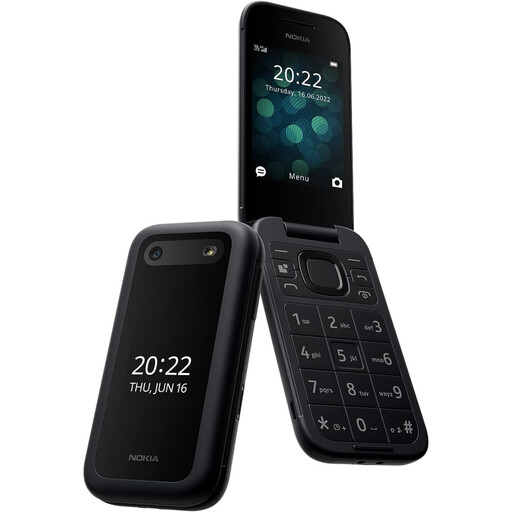
Nokia 2660 TA-1469
Consider this model if calls and texts with physical controls are the main requirement. Confirm 4G/VoLTE compatibility with the intended UK provider and check any hearing-aid fit with the user’s own aids. If using its contact-alert function, configure and test the trusted contacts; it does not guarantee an emergency response.
View on Joybuy
 No image available
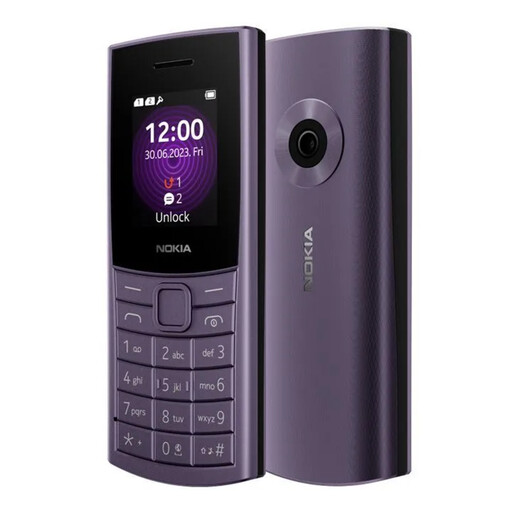
Nokia 110 4G TA-1543 DS Purple
Consider this 4G model if a keypad phone for calls and texts suits the user. Confirm 4G/VoLTE compatibility and coverage with the intended UK provider; if hearing-aid support or a named app is required, check it for this exact model before buying.
View on Joybuy
Common questions
Should a new simple phone support 4G in the UK?
Choose a 4G- or 5G-capable handset for a new UK purchase and check it with the intended provider. Ofcom says UK 3G networks have switched off and 2G networks are being withdrawn, so a phone limited to those older networks is a poor choice for continued use.
Can a simple phone run WhatsApp?
Some simplified smartphones can: Doro says its Android-based Aurora range supports WhatsApp. Do not assume a calls-and-texts feature phone does; check current app support for the exact model if WhatsApp matters.
How can I check coverage where the phone will be used?
Enter the relevant postcode in Ofcom’s mobile coverage checker and compare the intended providers. Its coverage information is a guide, so local conditions can still affect service.
How can I keep my number when changing UK provider?
Ask your current provider for a porting authorisation code (PAC) and give it to the new provider. Ofcom says you can request a PAC for one number by texting PAC to 65075, and that the code is valid for 30 days.
Does an assistance button replace emergency services?
No. A handset’s contact-alert function needs to be set up and cannot guarantee a response or replace a medical-alert service. Test it with the chosen contacts and keep a separate emergency plan; GOV.UK identifies 999 and 112 as the UK’s national emergency numbers.


