Choose for your game and platform before choosing extra controller features. Electronic Arts says a controller is required for skate. on PC and names Xbox and PlayStation controller families among its compatible examples; a Switch-first setup calls for a different choice, while a third-party PC controller warrants a check against the exact game. For a small desk, weigh wireless convenience against the cable, receiver or battery arrangements each model needs.
Who is this for?
PC skate. players checking compatibility
Electronic Arts says skate. requires a controller on PC and names PS4 DualShock, PS5 DualSense, Xbox One and Xbox Series X|S controllers as compatible examples. Start there if this is the game you intend to play.
Players switching between devices
If you use a console as well as a computer, check pairing and game support on both. Microsoft lists Xbox, Windows PC, Android and iOS support for the Xbox Wireless Controller; PlayStation lists PS5, PC, Mac and mobile compatibility for DualSense.
Switch-first players planning longer sessions
For a controller-supported skating game on Nintendo Switch, the Switch Pro Controller is a rechargeable, full-size option. Nintendo quotes approximately 40 hours from a full charge, with shorter life possible depending on the software and functions used.
What matters when choosing?
Check the exact game and platform first; then consider how the controls, connection and battery arrangement will work in your room.
| Concern |
What to check |
Who this matters to |
| Game and platform compatibility |
Confirm support for the exact game, device and controller model. For skate. on PC, Electronic Arts names Xbox and PlayStation controller families as examples. |
If I am playing skate. on PC, I need a controller the game recognises. Around 33% of consumers put game and device compatibility first. |
| Stick and button layout |
Compare stick placement and button reach; check whether any extra controls can be mapped on your platform. |
For trick-focused play, I want to reach the sticks and buttons comfortably without shifting my grip. Comfortable control comes first for around 25% of consumers. |
| Desk-friendly connection |
Check Bluetooth availability, spare USB ports and whether the chosen model needs a receiver or cable. |
If desk space is tight, I want a connection I can manage without troublesome cables or pairing. Around 25% of consumers prioritise a manageable room setup. |
| Battery and accessory planning |
Check the power source, charging method and which cables or accessories come with the exact model. |
When I have limited space to charge and store things, I want to know what the controller needs between sessions. Battery and accessory upkeep is the main concern for around 17% of consumers. |
Buying pitfalls
-
Assuming any PC controller will work with skate.
Electronic Arts requires a controller for skate. on PC and names specific Xbox and PlayStation families as compatible examples. A third-party controller's Windows support alone does not establish support for that game.
Choose an EA-named controller family, or confirm the third-party model's input mode and skate. support before buying.
-
Forgetting what wireless play needs between sessions
The standard Xbox Wireless Controller uses batteries, while rechargeable controllers need charging access. Battery-life figures are conditional rather than a promise for every session.
Check the exact model's power source, charging method and included accessories.
Depending on the controller, you may need to keep spare AA batteries, a separate rechargeable pack or a compatible charging cable to hand.
-
Choosing extra features before game support
Adaptive triggers, haptic feedback and remappable buttons are only useful for a chosen game where the relevant features work.
Establish platform and game compatibility first, then check whether your intended skating game supports the features you want to use.
Relevant brands to consider
Xbox
Microsoft's Xbox Wireless Controller line is relevant to players using Xbox, Windows PC or both.
- Microsoft lists Xbox Wireless and Bluetooth connectivity; its controller documentation also describes USB-C and a 3.5 mm headset jack.
- The standard controller uses batteries. A rechargeable battery pack is a separate option, not a built-in feature of every Xbox controller.
PlayStation
DualSense is a PS5-oriented choice that Electronic Arts also names as a controller example for skate. on PC.
- PlayStation lists PC, Mac and mobile compatibility alongside PS5, as well as a built-in rechargeable battery.
- Its haptic feedback and adaptive triggers depend on game and platform support; do not assume those effects work in every PC skating game.
Nintendo
The Switch Pro Controller is relevant to a Switch-first setup when the chosen skating game supports controller play.
- Nintendo quotes approximately 40 hours of battery life from a full charge, potentially less depending on software and functions.
- Electronic Arts does not name the Switch Pro Controller among its skate. PC controller examples; check support before choosing it for that game.
8BitDo
Selected 8BitDo models give Windows-focused players another set of controls and connection options to consider.
- 8BitDo lists Hall Effect sticks and triggers and additional bumpers for its Ultimate 2C Wireless Controller.
- Check the exact model's Windows connection mode and support for your skating game; a controller feature list does not establish game compatibility.
Joybuy controllers for this setup
These controllers cover Xbox and PC choices, a PS5 DualSense option, and a PC/Switch-labelled option. For skate. on PC, distinguish the controller families Electronic Arts names from other models whose game support needs checking.
 No image available
Microsoft Xbox Elite Wireless Controller Series 2 (Xbox One/Xbox Series X|S/PC)
Consider this Xbox and PC option if you want adjustable controls for skateboarding games; Electronic Arts names Xbox Elite V1 and V2 as compatible with skate. on PC.
Microsoft specifies adjustable-tension thumbsticks and interchangeable components for Elite Series 2. Keep the interchangeable parts somewhere you can find them.
Joybuy
 No image available
Sony PlayStation 5 DualSense Wireless Controller V3 – Starlight Blue
This PS5 controller belongs to a family Electronic Arts names for skate. on PC.
Check the individual PC game before choosing it for haptic feedback or adaptive triggers; those features depend on game and platform support.
Joybuy
 No image available
Xbox Wireless Controller – Robot White
The standard Xbox Wireless Controller is a starting point for Xbox and Windows play; Electronic Arts names Xbox One and Xbox Series X|S controller families for skate. on PC.
Microsoft lists Xbox Wireless and Bluetooth connectivity for the standard controller. It uses batteries; a rechargeable pack is a separate option.
Joybuy
 No image available
Turtle Beach Afterglow Ignite Time Wired RGB Controller – Time Machine (Xbox/PC)
Consider this Xbox and PC controller if a wired desk setup suits you better than wireless pairing.
The wired design means keeping a cable at your desk. Confirm support for your intended skateboarding game rather than assuming Xbox and PC labelling establishes title-specific compatibility.
Joybuy
 No image available
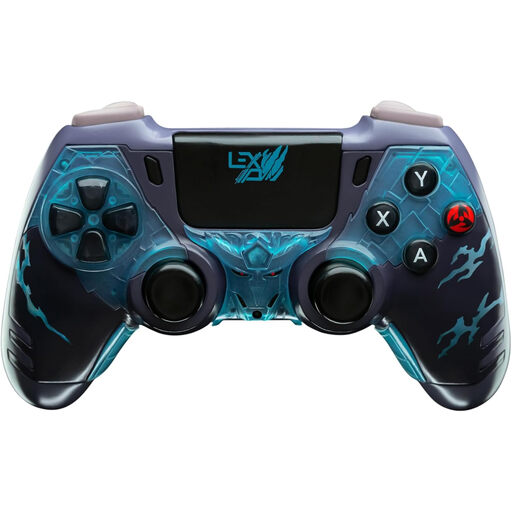
LEXIP Kakashi Kamui Controller (PC, Switch)
This PC- and Switch-labelled controller is worth considering only after checking support for the skating game you plan to play.
Confirm this variant's connection mode and included cable before deciding how it will fit your desk setup.
Joybuy
Common questions
Do I need a controller for EA's skate. on PC?
Yes. Electronic Arts says a controller is required for skate. on PC and that keyboard and mouse are not supported. Its compatible examples include PS4 DualShock, PS5 DualSense, Xbox One and Xbox Series X|S controllers, plus DualSense Edge and Xbox Elite V1/V2.
Should I choose Bluetooth, a receiver or USB for a small desk?
Choose the connection your controller and computer both support, while allowing for the space it needs. Bluetooth avoids a receiver where supported; a 2.4 GHz receiver occupies a compatible USB port; a wired USB connection leaves a cable at the desk. Check the exact model's connection options.
Will DualSense haptics work in every PC skateboarding game?
No universal support should be assumed. PlayStation lists haptic feedback and adaptive triggers for DualSense, but their availability depends on the game and platform. Check the intended game's feature information before choosing DualSense for those effects.
What should I check about controller batteries?
Check whether the exact controller takes replaceable batteries or has a built-in rechargeable battery, and what charging equipment it needs. Microsoft describes a rechargeable pack as a separate option for the standard Xbox Wireless Controller; Nintendo's approximately 40-hour Switch Pro Controller figure can be shorter depending on software and use.


