Small-desk slide editors
If you arrange text and objects beside a laptop, decide whether there is room to move a compact mouse. A stationary trackball is worth considering when that movement is restricted.


Choose a compact mouse if you have enough clear surface to move it and want familiar cursor control for editing slides. If mouse travel is the problem, consider a stationary trackball instead; if you also present away from the computer, a presentation remote can help with delivery but will not replace a mouse or trackball for detailed editing. Check the exact model’s connection method and compatibility before buying.
If you arrange text and objects beside a laptop, decide whether there is room to move a compact mouse. A stationary trackball is worth considering when that movement is restricted.
If you prepare slides near other people or move between compatible devices, check the exact model’s click-noise claims and switching options rather than assuming every compact mouse has them.
If you edit at a desk but deliver slides while standing away from the computer, you may want a mouse or trackball for preparation and a separate remote for presentation.
Start with the clear space beside your laptop: it determines whether a movement-based mouse is practical. Then consider how you connect to your devices and whether you need to control slides away from the desk.
| Concern | What to check | Who this matters to |
|---|---|---|
| Desk space and cursor control | Measure the area available for mouse travel. If movement is restricted, compare the stationary footprint and connection of a trackball. | I need to position text and objects without running out of room beside my laptop; around 33% of consumers put desk clearance first. |
| Quiet use and device switching | Check the model’s click-noise claim, supported devices and operating systems, and whether switching uses Bluetooth or a receiver. | Working near others, I want clicks to be less disruptive and a straightforward way to move between compatible devices; around 27% of consumers prioritise quiet, multi-device work. |
| Portability and tracking | Check the device’s size, supported surfaces and scrolling controls against where you edit; a high DPI figure alone does not establish suitability. | I carry my slide-editing setup between locations and want a pointer that works on the surfaces I use; roughly 20% of consumers put portable use and tracking first. |
| Presenting away from the desk | Check your presentation software and whether you need slide navigation, an on-screen pointer or a physical laser. | Once the deck is ready, I need to advance slides while standing away from the computer; around 20% of consumers prioritise presentation control. |
A compact mouse still needs clear surface for cursor movement. Kensington describes its Orbit Optical Trackball as taking less desk space than operating a mouse because the trackball stays in place.
Measure the usable area beside your laptop. If mouse movement would be cramped, consider whether you could adapt to trackball control.
A remote is intended for tasks such as advancing slides or pointing during delivery, not arranging objects and editing text in a deck.
Choose a mouse or trackball for creating slides, and consider a remote if you need control away from the computer.
Bluetooth, USB-receiver and wired options vary by model. A connection method named for one product does not establish what another product supports or includes.
Check your computer’s operating system, available ports, Bluetooth support and the exact model’s receiver contents.
A receiver also occupies a port while in use; check whether an adapter would be needed for your laptop.
GOV.UK advises keeping batteries and electrical products out of household rubbish and using appropriate collection routes.
Take removable portable batteries to a battery collection point and the device to an electrical-waste collection route.
Its documented options include compact mice for editing slides and separate remotes for presenting them, such as Pebble Mouse 2 M350s, MX Anywhere 3S, R500s and Spotlight.
Its Orbit trackballs are alternatives when there is too little clear space to move a conventional mouse.
Surface Arc Mouse is a slim Bluetooth option for people who want a mouse that snaps flat for transport.
These are movement-based mice for preparing slides at a desk. Compare their connections and listed variants, but check that you have enough clear surface to move a mouse; this selection does not serve the same purpose as a stationary trackball or a presentation remote.
 No image available
Consider this conventional pointer if you edit slides at a desk and want the connection options named for this variant.
The product name specifies 2.4G+BT connectivity, adjustable DPI and one AA battery. Its Silent designation is a product claim, not an independent noise measurement.
Check the intended connection and leave enough clear surface for mouse movement.
 No image available
Consider this mouse if you carry your slide-editing setup and want the listed wired and wireless connection choices.
The product name specifies wired, 2.4G and Bluetooth modes, a 49 g weight and PAW3395 Dual 8K.
Check its full dimensions against your desk space, as well as compatibility and whether the connection you plan to use needs a separate receiver.
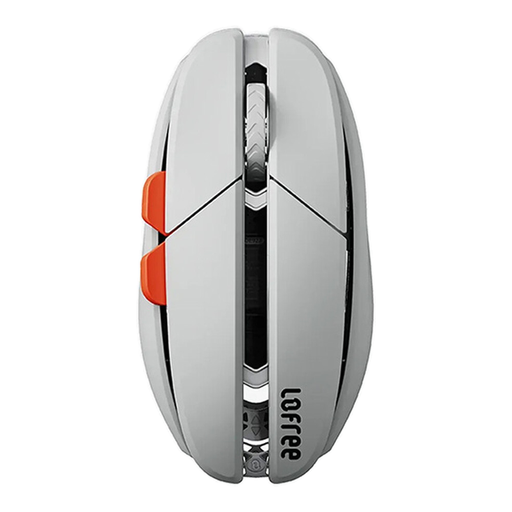 No image available
Consider this mouse for slide editing if you want to choose between the connection modes listed for the OE923 variant.
The product name specifies Bluetooth, 2.4G and wired modes, a magnesium-alloy frame with a PC shell, and a PAW3950 sensor.
Check its physical footprint before choosing it for a small desk. If you use Boot Camp dual-system mode on a Mac, note the stated incompatibility for this model.
 No image available
Consider this slim mouse if you prefer a familiar pointer for editing slides and carrying with a laptop.
The product name identifies the Black variant; do not assume it has the connections or three-device switching specified for Pebble Mouse 2 M350s.
Check this mouse’s exact connection method, receiver contents and available movement space before buying.
 No image available
Consider this movement-based mouse if you want the listed connection and cursor-setting options for desk-based slide work.
The product name specifies Bluetooth and 2.4G modes, five DPI levels and an 800mAh battery.
Check its dimensions against your available mouse-travel space. The stated model limitation excludes Boot Camp dual-system mode on Mac devices.
Choose a trackball if there is too little room for normal mouse movement and you are willing to use a different control method. Kensington says its Orbit Optical Trackball takes less desk space than operating a mouse; a compact mouse remains an option if you have enough clear surface and prefer movement-based control.
You do not need a remote for desk-based slide creation, but it can help if you advance slides while away from the computer. Logitech specifies an operating range of up to 20 m for the R500s, subject to the working environment and computing conditions; its Spotlight offers digital on-screen pointing modes.
Check that the exact mouse and your computer support the intended Bluetooth connection and operating system. Microsoft specifies Bluetooth for Surface Arc Mouse, while Logitech lists device compatibility for particular models; those specifications should not be assumed to apply to every mouse in the same brand or range.
Use appropriate battery and electrical-waste collection routes rather than household rubbish. GOV.UK advises taking portable batteries to collection points and electrical products to a suitable recycling facility.