Check whether the problem is your incoming broadband service or the Wi-Fi inside your home before buying equipment: Ofcom advises testing through Ethernet where possible, because Wi-Fi can slow a connection and cannot outperform the service feeding it. For recurring gaps across several rooms, consider mesh; for a fixed device, use Ethernet where cabling is practical; and for one contained dead zone, consider an extender that can still receive a usable signal. Mobile data is a separate backup route, provided indoor coverage and the chosen SIM plan suit your needs.
Who these options suit
Households with gaps across the home
If the connection works near the router but weakens across several rooms or floors, consider mesh placement after checking that the incoming service is adequate. Ofcom notes that Wi-Fi conditions inside the home affect the connection.
People connecting a device in one place
A work desk, television or games console that stays put may benefit from a practical Ethernet run instead of relying solely on Wi-Fi. Ofcom recommends a wired connection when checking broadband speed.
Households planning a second connection
A mobile router or hotspot is worth considering for temporary use or fixed-broadband disruption if the intended network has suitable indoor coverage and the SIM plan permits the intended use. Ofcom’s coverage checker can guide the network check.
What to check before buying
Start with a wired test at the router where possible. If that result is poor too, investigate the broadband service before choosing equipment to improve coverage inside the home.
| Concern |
What to check |
Who this matters to |
| Finding the bottleneck |
Compare an Ethernet test at the router with the speed information in your broadband contract. |
If the connection feels slow everywhere, I want to know whether new Wi-Fi equipment would address the problem at all. About 36% of consumers put identifying the bottleneck first. |
| Coverage across rooms |
Consider the number and placement of mesh units; check whether a wired link between units is practical. |
When the connection is fine near the router but fades across rooms or floors, consistent coverage becomes the priority. About 29% of consumers put whole-home coverage first. |
| A fixed-device connection |
Check Ethernet ports and the cable route; if you need Wi-Fi at the far end, check access-point capability. |
At a desk or television that stays in one place, I would rather establish a dependable connection than extend Wi-Fi throughout the property. About 21% of consumers prioritise that fixed location. |
| A separate backup |
Check indoor coverage for the underlying mobile network, then confirm SIM compatibility and plan terms. |
During a fixed-broadband outage or temporary stay, I need another way online rather than stronger Wi-Fi from the same line. About 14% of consumers put that separate connection first. |
Buying pitfalls
-
Expecting a higher Wi-Fi rating to fix the incoming service
Mesh and other local equipment can address coverage inside the home, but Ofcom says Wi-Fi cannot outperform the broadband service feeding it.
Where possible, test through Ethernet at the router and compare the result with your contract before choosing a coverage product.
-
Putting an extender where the router signal is already weak
An extender needs a usable signal to repeat. Ofcom also cautions that boosters can affect speed and responsiveness.
For one contained dead zone, position the extender where it can still receive the router’s signal; consider mesh or a wired access point for wider gaps.
-
Assuming a mobile router will work equally well indoors
Ofcom’s postcode-level coverage results are a guide, while walls and local conditions can change reception where the router will sit.
Check the intended underlying network’s indoor coverage, then confirm the device’s SIM requirements and the plan’s permitted router use.
-
Treating stated coverage and Wi-Fi rates as results for your home
Manufacturer figures do not account for every property’s walls, layout, node placement and connected devices.
Use those figures as starting points, then plan unit placement and check whether Ethernet backhaul is supported if you intend to cable the units together.
Brands to consider
TP-Link
Its Deco mesh, RE-series extender and Archer mobile-router lines cover different connectivity problems; choose by the specific model and hardware version.
- TP-Link describes optional Ethernet backhaul for Deco X50 V2, access-point mode for RE315 and Nano-SIM use for Archer MR600 V3.
- Check the selected version’s features and compatibility rather than applying one model’s specifications to the whole range.
NETGEAR
The Orbi range is relevant when a multi-unit layout and wired connections matter to the household.
- NETGEAR lists a 2.5 Gig wired-backhaul option for its Orbi 370 RBE373 three-pack.
- Its stated device capacity and coverage are manufacturer claims, not a promise of performance in a particular home.
eero
An app-managed mesh option for households considering expandable nodes alongside Wi-Fi coverage.
- Amazon UK’s eero 6+ listing describes expansion with cross-compatible eero hardware.
- Check which network-management features are included with the selected product before relying on them.
Joybuy products for local connectivity
These products address multi-room Wi-Fi coverage, one contained weak-signal area or wired connections for fixed devices. Start with the connection problem you have identified rather than choosing by a Wi-Fi class label alone.
 Image unavailable
NETGEAR Orbi 370 RBE373 Wi-Fi 7 mesh, 3-pack
Consider this three-pack when weak Wi-Fi recurs across several rooms and you can plan positions for the units.
The product name identifies dual-band BE3600 and 2.5Gbps Ethernet. Check compatibility with your existing modem or gateway and whether the intended placement suits your home.
View on Joybuy
 Image unavailable
TP-Link Deco BE22 BE3600 Wi-Fi 7 mesh, 3-pack
This three-pack is a route to consider for recurring Wi-Fi gaps in multiple parts of the home.
Plan where each unit would go. If you intend to connect units by cable, confirm the required ports and backhaul arrangement for this variant before buying.
View on Joybuy
 Image unavailable
TP-Link RE220BE BE3600 Wi-Fi 7 range extender
Consider an extender for one contained weak-signal area when the existing router works well elsewhere.
Place it where the router signal is still usable. If seamless EasyMesh roaming matters, check whether your existing router supports EasyMesh.
View on Joybuy
 Image unavailable
TP-Link Deco BE25 Wi-Fi 7 mesh, 3-pack
This three-pack is relevant when coverage gaps recur across several rooms rather than in a single spot.
Check unit placement against your layout. If a wired link between mesh units is part of your plan, confirm backhaul support for this variant.
View on Joybuy
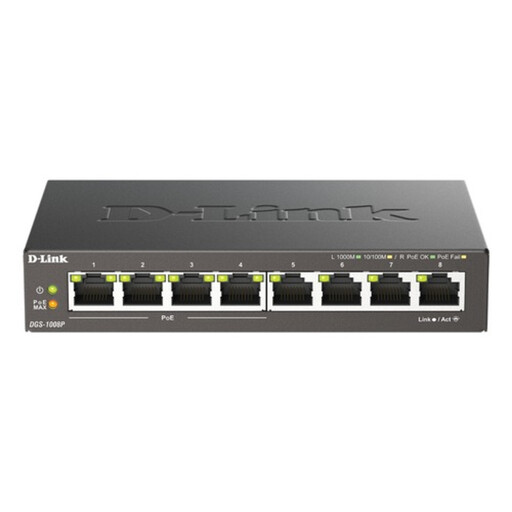 Image unavailable
D-Link 8-Port Gigabit PoE Unmanaged Desktop Switch
Consider this switch when several devices in fixed locations need wired network connections and you can route Ethernet cables to them.
Its name identifies eight Gigabit ports and PoE. If you plan to power a device over Ethernet, check its required PoE standard and power needs against the switch before buying; a switch does not extend Wi-Fi coverage on its own.
View on Joybuy
Common questions
How do I tell whether the problem is Wi-Fi or broadband?
Test with a device connected to the router by Ethernet where possible, then compare the result with your broadband contract. Ofcom says Wi-Fi can slow the signal; if the wired result also falls short of the service you expect, contact your provider before treating new Wi-Fi equipment as the fix.
When should I consider mesh instead of an extender?
Consider mesh when weak coverage recurs across several rooms or floors. An extender is a more focused option for one dead zone if it can still receive a usable router signal; Ofcom notes that boosters can affect speed and responsiveness.
What should I check before using mobile data as a backup?
Check the intended network’s likely indoor coverage using Ofcom’s mobile coverage checker, then confirm the router’s SIM requirements and your plan’s data allowance and permitted use. Coverage predictions are guidance, not a guarantee of reception inside your home.
What if the fixed broadband connection itself is faulty?
Report the fault to your broadband provider rather than expecting mesh or an extender to repair it. Ofcom says the provider is responsible for fixing faults even if another company owns the network; keep a record of outages and the information you receive from the provider.


