What should you check before choosing?
Decide which files and services must be recoverable, then compare routes on restoration, access and the practical work of maintaining a separate copy.
Endpoint cloud backup
Consider it when: staff need copies of files held on separate Mac or Windows computers.
Check: the plan’s device and folder coverage, deleted-file retention and restore process.
Multi-user cloud workspace
Consider it when: staff need controlled access to shared operational documents.
Check: collaboration permissions do not, by themselves, establish independent backup coverage for email, endpoints or other systems.
Removable storage
Consider it when: you need a local copy that can be disconnected between backup runs.
Allow for: secure storage and a routine for making and testing copies.
NAS
Consider it when: several people need central local storage and someone can manage its configuration.
Remember: the NAS needs a separate backup destination; the device alone is not an off-site copy.
| Concern | What to check | Who this matters to |
|---|
| Recoverability |
Confirm which data and earlier versions can be restored, how long they remain available and how to run a test restore. |
If I discover a deleted or damaged file late, I need a usable earlier copy rather than a record that a backup job ran. About 36% of consumers put recoverability first. |
| Shared access |
Check named-user roles and administrator controls, including access changes when staff leave. |
When colleagues share operational documents, I need to control who can use them as responsibilities change; for about 22% of consumers, that is the primary concern. |
| Capacity and retention |
Measure the data to protect and check capacity limits and the available version-retention period. |
As our files grow, I need enough room for the required copies and a recovery window that covers delayed discoveries. Capacity and retention come first for about 21% of consumers. |
| Local and offline copies |
Check the connection needed, secure storage arrangements and whether the copy can stay disconnected between uses. |
If connectivity is unreliable or I want a copy separate from the working computer, local access and disconnection matter most. About 21% of consumers prioritise that need. |
Joybuy storage options for local copies
These products cover central local storage through a diskless NAS and removable copies through external SSDs or a USB flash drive. Choose a backup routine and test recovery separately from choosing the device.
 Image unavailable
Synology DS225+ two-bay diskless NAS
Consider this for central local storage if your organisation can install drives and manage its backup setup.
The two-bay unit is diskless, so check drive compatibility and the resulting usable capacity before buying. Configure a separate backup destination, confirm version retention and test a restore.
View on Joybuy
 Image unavailable
Samsung MU-PE1T0S 1 TB USB Type-C external SSD
This removable SSD can hold a separate local copy for an organisation whose protected files fit its stated capacity.
Its listing specifies 1 TB and USB Type-C connectivity. Decide how backups will be made, keep the drive disconnected when it is not in use and test restoration.
View on Joybuy
 Image unavailable
Samsung MU-PG1T0B 1 TB USB Type-C external SSD
Consider this removable drive when you need a local copy and want the listed password-security feature for stored files.
The listing describes 1 TB capacity, AES 256-bit hardware encryption and USB-C-to-C and USB-C-to-A cables. Check that capacity covers future copies, establish a backup routine and test a restore.
View on Joybuy
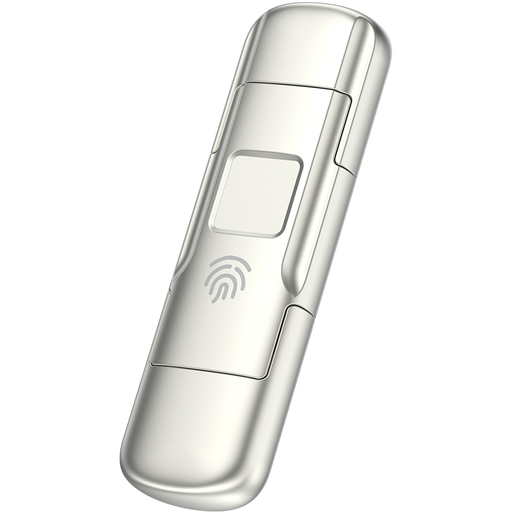 Image unavailable
MOVESPEED YSUYC-256GSN 256 GB fingerprint USB drive
This compact removable option is worth considering for selected business files if they fit within its stated capacity.
The listing describes USB-A and Type-C interfaces, AES-256 encryption and fingerprint access. Check the amount of data to protect, establish how copies will be made and test recovery.
View on Joybuy
Backup storage questions
Is cloud file storage automatically a complete backup?
No. Check which files and services are covered, whether earlier versions remain recoverable and how a restore works. Microsoft Learn documents distinct Microsoft 365 Backup restoration capabilities for OneDrive, SharePoint and Exchange; that does not establish coverage for every business system.
How often should a small organisation test restoration?
Test regularly, on a schedule that reflects how quickly essential files change and how much interruption the organisation can tolerate. The National Cyber Security Centre advises regular daily or weekly copies of essential information and regular checks that a backup works, rather than one testing interval for every organisation.
Should an external backup drive stay plugged in?
Disconnect it when it is not in use. The National Cyber Security Centre warns that viruses can also affect storage connected to an infected computer; store the drive securely and test that its copy can be restored.
Does buying a backup product make a UK organisation compliant with data-protection rules?
No product feature alone establishes UK GDPR compliance. For personal data, the Information Commissioner’s Office advises assessing security and restoration arrangements and documenting retention; where a provider processes that data on the organisation’s behalf, the controller must have a written processor contract.
What should we check if a backup provider can access data from overseas?
Check where personal data can be accessed, who processes it and whether the arrangement creates a restricted transfer under UK GDPR. The Information Commissioner’s Office explains that overseas access can raise transfer questions; the answer depends on the actual organisations and arrangement, not the storage product’s name.


