Who needs which setup?
The useful distinction is not business size alone: it is where essential files live, who must manage the copies and what could prevent a restore.
Owner-managed businesses with essential office files
If customer records, emails and invoices keep the business running, choose a routine that does not rely on remembering a manual copy. Keep a recovery copy separate from the working device and make sure you know how to restore the files you need.
Small teams using laptops away from the office
When work is spread across several computers, check whether a service or centrally managed system covers each device and lets an authorised person oversee backups and restores. A drive attached to one office computer will not, by itself, cover files kept elsewhere.
Businesses handling personal information
Customer or employee information in a backup needs protection against inappropriate access as well as a workable restore process. Assess access permissions, encryption and who can recover the credentials if the usual administrator is unavailable.
What should you check before choosing?
Start with the data and systems you would have to restore. Then choose where copies should live, how they will be protected and who will test recovery.
| Priority |
What to check |
Your needs |
| Restore coverage |
List files, email, invoicing data and any other essential sources. Confirm that the chosen backup method covers each source and offers a usable restore procedure. |
I need to recover the information that keeps the business operating, not just the files on one computer. |
| Copy location |
Check whether at least one copy is separate from the main device and premises. The National Cyber Security Centre advises disconnecting storage-device backups when they are not in use. |
If an office device is stolen or affected by malware, I want another copy that is not exposed to the same incident. |
| Internet dependence |
Assess whether the connection can support the intended cloud backups and restores. Where internet access is unreliable, consider an external storage device for a local copy. |
Work still needs a recovery route when the connection is unavailable or moving files online is impractical. |
| Shared administration |
For several devices, check endpoint coverage, backup scheduling, restore permissions and who can see whether jobs have run. For NAS, confirm the application supports the exact devices and workloads. |
With staff working on different computers, I need someone authorised to manage recovery without relying on each person's drive routine. |
| Data protection |
Assess access controls and encryption for the data and media involved. The Information Commissioner's Office says UK GDPR requires security appropriate to risk, rather than encryption of every item of personal information. |
Customer information in a portable or shared backup should be accessible to the right people and recoverable if a password or key is needed. |
| Retention and recovery |
Check how long versions are kept, what happens after deletion and how an authorised restore works. If encryption uses a customer-managed passphrase, establish how the business will retain access to it. |
I may need an earlier version of a file, and a backup is useful only if authorised staff can restore it. |
Which brands are relevant?
These brands illustrate different backup routes and product lines; brand-level features should not be assumed to apply to every model or service plan.
Synology
A NAS route for centrally managing backups from supported computers and servers, with a separate off-site copy still to plan.
- Synology describes Active Backup for Business as a way to manage several supported workload types from a NAS.
- Synology's quick-start guide requires a supported x64 NAS using Btrfs. It says encrypted shared folders are not supported for its PC, Mac, physical-server and virtual-machine backup tasks, so check the exact model and task.
QNAP
A centrally managed NAS route for a business prepared to configure backup jobs and maintain a separate remote copy.
- QNAP says its backup solutions cover a range of systems, including PCs, Macs, file servers, virtual machines and some cloud services; check the specific application for each source.
- A NAS on the premises is not itself an off-site backup. Its setup, administration and secondary-copy plan remain part of the decision.
Backblaze
A cloud-backup option to examine when staff computers are spread across locations and central administration matters.
- Backblaze describes central controls for business backups, restores and retention.
- Check the particular product and plan for the data sources, version history, permissions and restore process you require. If using its customer-controlled passphrase option, Backblaze says a forgotten passphrase cannot be recovered by the company.
Samsung
A portable-SSD route for a compact local copy or transfer of work files, rather than a complete backup plan on its own.
- Samsung lists password-protected AES 256-bit encryption for its T7 line.
- Samsung's stated T7 peak transfer speeds depend on compatible host hardware, cable and UASP. Confirm the exact model's features and keep another recovery copy separate from the portable device.
Joybuy local-backup hardware options
These external drives, portable storage and NAS devices represent local-hardware routes. Choose them against your required data sources and restore procedure, and plan a separate copy where a device or premises-level incident could affect the local one.
 No image available
Western Digital My Passport 2TB portable hard drive, black
This portable external drive is a local-copy option for work files. Its stated capacity is 2TB; before relying on it, check how your chosen backup software covers essential data and restores it. Keep a separate copy if loss of the drive or premises is part of your recovery plan.
View on Joybuy
 No image available
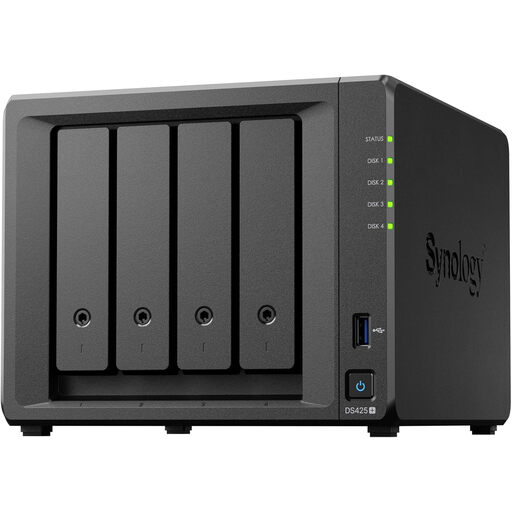
Synology DS425+ 4-bay NAS
A 4-bay NAS is a route to consider when several office devices need centrally managed local storage. Check the drives required for the complete setup, the backup application's compatibility with each business data source and how a separate remote copy will be made.
View on Joybuy
 No image available
Samsung MU-PG4T0B 4 TB USB-C portable SSD, black
This 4 TB portable device is a local-copy option when work files need to move between compatible computers. Its title specifies USB Type-C and USB 3.2 Gen 2x2; check the host connection, backup method and protection of any sensitive files before using it for business recovery.
View on Joybuy
 No image available
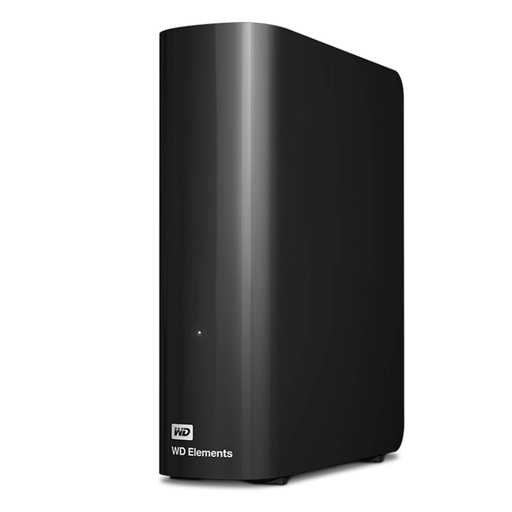
Western Digital Elements Desktop 10TB external hard drive
This 10TB desktop drive is a local storage option for a fixed workspace. Check that your backup software can cover and restore the required business data, and assess how files on the drive will be protected and copied away from the premises.
View on Joybuy
 No image available
Synology DS225+ 2-bay diskless NAS
This 2-bay diskless NAS is a local-hardware route for a business able to set up and manage its backups. Select compatible drives, confirm that the intended application covers each essential workload and establish both a restore procedure and a separate-copy destination.
View on Joybuy
Common backup questions
Should a small business use cloud backup, local storage or both?
Use an off-site copy alongside a local copy when you can manage both: they address different loss scenarios. The National Cyber Security Centre discusses online and storage-device backups as complementary routes. Check internet reliability for cloud backup, and keep a storage-device backup disconnected when it is not in use.
Can an external backup drive stay connected?
Disconnect it when the backup job is complete. The National Cyber Security Centre warns that malware on a computer can affect connected storage, so also store the drive securely and retain another copy where one device or location would be a single point of failure.
Does UK data protection law require every backup to be encrypted?
No. The Information Commissioner's Office says UK GDPR does not specifically require encryption of all personal information, but it does require that information to be processed securely. Assess the risks to the data and the media carrying it; encryption is particularly relevant when personal information is stored on a portable device.
When should I check retention and restore permissions?
Check them before choosing a service if files may need earlier versions or more than one person can manage backups. Confirm how long versions remain available, who may restore them and how the restore works for your actual data sources; Backblaze, for example, describes central backup, restore and retention controls for its business offering.
What if an encrypted-backup passphrase is forgotten?
Recovery may be impossible, depending on how the encryption works. Backblaze says it cannot restore data protected by its customer-controlled passphrase if the customer forgets it. Put credential access and recovery procedures under controlled business ownership before relying on that option.


