What matters when choosing?
Set the recovery requirement before choosing storage: the National Cyber Security Centre distinguishes making a copy from keeping that copy recoverable after an attack. These routes address different parts of that job.
External backup drive
Consider it: For file copies from one or a few devices when someone can manage a secure backup and storage routine.
Trade-off: A drive left connected can be affected by malware; rotation, physical security and another copy need attention.
Network-attached storage
Consider it: When several devices need centrally managed local backup and on-site restoration is important.
Trade-off: A NAS needs administration, patching and isolation, and it does not provide an off-site copy by itself.
Cloud backup service
Consider it: When staff work across devices or locations and centrally managed off-site backup is needed.
Trade-off: Confirm which workloads and plans are covered, how earlier versions are protected, and how personal data is handled.
Disconnected media
Consider it: As an additional copy of essential records that should not remain reachable from the network.
Trade-off: Copies must be rotated, stored and tested, or they may be too old or unusable when needed.
| Concern |
What to check |
Who this matters to |
| Recovery speed and scope |
Identify essential files and systems; check file-level versus whole-device recovery and test the restoration process. |
If losing a PC or server would stop invoicing or customer work, I need a workable route back to those records. Around 29% of consumers would put recovery speed and scope first. |
| Protection from compromised access |
Check earlier-version restores, separation of backup credentials and protection against deletion; plan a disconnected copy where needed. |
If malware reaches everyday accounts, I need a copy that remains recoverable rather than another accessible file. Roughly 29% of consumers would prioritise protection from compromised access. |
| Retention and personal data |
Set retention by record type; review restore and deletion permissions and, for cloud processing of personal data, the supplier arrangement. |
When customer records and business documents have different retention needs, I want backup settings that follow those obligations. About 24% of consumers would make governance their primary concern. |
| Automated coverage |
Confirm supported devices and workloads, schedules and failure alerts; do not assume endpoint backup covers online services. |
With staff working on several devices, I need missed backups to be visible without relying on manual copying. Around 18% of consumers would put manageable automation first. |
Joybuy storage choices
These NAS systems and external drive represent local-storage routes for backing up a small organisation's files. Choose between central management and a removable copy according to your devices and backup routine; plan separation and restore tests whichever you use.
 No image available
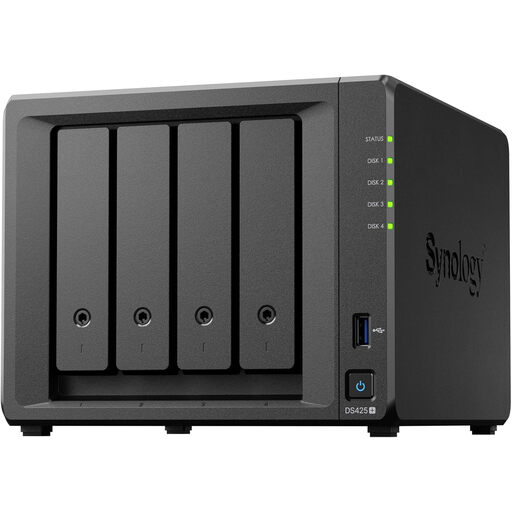
Synology DS425+ four-bay NAS
Consider this four-bay NAS if your team needs a central location for a locally managed backup arrangement.
Confirm the supplied drives, usable capacity and recovery functions for your chosen configuration. Plan a separate copy and test restores.
View on Joybuy
 No image available
Synology DS225+ two-bay diskless NAS
Consider this two-bay NAS for a small team planning centralised local file storage and backups.
It is sold as diskless, so obtain compatible drives separately. Check the intended backup and restore workflow, and maintain a separate copy.
View on Joybuy
 No image available
Western Digital My Passport 2TB portable hard drive, black
Consider this 2TB external drive for a removable local copy when one person can manage the backup routine.
Check that the intended devices and files are covered. Disconnect and store the drive securely after use, keep another appropriate copy and test restoration.
View on Joybuy
Common questions
Which business files should be backed up?
Start with records needed to keep the organisation operating. The National Cyber Security Centre identifies documents, emails, invoices, contacts and customer information; map where each type lives and check whether records held in an online service need separate backup.
Is one external drive enough?
Do not rely on a permanently connected drive as the only recovery copy. The National Cyber Security Centre warns that connected storage can be affected by malware; disconnect and secure removable media after use, maintain another appropriate copy and test that files can be restored.
Does a NAS or cloud backup protect against ransomware?
Neither is ransomware-resistant by default, according to the National Cyber Security Centre. Check whether an earlier version remains restorable after corruption, whether destructive actions are controlled and alerted, and whether backup administration is separated from everyday access.
How should a small organisation set backup retention?
Set a documented schedule by record type and applicable business, legal and contractual need. The Information Commissioner's Office advises reviewing personal-data retention rather than keeping it indefinitely; any tax or sector-specific period must be checked for the organisation and records concerned.
What should be checked before backing up personal data to the cloud?
Check the supplier's role, written processing terms, security arrangements, sub-processors, access and exit process. Under Information Commissioner's Office guidance, assess whether making personal data accessible outside the UK creates a restricted transfer and, if so, which transfer mechanism applies.


