What to consider when choosing backup storage
For small organisations in the UK, the NCSC advises identifying essential data and notes that cloud backup needs a reliable internet connection. Compare the backup route against the files you need, the recovery you can carry out and the routine you can maintain.
| Concern |
What to check when buying |
Who this matters to |
| Restoring essential operations |
List essential files, set a backup schedule and test restoring a sample file and, where relevant, a larger working set. |
If I need current documents and records to keep working, I want to know that a real restore is practical; consumers who put operational recovery first make up around 28%. |
| Independence from internet or connected systems |
Check upload and recovery requirements, and decide when a removable copy will be connected, disconnected and stored. |
When internet access is unreliable or connected copies are a concern, I need a workable local or disconnected route; consumers who prioritise independent or offline access account for around 22%. |
| Protecting customer information |
Identify who can access backups and how encryption, recovery keys and any cloud-provider arrangements are managed. |
If backups hold customer information, I want to control who can reach or change the copies; consumers who put controlled access first represent around 22%. |
| Capacity for the planned backup |
Measure the selected files and allow for the versions or additional copies you intend to keep. |
When the file set is growing, I need enough room for the files and planned versions; consumers who prioritise capacity make up around 17%. |
| A maintainable routine |
Check how backup status, retention, deletion and restoration are managed, and who will test the process. |
If several people share responsibility, I need a routine the organisation can keep up and test; consumers who prioritise manageable upkeep account for around 11%. |
Joybuy storage for local backups
These Joybuy products are removable external drives for local copies. Match capacity and connection details to your intended files, then disconnect removable storage between backup sessions.
 No image available
Samsung T7 Shield Portable SSD, 1 TB, Blue
Consider this portable SSD for a local copy when the stated capacity and USB connection suit your backup set.
1 TB; USB Type-C; USB 3.2 Gen 2; optional AES-256-bit hardware encryption.
Check host compatibility and keep the drive disconnected when it is not being used for backup.
Buy on Joybuy
 No image available
Western Digital My Book External Desktop Hard Drive, 22TB
Consider this desktop drive if its stated capacity fits a larger local backup set.
22TB; USB 3.0; password protection with hardware encryption; backup software; PC and Mac compatibility stated in the product name.
Check that the connection suits your device and disconnect the drive between backup sessions.
Buy on Joybuy
 No image available
Western Digital My Passport Portable Hard Drive, 4TB, Black
Consider this portable hard drive for a local copy when 4TB suits the selected files and planned versions.
4TB; 256-bit AES hardware encryption; password protection; scheduled backup software.
Check device compatibility and keep the drive disconnected between backup sessions.
Buy on Joybuy
 No image available
Western Digital My Passport Portable External Hard Drive, 2TB, Black
Consider this portable hard drive for selected operational files if 2TB is enough for the planned copies.
2TB; 256-bit AES hardware encryption; password protection; scheduled backup software.
Check device compatibility and keep the drive disconnected when it is not being used for backup.
Buy on Joybuy
 No image available
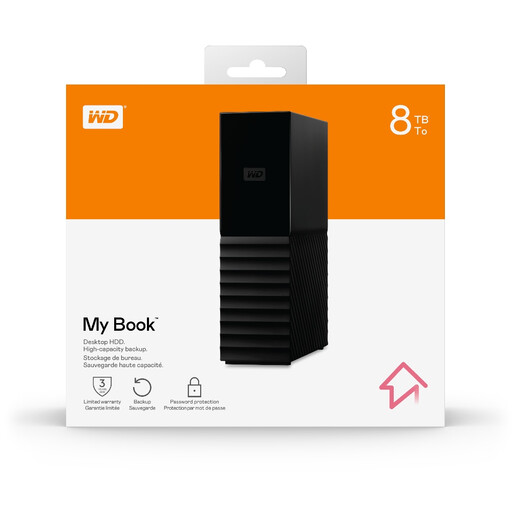
Western Digital My Book Desktop External Hard Drive, 8TB
Consider this desktop drive for a local backup set if its stated capacity fits the files and versions you plan to keep.
8TB; exFAT formatting; backup software; password protection with hardware encryption.
Check device compatibility and disconnect the drive between backup sessions.
Buy on Joybuy
Small-business backup FAQs
How much storage should I buy?
Measure the files you intend to protect, then allow for the versions or additional copies in your backup plan. Check the exact model: the cited examples include a 128GB encrypted USB device, a 1TB portable SSD and a 6TB portable hard drive, not universal capacity targets.
Can I leave a NAS connected as my only backup?
Not if your plan relies on a copy being offline or separate from connected storage. The NCSC reports ransomware affecting connected USB and network backup drives. A compatible NAS can send copies to another destination, but configure and test that separate route.
How can I check that a backup works?
Check that the expected files are present and restore a representative file; periodically test the copy and recovery point you intend to rely on. A backup-status indicator alone does not show that essential working files can be recovered.
Does UK data-protection law require every backup to be encrypted?
The ICO says UK data-protection law does not specifically require encryption of all personal information. Security measures should be appropriate to the risk, so consider the information held and how the backup is stored, moved and accessed.
What should I check before using cloud backup for customer information?
Check access controls, retention, restoration and how the provider processes the information. The ICO says a written contract or other legal act is required when a controller uses a processor; if a restricted international transfer is involved, the UK transfer rules need assessment.


