What matters when choosing
Decide how much desk space you need, then check which keys you can afford to access through shortcuts. Height, typing feel and connections can help distinguish models once the layout works for you.
75% keyboard
Choose it when: You want a smaller board while keeping direct access to frequently used keys, provided the model’s key map includes them.
Trade-off: It leaves less room beside the keyboard than a 60% layout.
60% keyboard
Choose it when: Space for a mouse or cards takes priority and you are happy to use key combinations.
Trade-off: Dedicated arrows, function keys and navigation keys are absent from the 60% layout described by SCAN UK.
Low-profile TKL keyboard
Choose it when: You prefer a lower keyboard and a fuller set of keys for typing and everyday PC use.
Trade-off: A TKL board generally needs more horizontal space than the compact layouts considered here.
| Concern |
What to check |
Who this matters to |
| Desk space |
Compare the layout and actual dimensions, especially the room left for a mouse or cards. |
If my mouse and cards need space beside the keyboard, its footprint could decide the purchase. Around 33% of consumers would put desk space first. |
| Dedicated keys |
Check the key map for arrows, the function row and navigation controls rather than relying on a percentage label alone. |
For typing and PC navigation between games, I want the keys I use often within direct reach. Roughly 27% of consumers would make dedicated-key access their main concern. |
| Typing feel and sound |
Identify the installed switches and any stated sound-dampening construction; do not assume tactile switches are quiet. |
At a desk used for long sessions or shared with others, I care most about how the keys feel and sound. Around 20% of consumers would prioritise that experience. |
| Connections |
Confirm the model’s wired and wireless modes, receiver requirements and charging arrangements. |
When I move between devices, a workable connection matters more to me than saving the last bit of desk space. About 20% of consumers would put connectivity first. |
Compact keyboards on Joybuy
These 75% and 60% listings offer different ways to make room at a small deck-building desk. Check each variant’s stated layout and key map: the percentage alone does not confirm which controls are dedicated.
 No image available
AULA F75 75% Wireless Keyboard, US QWERTY
A 75% option if you want more room beside the keyboard without moving straight to a 60% layout.
The product name specifies wired, Bluetooth and 2.4 GHz modes, PBT keycaps and a US QWERTY layout. Check whether that layout suits your UK use and confirm the keys shown on the listing.
View on Joybuy
 No image available
Razer Huntsman V3 Pro Mini 60% Keyboard
Consider this model when room for a mouse or cards takes priority over dedicated arrow, function and navigation keys.
Razer identifies the Huntsman V3 Pro Mini as a 60% keyboard with analog optical switches. Check its modifier-based key access and the exact keyboard layout before ordering.
View on Joybuy
 No image available
AULA S75 Pro 75% Keyboard with TFT Display and Star Vektor Switches
This 75% variant may suit a compact desk if its exact key map has the direct controls you need.
The product name specifies tri-mode connectivity, a knob and hot-swappable switches. Check the advertised keyboard layout, dedicated keys and charging arrangements for this variant.
View on Joybuy
 No image available
AULA F75 PRO 75% Wireless Keyboard, US QWERTY
A compact option for a fixed or multi-device desk, provided its key arrangement works for your other PC tasks.
The product name specifies Bluetooth, 2.4 GHz and wired modes, hot-swappable switches and a US QWERTY layout. Check the dedicated-key map, charging arrangements and layout suitability before buying.
View on Joybuy
 No image available
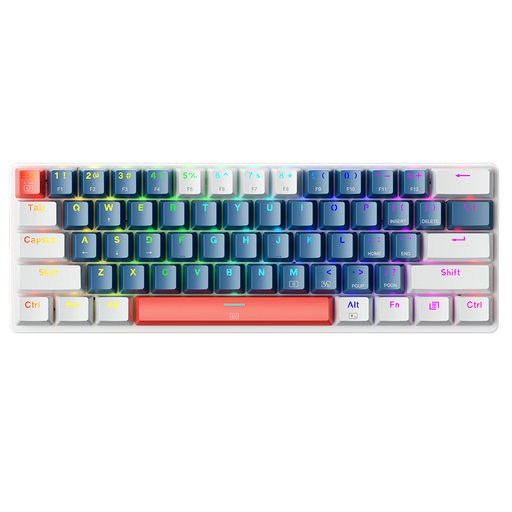
MACHENIKE K500-B61 60% Wired Keyboard, Brown Switch, US QWERTY
Its advertised 60% layout is relevant if desk space matters more than dedicated keys.
The product name specifies wired operation, a Brown Switch variant and US QWERTY. Check the photographs and exact variant details for the physical key arrangement and connection before ordering.
View on Joybuy
Common questions
Is a 60% keyboard automatically the right choice for a small desk?
No. It gives more room beside the keyboard, but SCAN UK’s layout guide notes that 60% boards remove dedicated function, arrow and navigation keys. If you use those controls regularly, compare a 75% model’s actual key map before choosing.
Do I need wireless for a deck-building setup?
No. Wireless can reduce visible cable clutter or help when switching between compatible devices, but you will need to account for charging and any receiver. A wired connection may be simpler for a fixed desk.
What should I check when buying a wireless keyboard for use in Great Britain?
Check the product information and seller details for the exact keyboard. The Office for Product Safety & Standards describes Great Britain’s Radio Equipment Regulations 2017 as covering safety, electromagnetic compatibility and protection of the radio spectrum for radio equipment; that general rule does not establish the status of an individual listing.
Who should I contact if a keyboard bought from a UK trader is faulty?
Contact the selling trader and keep your order information. The UK Department for Business and Trade explains that the Consumer Rights Act 2015 covers what happens when goods are faulty; the appropriate remedy depends on the circumstances, rather than simply on the manufacturer’s voluntary support arrangements.


